<?xml version="1.0" encoding="utf-8"?>
<feed xmlns="http://www.w3.org/2005/Atom">
    <title>On The Way</title>
    <link href="http://wlog.cn/feed.xml" rel="self" />
    <link href="http://wlog.cn/" />
    <updated>2017-07-10T23:00:58+08:00</updated>
    <id>http://wlog.cn/</id>
    <entry>
        <title type="html"><![CDATA[搭建通过 ssh 访问的 Git 服务器]]></title>
        <author><name>bingdian</name></author>
        <link href="http://wlog.cn/soft/git-ssh-server-for-debian.html"/>
        <published>2014-01-10T22:55:00+08:00</published>
        <updated>2016-11-18T23:06:29+08:00</updated>
        <id>http://wlog.cn/soft/git-ssh-server-for-debian.html</id>
        <category scheme="http://wlog.cn/tag/#git" term="git" label="git" />
        <category scheme="http://wlog.cn/tag/#版本控制" term="版本控制" label="版本控制" />
        <category scheme="http://wlog.cn/tag/#ssh" term="ssh" label="ssh" />
        <category scheme="http://wlog.cn/tag/#debian" term="debian" label="debian" />
        <category scheme="http://wlog.cn/tag/#linux" term="linux" label="linux" />
        <content type="html" xml:base="http://wlog.cn" xml:lang="en">
            <![CDATA[ <h2 id="toc_0">一、Git - 协议</h2>
<p>Git 可以使用四种主要的协议来传输数据：本地传输，ssh 协议，Git 协议和 HTTP 协议。</p>
<p>Git 使用的传输协议中最常见的就是 ssh 了。大多数环境已经支持通过 ssh 对服务器的访问 ，ssh 也是唯一一个同时支持读写操作的网络协议。另外两个网络协议（HTTP 和 Git）通常都是只读的。ssh 同时也是一个验证授权的网络协议；而因为其普遍性，一般架设和使用都很容易。</p>
<p>本文主要介绍如何搭建 ssh 协议的 Git 服务器。</p>

<h2 id="toc_1">二、在服务器上部署 Git</h2>
<p>首先，你需要一台 Linux 器并且拥有 sudo 权限，本文使用的是 Debian 7.0 x32 。下面就开始安装：</p>

<h3 id="toc_2">2.1 第一步，安装 git ：</h3>

<pre><code>$ sudo apt-get install git</code></pre>

<h3 id="toc_3">2.2 第二步，创建一个 git 用户，用来运行 git 服务：</h3>

<pre><code>$ sudo adduser git</code></pre>

<h3 id="toc_4">2.3 第三步，设置访问权限：</h3>
<p>有几个办法可以让团队的每个成员都有访问权：</p>

<ol>
<li>给每个人建立一个账户。反复使用 adduser 并给所有人设定临时密码比较麻烦。</li>
<li>在服务器上建立一个 Git 账户，让每个需要写权限的人发送一个 ssh 公钥，然后将其加入 Git 账户的 ~/.ssh/authorized_keys 文件。这样，所有人都将通过 Git 账户访问主机。</li>
<li>另一个办法是让 ssh 服务器通过某个 LDAP 服务，或者其他已经设定好的集中授权机制，来进行授权。</li>
</ol>
<p>这里我们使用第二种方法，收集所有需要登录该 Git 服务器用户的公钥，就是他们自己的 id_rsa.pub 文件，把所有公钥导入到 /home/git/.ssh/authorized_keys 文件里，每行一个。（注意：/home/git/.ssh/authorized_keys 这个文件的 owner 为 Git ，如果不是请使用 chown 命令修改）。</p>
<p>下面是创建公钥命令：</p>

<pre><code>$ ssh-keygen -t rsa -C  'your email@domain.com'</code></pre>
<p>-t 指定密钥类型，默认即 rsa ，可以省略</p>
<p>-C 设置注释文字，比如你的邮箱</p>
<p>关于创建公钥的详细信息，可以参考 <a href="http://github.com/guides/providing-your-ssh-key">http://github.com/guides/providing-your-ssh-key</a>。</p>

<h3 id="toc_5">2.4 第四步，禁用 shell 登录：</h3>
<p>出于安全考虑，你可以用 Git 自带的 git-shell 工具限制 git 用户的活动范围。这可以通过编辑 /etc/passwd 文件完成。找到类似下面的一行：</p>
<p>把 bin/sh 改为 /usr/bin/git-shell （或者用 which git-shell 查看它的实际安装路径）</p>

<pre><code>git:x:1003:1003:,,,:/home/git:/bin/bash</code></pre>
<p>改为：</p>

<pre><code>git:x:1003:1003:,,,:/home/git:/usr/bin/git-shell</code></pre>
<p>现在 git 用户只能用 ssh 连接来推送和获取 Git 仓库，而不能直接使用服务器的 shell。尝试普通 ssh 登录的话，会被拒绝登录。</p>

<h3 id="toc_6">2.5 第五步，初始化Git仓库：</h3>
<p>选定一个目录作为 Git 仓库，如 /home/git/project.git ，在 /home/git/ 目录下输入命令：</p>

<pre><code>$ sudo git init --bare project.git</code></pre>
<p>Git 会创建一个裸仓库，裸仓库没有工作区，因为服务器上的 Git 仓库是为了共享，所以不让用户直接登录到服务器上去改工作区，并且服务器上的 Git 仓库通常都以 .git 结尾。然后，把 project.git 的 owner 改为 git ：</p>

<pre><code>$ sudo chown -R git:git project.git</code></pre>

<h3 id="toc_7">2.6 第六步，克隆远程仓库：</h3>
<p>ssh 指定私钥的配置管理，为本地添加 ssh 别名，编辑 ~/.ssh/config ，如果没有该文件，创建一个:</p>

<pre><code>$ vi ~/.ssh/config</code></pre>
<p>在 config 中添加：</p>

<pre><code># 注释说明
Host 别名
HostName  域名或 ip
User 登陆服务器用的账号
Port 端口号(默认22，可以不填，如果服务器修改了 ssh 登录端口号，此处需要修改)
IdentityFile 密钥文件的位置</code></pre>
<p>例如设置为:</p>

<pre><code># bingdian's git server
Host gitserver
HostName 162.188.23.33
User git
Port 9000
IdentityFile ~/.ssh/server_rsa</code></pre>
<p>现在，可以通过 git clone 命令克隆远程仓库了：</p>

<pre><code>$ git clone ssh://git@gitserver:/home/git/project.git</code></pre>
<p>接下来你就可以享受你的 Git 之旅了。</p>

<h2 id="toc_8">扩展阅读</h2>

<ul>
<li><a href="http://git-scm.com/book/zh/%E6%9C%8D%E5%8A%A1%E5%99%A8%E4%B8%8A%E7%9A%84-Git-%E5%8D%8F%E8%AE%AE">http://git-scm.com/book/zh/服务器上的-Git-协议</a></li>
<li><a href="http://dracoblue.net/dev/custom-identity-file-idrsapub-with-git-client/">Custom identity file (id_rsa.pub) with git client</a></li>
<li><a href="http://84kids.com/git-config-for-mutiply-ssh-keys/">Git config for mutiply ssh keys</a></li>
</ul>
]]>
        </content>
    </entry><entry>
        <title type="html"><![CDATA[html5 Geolocation 地理定位]]></title>
        <author><name>bingdian</name></author>
        <link href="http://wlog.cn/html/geolocation.html"/>
        <published>2013-12-26T22:41:00+08:00</published>
        <updated>2016-11-18T23:06:29+08:00</updated>
        <id>http://wlog.cn/html/geolocation.html</id>
        <category scheme="http://wlog.cn/tag/#html5" term="html5" label="html5" />
        <category scheme="http://wlog.cn/tag/#geolocation" term="geolocation" label="geolocation" />
        <category scheme="http://wlog.cn/tag/#api" term="api" label="api" />
        <content type="html" xml:base="http://wlog.cn" xml:lang="en">
            <![CDATA[ <h2 id="toc_0">一、Geolocation 概述</h2>
<p>Geolocation API 在网页中使用 geolocation 对象向javaScript 提供经度和纬度。利用 geolocation 对象，可以获取用户位置和跟踪用户位置的变化。</p>

<h3 id="toc_1">1.1 Geolocation API 获取地理位置的方式</h3>
<p>设备使用下列数据源：</p>

<ul>
<li>IP地址 - 任何地方可用，不精确</li>
<li>GPS - 很精确，定位需要时间长，耗电大，室内效果不好，需要额外设备</li>
<li>WiFi基站的mac地址 - 精确，可在室内使用，在无线接入点少的地方效果不好</li>
<li>GSM或CDMA基站 - 相当准确，可在室内使用，在基站较少的地区效果不好</li>
</ul>
<p>为了使用更高的准确度，许多设备使用一个或更多的数据源组合。</p>

<h3 id="toc_2">1.2 地理位置获取流程：</h3>

<ol>
<li>用户打开需要获取地理位置的web应用。</li>
<li>应用通过Geolocation API 向浏览器请求地理位置，浏览器拦截请求，向用户请求授权。</li>
<li>假设用户允许，浏览器从设备查询相关信息，如IP地址、WIFI地址或GPS坐标。</li>
<li>浏览器将相关信息发送给信任的外部定位服务器，服务器返回具体的地理位置。</li>
</ol>

<h4 id="toc_3">1.3 隐私</h4>
<p>Geolocation API 规范提供了一套保护用户隐私的机制，必须先得到用户明确许可，才能获取用户的位置信息。</p>
<p>访问使用Geolocation API的页面应用时，会触发隐私保护机制，浏览器会询问用户是否共享位置信息。</p>
<p>用于收集位置数据的应用程序的开发人员应考虑关于隐私的以下准则：</p>
<p>因为位置数据属于敏感信息，所以开发人员应考虑遵循以下准则：</p>

<ul>
<li>仅在必要时请求位置信息，并且仅将位置信息用于其原计划用于的任务。</li>
<li>如果用户没有授权存储这些数据，那么应用程序应该在相应任务完成后立即删除。</li>
<li>如果要在服务器上存储位置数据，请务必确保位置数据不受到未经授权的访问，并允许用户更新和删除此信息。</li>
</ul>

<h3 id="toc_4">1.4 应用场景</h3>

<ul>
<li>更新本地信息</li>
<li>显示用户周围的兴趣点</li>
<li>车载导航系统</li>
</ul>

<h2 id="toc_5">二、Geolocation 使用</h2>
<p>Geolocation API的使用很简单，请求一个位置信息，如果用户同意，就返回位置信息。</p>

<h3 id="toc_6">2.1 检测浏览器是否支持Geolocation</h3>
<p>在使用html5 Geolocation API时，应确保浏览器支持Geolocation API.</p>

<pre><code>if (navigator.geolocation) {
    console.log('Geolocation is supported.');
} else {
    console.log('geolocation is not supported in your broswer.');
}</code></pre>

<h3 id="toc_7">2.2 getCurrentPosition 和 watchPosition</h3>

<ul>
<li>使用 getCurrentPosition 方法获取当前的地理位置。</li>
<li>使用 watchPosition 方法监视位置随时间变化的情况。</li>
</ul>
<p>语法：</p>

<pre><code>// getCurrentPosition
navigator.geolocation.getCurrentPosition(successCallback, errorCallback, options);

// watchPosition
navigator.geolocation.watchPosition(successCallback, errorCallback, options);</code></pre>
<p>这两个方法都就使用的是异步回调的方式。它们有相同的参数：</p>

<ol>
<li>successCallback – 为浏览器成功获得位置信息后的回调函数。</li>
<li>errorCallback – 用于位置信息获取失败时的回调函数。</li>
<li>options – 配置参数，可以调整geolocation的数据收集方式

<ul>
<li>enableHighAccuracy - 指示浏览器获取高精度的位置，默认为false。当开启后，可能没有任何影响，也可能使浏览器花费更长的时间获取更精确的位置数据。</li>
<li>timeout - 最长有效期，在重复获取地理位置时，此参数指定多久再次获取位置。默认为0，表示浏览器需要立刻重新计算位置。</li>
<li>maximumAge - 表示程序能接受的被缓存位置的最大过期时间。接受一个数字作为参数，默认为0微秒。这就意味这默认每次获取位置都必需重新获取一个新位置。</li>
</ul></li>
</ol>

<h3 id="toc_8">2.3 clearWatch()</h3>
<p>这个方法接受一个参数，需要清理监视位置变化的方法的id：watchID（这个参数由watchPosition方法返回）。</p>

<h3 id="toc_9">2.4 示例：</h3>

<pre><code>var watchId = navigator.geolocation.watchPosition(function(position) { // succes callback
    var coords = position.coords;

    console.log(coords.latitude); // 纬度
    console.log(coords.longitude); // 经度
    console.log(coords.accuracy); // 准确度，由于geolocation的实现方式，呈现返回值时一定要检查返回值的准确度
    console.log(coords.altitude); // 海拔，以米为单位，如不支持altitude特性，返回null
    console.log(coords.altitudeAccuracy); // 海拔经度，以米为单位，如不支持altitude特性，返回null
    console.log(coords.heading); // 行进方向，相对正北
    console.log(coords.speed); // 行进速度，单位m/s
    console.log(timestamp); // 获取位置的时间

}, function(error) { // error callback
    console.log('获取位置信息失败。');
    console.log(error.code);
    // UNKNOWN_ERROR (error code 0) - 未知错误
    // PERMISSION_DENIED (error code 1) - 用户拒绝共享地理位置
    // POSITION_UNAVAILABLE (error code 2) - 无法获取当前位置
    // TIMEOUT (error code 3) - 在指定时间无法获取位置会触发此错误。
}, { // options
    enableHighAccuracy: true, 
    maximumAge: 30000, 
    timeout: 27000 
});</code></pre>

<h2 id="toc_10">三、Geolocation Demo</h2>

<ul>
<li><a href="http://html5doctor.com/demos/geolocation/geolocation-watchposition-example.html">html5doctor.com/demos/geolocation/geolocation-watchposition-example.html</a></li>
</ul>

<h2 id="toc_11">扩展阅读</h2>

<ul>
<li><a href="http://dev.w3.org/geo/api/spec-source.html">dev.w3.org/geo/api/spec-source.html</a></li>
<li><a href="http://msdn.microsoft.com/zh-cn/library/ie/gg589513(v=vs.85).aspx">msdn.microsoft.com/zh-cn/library/ie/gg589513(v=vs.85).aspx</a></li>
<li><a href="http://msdn.microsoft.com/zh-CN/hh781006">msdn.microsoft.com/zh-CN/hh781006</a></li>
<li><a href="https://developer.mozilla.org/en-US/docs/WebAPI/Using_geolocation">developer.mozilla.org/en-US/docs/WebAPI/Using_geolocation</a></li>
<li><a href="http://html5demos.com/geo">html5demos.com/geo</a></li>
</ul>
]]>
        </content>
    </entry><entry>
        <title type="html"><![CDATA[jquery 瀑布流插件]]></title>
        <author><name>bingdian</name></author>
        <link href="http://wlog.cn/jquery/jquery-waterfall-plugin.html"/>
        <published>2013-05-25T17:53:00+08:00</published>
        <updated>2016-11-18T23:06:29+08:00</updated>
        <id>http://wlog.cn/jquery/jquery-waterfall-plugin.html</id>
        <category scheme="http://wlog.cn/tag/#waterfall" term="waterfall" label="waterfall" />
        <category scheme="http://wlog.cn/tag/#jquery" term="jquery" label="jquery" />
        <category scheme="http://wlog.cn/tag/#plugin" term="plugin" label="plugin" />
        <category scheme="http://wlog.cn/tag/#插件" term="插件" label="插件" />
        <content type="html" xml:base="http://wlog.cn" xml:lang="en">
            <![CDATA[ <p>瀑布流布局插件, 类似于 <a href="http://pinterest.com/">Pinterest</a>、<a href="http://huaban.com/">花瓣</a>、<a href="http://faxianla.com/">发现啦</a>。</p>

<h2 id="toc_0">文档</h2>

<h3 id="toc_1">项目地址</h3>
<p><a href="https://github.com/bingdian/waterfall">https://github.com/bingdian/waterfall</a></p>

<h3 id="toc_2">下载</h3>
<p>下载<a href="https://github.com/bingdian/waterfall/archive/master.tar.gz">waterfall插件</a>最新版本。</p>

<h3 id="toc_3">使用</h3>
<p>html：</p>

<pre><code>&lt;div id=&quot;container&quot;&gt;&lt;/div&gt;</code></pre>
<p>引入jquery，handlebars和waterfall(注：waterfall默认返回json格式数据并使用<a href="http://handlebarsjs.com/">handlebars</a>模板渲染json数据，你也可以在options中配置使用其它javascript模板如<a href="http://mustache.github.com/">mustache</a>解析json数据或者直接返回html):</p>

<pre><code>&lt;script src=&quot;/path/jquery.min.js&quot;&gt;&lt;/script&gt;
&lt;script src=&quot;/path/handlebars.js&quot;&gt;&lt;/script&gt;
&lt;script src=&quot;/path/waterfall.min.js&quot;&gt;&lt;/script&gt;</code></pre>
<p>template:</p>

<pre><code>&lt;script id=&quot;waterfall-tpl&quot; type=&quot;text/x-handlebars-template&quot;&gt;
    //template content
&lt;/script&gt;</code></pre>
<p>script:</p>

<pre><code>$('#container').waterfall(options);</code></pre>

<h3 id="toc_4">options</h3>

<table>
    <tr>
        <th class="min-th">Name</th>
        <th class="min-th">Type</th>
        <th class="min-th">Default value</th>
        <th>Description</th>
    </tr>
    <tr>
        <td>itemCls</td>
        <td>String</td>
        <td>&lsquo;waterfall-item&rsquo;</td>
        <td>瀑布流数据块class</td>
    </tr>
    <tr>
        <td>prefix</td>
        <td>String</td>
        <td>&lsquo;waterfall&rsquo;</td>
        <td>瀑布流元素前辍</td>
    </tr>
    <tr>
        <td>fitWidth</td>
        <td>Boolean</td>
        <td>true</td>
        <td>是否自适应父元素宽度</td>
    </tr>
    <tr>
        <td>colWidth</td>
        <td>Integer</td>
        <td>240</td>
        <td>瀑布流每列的宽度</td>
    </tr>
    <tr>
        <td>gutterWidth</td>
        <td>Integer</td>
        <td>10</td>
        <td>数据块水平间距</td>
    </tr>
    <tr>
        <td>gutterHeight</td>
        <td>Integer</td>
        <td>10</td>
        <td>数据块垂直间距</td>
    </tr>
    <tr>
        <td>align</td>
        <td>String</td>
        <td>&lsquo;center&rsquo;</td>
        <td>数据块相对于容器对齐方式，'align', &lsquo;left&rsquo;, &lsquo;right&rsquo;</td>
    </tr>
    <tr>
        <td>minCol</td>
        <td>Integer</td>
        <td>1</td>
        <td>数据块最小列数</td>
    </tr>
    <tr>
        <td>maxCol</td>
        <td>Integer</td>
        <td>undefined</td>
        <td>数据块最多显示列数,默认undefined，最大列数无限制</td>
    </tr>
    <tr>
        <td>maxPage</td>
        <td>Integer</td>
        <td>undefined</td>
        <td>最多显示多少页数据,默认undefined，无限下拉</td>
    </tr>
    <tr>
        <td>bufferPixel</td>
        <td>Integer</td>
        <td>-50</td>
        <td>滚动时, 窗口底部到瀑布流最小高度列的距离 > bufferPixel时, 自动加载新数据</td>
    </tr>
    <tr>
        <td>containerStyle</td>
        <td>Object</td>
        <td>{position: &lsquo;relative&rsquo;}</td>
        <td>瀑布流默认样式</td>
    </tr>
    <tr>
        <td>resizable</td>
        <td>Boolean</td>
        <td>true</td>
        <td>缩放时是否触发数据重排</td>
    </tr>
    <tr>
        <td>isFadeIn</td>
        <td>Boolean</td>
        <td>false</td>
        <td>新插入数据是否使用fade动画</td>
    </tr>
    <tr>
        <td>isAnimated</td>
        <td>Boolean</td>
        <td>false</td>
        <td>resize时数据是否显示动画</td>
    </tr>
    <tr>
        <td>animationOptions</td>
        <td>Object</td>
        <td>{}</td>
        <td>resize动画效果，isAnimated为true时有效</td>
    </tr>
    <tr>
        <td>isAutoPrefill</td>
        <td>Boolean</td>
        <td>true</td>
        <td>当文档小于窗口可见区域，自动加载数据</td>
    </tr>
    <tr>
        <td>checkImagesLoaded</td>
        <td>Boolean</td>
        <td>true</td>
        <td>是否图片加载完成后开始排列数据块。如果直接后台输出图片尺寸，可设置为false，强烈建议从后台输出图片尺寸，设置为false</td>
    </tr>
    <tr>
        <td>path</td>
        <td>Array, Function</td>
        <td>undefined</td>
        <td>瀑布流数据分页url，可以是数组如[&ldquo;/popular/page/&rdquo;, &ldquo;/&rdquo;] => &ldquo;/popular/page/1/&quot;，或者是根据分页返回一个url方法如：function(page) { return &lsquo;/populr/page/&rsquo; + page; } => &rdquo;/popular/page/1/&ldquo;</td>
    </tr>
    <tr>
        <td>dataType</td>
        <td>String</td>
        <td>&lsquo;json&rsquo;</td>
        <td>瀑布流返回数据格式，'json', &lsquo;jsonp&rsquo;, &lsquo;html&rsquo;</td>
    </tr>
    <tr>
        <td>params</td>
        <td>Object</td>
        <td>{}</td>
        <td>瀑布流数据请求参数,{type: &quot;popular&rdquo;, tags: &ldquo;travel&rdquo;, format: &ldquo;json&rdquo;} => &ldquo;type=popular&tags=travel&format=json&rdquo;</td>
    </tr>
    <tr>
        <td>loadingMsg</td>
        <td>Html</td>
        <td>见下面代码</td>
        <td>加载提示进度条，html</td>
    </tr>
    <tr>
        <td>callbacks</td>
        <td>Object</td>
        <td>见下面代码</td>
        <td>callback</td>
    </tr>
</table>
<p>loadingMsg:</p>

<pre><code>'&amp;lt;div style=&quot;text-align:center;padding:10px 0; color:#999;&quot;&gt;&amp;lt;img src=&quot;data:image/gif;base64,R0lGODlhEAALAPQAAP///zMzM+Li4tra2u7u7jk5OTMzM1hYWJubm4CAgMjIyE9PT29vb6KiooODg8vLy1JSUjc3N3Jycuvr6+Dg4Pb29mBgYOPj4/X19cXFxbOzs9XV1fHx8TMzMzMzMzMzMyH5BAkLAAAAIf4aQ3JlYXRlZCB3aXRoIGFqYXhsb2FkLmluZm8AIf8LTkVUU0NBUEUyLjADAQAAACwAAAAAEAALAAAFLSAgjmRpnqSgCuLKAq5AEIM4zDVw03ve27ifDgfkEYe04kDIDC5zrtYKRa2WQgAh+QQJCwAAACwAAAAAEAALAAAFJGBhGAVgnqhpHIeRvsDawqns0qeN5+y967tYLyicBYE7EYkYAgAh+QQJCwAAACwAAAAAEAALAAAFNiAgjothLOOIJAkiGgxjpGKiKMkbz7SN6zIawJcDwIK9W/HISxGBzdHTuBNOmcJVCyoUlk7CEAAh+QQJCwAAACwAAAAAEAALAAAFNSAgjqQIRRFUAo3jNGIkSdHqPI8Tz3V55zuaDacDyIQ+YrBH+hWPzJFzOQQaeavWi7oqnVIhACH5BAkLAAAALAAAAAAQAAsAAAUyICCOZGme1rJY5kRRk7hI0mJSVUXJtF3iOl7tltsBZsNfUegjAY3I5sgFY55KqdX1GgIAIfkECQsAAAAsAAAAABAACwAABTcgII5kaZ4kcV2EqLJipmnZhWGXaOOitm2aXQ4g7P2Ct2ER4AMul00kj5g0Al8tADY2y6C+4FIIACH5BAkLAAAALAAAAAAQAAsAAAUvICCOZGme5ERRk6iy7qpyHCVStA3gNa/7txxwlwv2isSacYUc+l4tADQGQ1mvpBAAIfkECQsAAAAsAAAAABAACwAABS8gII5kaZ7kRFGTqLLuqnIcJVK0DeA1r/u3HHCXC/aKxJpxhRz6Xi0ANAZDWa+kEAA7&quot; alt=&quot;&quot;&gt;&amp;lt;br /&gt;Loading...&amp;lt;/div&gt;'</code></pre>
<p>callbacks:</p>

<pre><code>callbacks: {
    /*
     * ajax请求开始之前
     * @param {Object} loading $('#waterfall-loading')
     */
    loadingStart: function($loading) {
        $loading.show();
    },

    /*
     * ajax请求加载完成
     * @param {Object} loading $('#waterfall-loading')
     * @param {Boolean} isBeyondMaxPage
     */
    loadingFinished: function($loading, isBeyondMaxPage) {
        if ( !isBeyondMaxPage ) {
            $loading.fadeOut();
        } else {
            $loading.remove();
        }
    },

    /*
     * ajax请求出错误
     * @param {String} xhr , &quot;end&quot; &quot;error&quot;
     */
    loadingError: function($message, xhr) {
        $message.html('Data load faild, please try again later.');
    },

    /*
     * 处理ajax返回数方法
     * @param {String} data
     * @param {String} dataType , &quot;json&quot;, &quot;jsonp&quot;, &quot;html&quot;
     */
    renderData: function (data, dataType) {
        var tpl,
            template;

        if ( dataType === 'json' ||  dataType === 'jsonp'  ) { // json或jsonp格式
            tpl = $('#waterfall-tpl').html();
            template = Handlebars.compile(tpl);

            return template(data);
        } else { // html格式
            return data;
        }
    }
}</code></pre>

<h3 id="toc_5">method</h3>

<pre><code>$('#container').waterfall( 'methodName', [optionalParameters] );</code></pre>
<p><strong>prepend</strong></p>

<pre><code>$('#container').waterfalll('prepend', $content, callback);</code></pre>
<p><strong>append</strong></p>

<pre><code>$('#container').waterfalll('append', $content, callback);</code></pre>
<p><strong>removeItems</strong></p>

<pre><code>$('#container').waterfalll('removeItems', $items, callback);</code></pre>
<p><strong>reLayout</strong></p>

<pre><code>$('#container').waterfalll('reLayout', $content, callback);</code></pre>
<p><strong>pause</strong></p>

<pre><code>$('#container').waterfalll('pause', callback);</code></pre>
<p><strong>resume</strong></p>

<pre><code>$('#container').waterfalll('resume', callback);</code></pre>
<p><strong>option</strong></p>

<pre><code>$('#container').waterfalll('option', options, callback);</code></pre>

<h2 id="toc_6">Demos</h2>

<ul>
<li><a href="http://wlog.cn/demo/waterfall/infinitescroll.html">无限下拉数据</a></li>
<li><a href="http://wlog.cn/demo/waterfall/finitescroll.html">有限下拉数据完成后显示分页</a></li>
<li><a href="http://wlog.cn/demo/waterfall/custom-width.html">瀑布流固定宽度</a></li>
<li><a href="http://wlog.cn/demo/waterfall/min-max-columns.html">自定义最大列最小列</a></li>
<li><a href="http://wlog.cn/demo/waterfall/animate.html">resize动画效果</a></li>
<li><a href="http://wlog.cn/demo/waterfall/fadein.html">加载数据时fadeIn效果</a></li>
<li><a href="http://wlog.cn/demo/waterfall/fixed-left-or-right.html">左侧或右侧固定列</a></li>
<li><a href="http://wlog.cn/demo/waterfall/mustache.html">使用其它模板如mustache解析json数据</a></li>
<li><a href="http://wlog.cn/demo/waterfall/html.html">ajax加载html格式</a></li>
<li><a href="http://wlog.cn/demo/waterfall/no-more-data.html">没有更多数据处理</a></li>
<li><a href="http://wlog.cn/demo/waterfall/jsonp.html">ajax加载jsonp格式</a></li>
</ul>
]]>
        </content>
    </entry><entry>
        <title type="html"><![CDATA[为什么要使用Markdown写作]]></title>
        <author><name>bingdian</name></author>
        <link href="http://wlog.cn/soft/why-use-markdown.html"/>
        <published>2013-04-05T21:26:00+08:00</published>
        <updated>2016-11-18T23:06:29+08:00</updated>
        <id>http://wlog.cn/soft/why-use-markdown.html</id>
        <category scheme="http://wlog.cn/tag/#markdown" term="markdown" label="markdown" />
        <category scheme="http://wlog.cn/tag/#写作" term="写作" label="写作" />
        <content type="html" xml:base="http://wlog.cn" xml:lang="en">
            <![CDATA[ <p><img src="/files/img/markdown.png" alt="markdown" /></p>
<p>题图来自：<a href="http://bywordapp.com/">bywordapp.com/</a></p>

<h2 id="toc_0">什么是Markdown</h2>
<p>Markdown 是一种轻量级标记语言，它允许使用易读易写的纯文本格式编写文档，然后转换成html文档。Markdown强调可读性高于一切。Markdwon吸收了很多在电子邮件中已有的纯文本标记的特性。参见<a href="http://zh.wikipedia.org/wiki/Markdown">wiki</a>。</p>

<h2 id="toc_1">Markdown优点</h2>

<ul>
<li>纯文本，所以兼容性极强，可以用所有文本编辑器编辑。</li>
<li>可以专注写作而不是排版。用Word写作的时候，经常浪费大量时间去思考排版，而用Markdown，写作完成后可以自己css定义样式或使用别人的css样式。</li>
<li>Markdown 语法简单，很快就可以学会。</li>
<li>Markdown 的标记语法有极好的可读性。</li>
<li>格式转换方便，Markdown 的文本你可以轻松可以通过各种工具（如<a href="http://johnmacfarlane.net/pandoc/">http://johnmacfarlane.net/pandoc/</a>）转换为html、pdf、epub、mobi等格式。</li>
<li>可以使用git、svn进行版本管理，协作也更方便。</li>
</ul>

<h2 id="toc_2">Markdown 语法</h2>
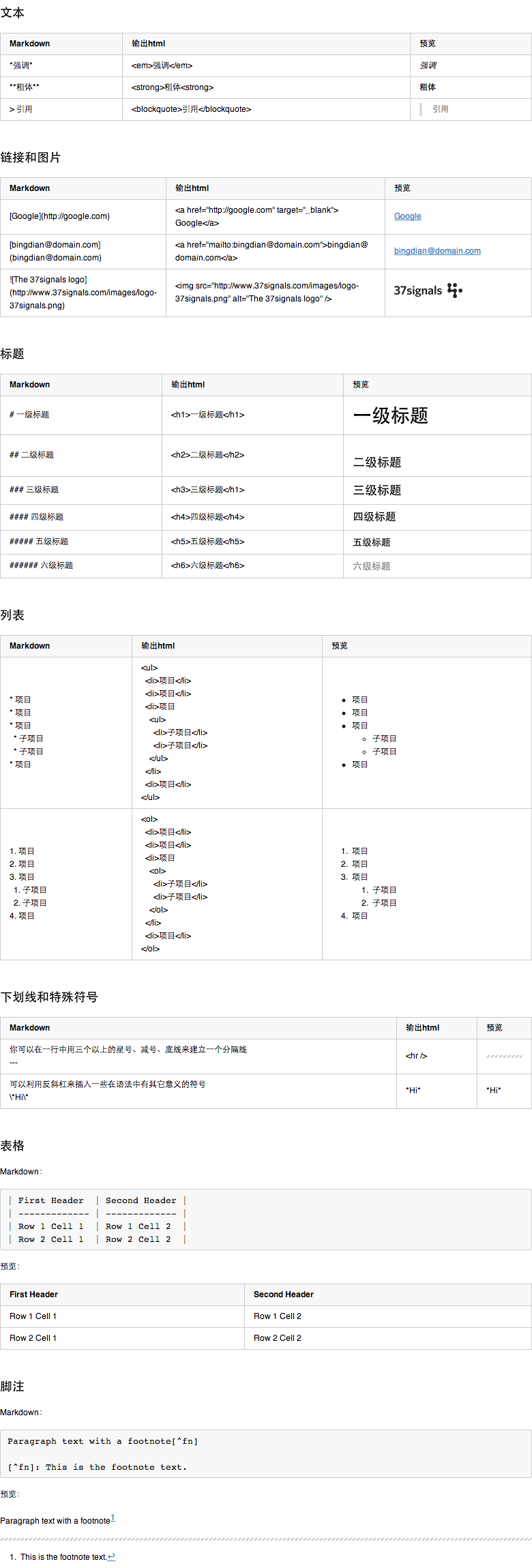
<p>参考下图或<a href="/demo/code/markdown-syntax.html">markdown syntax</a></p>
<p><img src="/files/img/markdown-syntax.png" alt="markdown syntax" /></p>

<h2 id="toc_3">Markdown 编辑器</h2>

<ul>
<li><a href="http://mouapp.com/">mouapp.com/</a> - 国人开发的一款很好的Markdown编辑器</li>
<li><a href="http://www.iawriter.com/mac/">www.iawriter.com/mac/</a> - mac</li>
<li><a href="http://bywordapp.com/">bywordapp.com/</a> - mac，iphone，ipad</li>
<li><a href="http://markedapp.com/">markedapp.com/</a> - mac，可以预览markdown，不能编辑，可以导出html、pdf,样式可自定义</li>
<li><a href="http://markdownpad.com/">markdownpad.com/</a> -  windows</li>
</ul>
<p>另外感谢 <a href="http://linlis.me/">@linlis</a> 推荐的支持Markdown的在线写作平台<a href="http://jianshu.io/">简书网</a> - 简书是一款属于写作者的笔记本, 致力于提供一个简洁而优雅的环境让你专注于书写。</p>

<h2 id="toc_4">扩展阅读</h2>

<ul>
<li><a href="http://zh.wikipedia.org/wiki/Markdown">wiki</a></li>
<li><a href="http://daringfireball.net/projects/markdown/syntax">Markdown: Syntax</a></li>
<li><a href="http://wowubuntu.com/markdown/">Markdow语法</a></li>
<li><a href="http://www.ituring.com.cn/article/828?q=markdown">用Markdown来写自由书籍-开源技术的方案</a></li>
<li><a href="https://github.com/progit/progit">Markdow电子书项目 - Pro Git Book</a></li>
<li><a href="https://github.com/bingdian/F2E-Cookbook">Markdow电子书项目 - F2E-Cookbook</a></li>
</ul>
]]>
        </content>
    </entry><entry>
        <title type="html"><![CDATA[Grunt 使用说明]]></title>
        <author><name>bingdian</name></author>
        <link href="http://wlog.cn/javascript/gruntjs-quick-start.html"/>
        <published>2013-03-12T21:33:00+08:00</published>
        <updated>2016-11-18T23:06:29+08:00</updated>
        <id>http://wlog.cn/javascript/gruntjs-quick-start.html</id>
        <category scheme="http://wlog.cn/tag/#javascript" term="javascript" label="javascript" />
        <category scheme="http://wlog.cn/tag/#自动化" term="自动化" label="自动化" />
        <category scheme="http://wlog.cn/tag/#构建" term="构建" label="构建" />
        <content type="html" xml:base="http://wlog.cn" xml:lang="en">
            <![CDATA[ <p><a href="http://gruntjs.com/">Gruntjs</a>是一款基于nodejs的javascript项目的自动化构建工具。很多知名的开源项目都在使用，如：jquery、yui、qunit、angular.js、CanJS、Modernizr等。</p>

<h2 id="toc_0">一、安装nodejs</h2>
<p><a href="http://nodejs.org/#download">nodejs.org/#download</a></p>

<h2 id="toc_1">如果以前全局安装过grunt 0.3x，执行以下命令</h2>

<pre><code>npm uninstall -g grunt</code></pre>

<h2 id="toc_2">二、安装grunt-cli</h2>

<pre><code>npm install -g grunt-cli</code></pre>

<h2 id="toc_3">三、安装templates</h2>

<pre><code>//clone the template inside of the ~/.grunt-init/ directory.
//http://gruntjs.com/project-scaffolding#installing-templates
git clone https://github.com/gruntjs/grunt-init-jquery.git ~/.grunt-init/jquery
git clone https://github.com/gruntjs/grunt-init-gruntfile.git ~/.grunt-init/gruntfile</code></pre>

<h2 id="toc_4">四、已经存在的grunt项目</h2>

<h3 id="toc_5">安装插件</h3>
<p>如果有配置文件package.json，执行npm install可以安装项目依赖的Grunt插件</p>

<pre><code>npm install</code></pre>
<p>或者直接通过官网<a href="http://gruntjs.com/plugins安装插件">gruntjs.com/plugins安装插件</a></p>

<h3 id="toc_6">使用</h3>

<pre><code>grunt//执行默认命令</code></pre>

<h2 id="toc_7">五、新建grunt项目</h2>

<h3 id="toc_8">创建项目</h3>

<pre><code>mkdir project
grunt-init template //如grunt-init gruntfile</code></pre>

<h3 id="toc_9">当前项目下安装grunt</h3>

<pre><code>npm install grunt --save-dev</code></pre>

<h3 id="toc_10">package.json</h3>
<p>可以在这个文件中配置项目依赖的Grunt插件</p>

<h3 id="toc_11">配置Gruntfile</h3>
<p>文件名为Gruntfile.js或Gruntfile.coffee，在这个文件中配置各种构建任务及其加载任务所需要的插件。</p>

<h3 id="toc_12">安装插件</h3>
<p>如果有配置文件package.json，执行npm install可以安装项目依赖的Grunt插件</p>

<pre><code>npm install</code></pre>
<p>或者直接通过官网<a href="http://gruntjs.com/plugins安装插件">gruntjs.com/plugins安装插件</a></p>

<h3 id="toc_13">使用</h3>

<pre><code>grunt//执行默认命令，也可以使用</code></pre>

<h2 id="toc_14">六、前端开发推荐插件</h2>
<p>grunt-contrib-clean</p>

<pre><code>npm install grunt-contrib-clean --save-dev</code></pre>
<p>grunt-contrib-concat</p>

<pre><code>npm install grunt-contrib-concat --save-dev</code></pre>
<p>grunt-yui-compressor</p>

<pre><code>npm install grunt-yui-compressor</code></pre>
<p>grunt-contrib-csslint</p>

<pre><code>npm install grunt-contrib-csslint --save-dev</code></pre>
<p>grunt-contrib-jshint</p>

<pre><code>npm install grunt-contrib-jshint --save-dev</code></pre>
<p>grunt-contrib-qunit</p>

<pre><code>npm install grunt-contrib-qunit --save-dev</code></pre>
<p>grunt-contrib-copy</p>

<pre><code>npm install grunt-contrib-copy --save-dev</code></pre>
<p>grunt-contrib-uglify</p>

<pre><code>npm install grunt-contrib-uglify --save-dev</code></pre>
<p>grunt-imagine
    npm install grunt-imagine</p>
<p>grunt-contrib-imagemin</p>

<pre><code>npm install grunt-contrib-imagemin --save-dev</code></pre>
<p>grunt-asset-revisions</p>

<pre><code>npm install grunt-asset-revisions</code></pre>
<p>grunt-assets-revving</p>

<pre><code>npm install grunt-assets-revving</code></pre>
]]>
        </content>
    </entry><entry>
        <title type="html"><![CDATA[html5概览]]></title>
        <author><name>bingdian</name></author>
        <link href="http://wlog.cn/html/html5.html"/>
        <published>2013-02-21T23:21:00+08:00</published>
        <updated>2016-11-18T23:06:29+08:00</updated>
        <id>http://wlog.cn/html/html5.html</id>
        <category scheme="http://wlog.cn/tag/#html5" term="html5" label="html5" />
        <category scheme="http://wlog.cn/tag/#doctype" term="doctype" label="doctype" />
        <category scheme="http://wlog.cn/tag/#element" term="element" label="element" />
        <category scheme="http://wlog.cn/tag/#api" term="api" label="api" />
        <content type="html" xml:base="http://wlog.cn" xml:lang="en">
            <![CDATA[ <h2 id="toc_0">一、简介</h2>
<p>HTML5是HTML的新一代标准，现在仍处于发展阶段。HTML5添加了许多新的语法特征，其中包括&lt;video&gt;, &lt;audio&gt;, 和&lt;canvas&gt;元素，同时集成了SVG内容。这些元素是为了更容易的在网页中添加和处理多媒体和图片内容而添加的。其它新的元素包括&lt;section&gt;, &lt;article&gt;,&lt;header&gt;, 和&lt;nav&gt;,是为了丰富文档的数据内容。新的属性的添加也是为了同样的目的。同时也有一些属性和元素被移除掉了。</p>

<h3 id="toc_1">1.1 html5设计原理</h3>

<ul>
<li>避免不必要的复杂性</li>
<li>支持已有的内容</li>
<li>解决现实的问题</li>
<li>平稳退化</li>
<li>最终用户优先</li>
</ul>
<p>详见Jeremy Keith在 Fronteers 2010 上的主题演讲<a href="http://adactio.com/articles/1704/">The Design of HTML5</a>,中文翻译见李松峰老师的翻译<a href="http://www.cn-cuckoo.com/2010/10/21/the-design-of-html5-2151.html">HTML5设计原理</a>。</p>

<h3 id="toc_2">1.2 浏览器支持性况：</h3>
<p>最新版本的 Safari、Chrome、Firefox 以及 Opera 支持某些 HTML5 特性。Internet Explorer 9支持某些 HTML5 特性。具体可查看<a href="http://html5test.com/results/desktop.html">http://html5test.com/results/desktop.html</a>。</p>
<p>对于ie9以下的ie浏览器，可以使用<a href="https://code.google.com/p/html5shiv/">html5shiv</a>使其支持HTML5标签，将下面代码插入到&lt;head&gt;标签中即。 </p>

<pre><code>&lt;!--[if lt IE 9]&gt;
&lt;script src=&quot;http://html5shiv.googlecode.com/svn/trunk/html5.js&quot;&gt;&lt;/script&gt;
&lt;![endif]--&gt;</code></pre>

<h2 id="toc_3">二、Doctype</h2>

<h3 id="toc_4">2.1 DOCTYPE 简介</h3>
<p>DOCTYPE，或者称为 Document Type Declaration（文档类型声明，缩写 DTD）。最初是XML的概念，即通过一种特定的语法，作为一种元数据，来描述XML文档中允许出现的元素，以及各元素的组成、嵌套规则等。参考<a href="http://zh.wikipedia.org/wiki/DOCTYPE">wiki</a>。</p>
<p>在HTML中，DOCTYPE声明位于文档中的最前面的位置，处于 &lt;html&gt; 标签之前。浏览器需要在解析 HTML 文档之前就确定当前文档的类型，以决定其需要采用的渲染模式，不同的渲染模式会影响到浏览器对于 CSS 代码甚至 JavaScript 脚本的解析。如果没有DOCTYPE，浏览器会进入一种被称为Quirks模式（又叫混杂模式，怪异模式，Quirks mode）渲染模式，在该模式下，浏览器的盒模型、样式解析、布局等都与标准规定的存在差异。</p>
<p>没有声明DOCTYPE情况：</p>

<pre><code>&lt;html&gt;
&lt;head&gt;
    &lt;title&gt;document&lt;/title&gt;
&lt;/head&gt;
&lt;body&gt;
&lt;script&gt;
document.write(document.compatMode); //BackCompat
&lt;/script&gt;
&lt;/body&gt;
&lt;/html&gt;</code></pre>
<p>声明DOCTYPE情况：</p>

<pre><code>&lt;!doctype html&gt;
&lt;html lang=&quot;en&quot;&gt;
&lt;head&gt;
    &lt;meta charset=&quot;UTF-8&quot;&gt;
    &lt;title&gt;document&lt;/title&gt;
&lt;/head&gt;
&lt;body&gt;
&lt;script&gt;
document.write(document.compatMode); //CSS1Compat
&lt;/script&gt;
&lt;/body&gt;
&lt;/html&gt;</code></pre>
<p>document.compatMode 最先出现在 IE6 中，它的值标示了浏览器的工作模式，这是一个只读的属性，返回一个字符串，只可能存在两种返回值：</p>

<pre><code>BackCompat：标准兼容模式（Standards-compliant mode）未开启
CSS1Compat：标准兼容模式（又叫严格模式，Standards mode 或者 Strict mode）已开启</code></pre>
<p>需要注意的是：在后来出现的接近标准模式中，document.compatMode 的返回值与标准模式一致，为CSS1Compat。也就是说，不能通过 document.compatMode 来详细区分浏览器的工作模式，只能用来判断浏览器是否工作在Quirks模式下。
因为“标准模式”与“接近标准模式”之间的差异并不大，所以这个方法至今仍被广泛使用。</p>
<p><strong>注意：</strong></p>

<ul>
<li>对于IE6-9，如果DOCTYPE前存在注释，会进入Quirks模式。</li>
<li>对于IE6，如果DOCTYPE前存在一个XML声明，会进入Quirks模式。</li>
</ul>

<h3 id="toc_5">2.2 HTML4 的DOCTYPE</h3>
<p>HTML 4.01的标准中指定了3种DOCTYPE：</p>

<pre><code>严格模式：
&lt;!DOCTYPE HTML PUBLIC &quot;-//W3C//DTD HTML 4.01//EN&quot; &quot;http://www.w3.org/TR/html4/strict.dtd&quot;&gt;

过渡模式：
&lt;!DOCTYPE HTML PUBLIC &quot;-//W3C//DTD HTML 4.01 Transitional//EN&quot; &quot;http://www.w3.org/TR/html4/loose.dtd&quot;&gt;

框架模式：
&lt;!DOCTYPE HTML PUBLIC &quot;-//W3C//DTD HTML 4.01 Frameset//EN&quot; &quot;http://www.w3.org/TR/html4/frameset.dtd&quot;&gt;</code></pre>
<p>在HTML4的标准中，每一个DOCTYPE对应的dtd文件都是有合法的URL指定的，可以通过互联网进行下载。浏览器可以根据URL获得到dtd的具体内容，并根据内容的规定来解析文档。</p>

<h3 id="toc_6">2.3 XHTML DOCTYPE</h3>
<p>XHTML 1.0 规定了三种 XML 文档类型：Strict、Transitional 以及 Frameset。</p>

<pre><code>严格模式：
&lt;!DOCTYPE html PUBLIC &quot;-//W3C//DTD XHTML 1.0 Strict//EN&quot; &quot;http://www.w3.org/TR/xhtml1/DTD/xhtml1-strict.dtd&quot;&gt;

过渡模式：
&lt;!DOCTYPE html PUBLIC &quot;-//W3C//DTD XHTML 1.0 Transitional//EN&quot; &quot;http://www.w3.org/TR/xhtml1/DTD/xhtml1-transitional.dtd&quot;&gt;

框架模式：
&lt;!DOCTYPE html PUBLIC &quot;-//W3C//DTD XHTML 1.0 Frameset//EN&quot; &quot;http://www.w3.org/TR/xhtml1/DTD/xhtml1-frameset.dtd&quot;&gt;</code></pre>

<h3 id="toc_7">2.4 HTML5 DOCTYPE</h3>
<p>HTML5具有更简单的DOCTYPE，在html5中，只需要写&lt;!DOCTYPE html&gt;就可以了。所有的主流浏览器都将这种DOCTYPE视为标准模式。
这样写的好处：</p>

<ol>
<li>你可以轻松的写下这个DOCTYPE，而不用担心会写错；</li>
<li>它是向后兼容的。 </li>
</ol>

<pre>
&lt;!DOCTYPE html>
</pre>
<p>注：DOCTYPE大小写不敏感。</p>

<h2 id="toc_8">三、标签</h2>

<h3 id="toc_9">3.1 新增的HTML5 标签</h3>
<p>新增加的英文标签不翻译了，直接看英文理解更准确些。</p>

<pre><code>//Sections
&lt;section&gt;   Defines a section in a document
&lt;nav&gt;   Defines a section that contains only navigation links
&lt;article&gt;   Defines self-contained content that could exist independantly of the rest of the content
&lt;aside&gt;     Defines some content set aside from the rest of page content. If it is removed, the remaining content still make sense.
&lt;hgroup&gt;    Groups a set of &lt;h1&gt; to &lt;h6&gt; elements when a heading has multiple levels
&lt;header&gt;    Defines the header of a page or section. It often contains a logo, the title of the Web site and a navigational table of content.
&lt;footer&gt;    Defines the footer for a page or section. It often contains a copyright notice, some links to legal information or addresses to give feedback.
&lt;main&gt;  Defines the main or important content in the document. There is only one &lt;main&gt; element in the document.


//Grouping content
&lt;figure&gt;    Represents a figure illustrated a part of the document.
&lt;figcaption&gt;    Represents the legend of a figure.


//Text-level semantics
&lt;data&gt;  Associates to its content a machine-readable equivalent. (This element is only in the WHATWG version of the HTML standard, and not in the W3C version of HTML5).
&lt;time&gt;  Represents a date and time value, eventually with a machine-readable equivalent.
&lt;mark&gt;  Represents text highlighted for reference purposes, that is for its relevance in another context.
&lt;ruby&gt;  Represents content to be marked with ruby annotations, short runs of text presented alongside the text. This is often used in conjunction with East Asian language where the annotations act as a guide for pronunciation, like the Japanese furigana.
&lt;rt&gt;    Represents the text of a ruby annotation.
&lt;rp&gt;    Represents parenthesis around a ruby annotation, used to display the annotation in an alternate way by browsers not supporting the standard display for annotations.
&lt;bdi&gt;   Represents text that must be isolated from its surrounding for bidirectional text formatting. It allows to embed span of text with a different, or unknown, directionality.
&lt;wbr&gt;   Represents a line break opportunity, that is a suggested wrapping point in order to improve readability of text split on several lines.


//Embedded content
&lt;embed&gt;     Represents a integration point for an external, often non_HTML, application or interactive content.
&lt;video&gt;     Represents a video, and its associated audio files and captions, with the necessary interface to play it.
&lt;audio&gt;     Represents a sound, or an audio stream.
&lt;source&gt;    Allows authors to specify alternative media resources for media elements like &lt;video&gt; or &lt;audio&gt;.
&lt;track&gt;     Allows authors to specify timed text track for media elements like &lt;video&gt; or &lt;audio&gt;.
&lt;canvas&gt;    Represents a bitmap area that scripts can be used to render graphics, like graphs, game graphics, any visual images on the fly.
&lt;svg&gt;   Defines an embedded vectorial image.
&lt;math&gt;  Defines a mathematical formula.


//Forms
&lt;datalist&gt;  Represents a set of predefined options for other controls.
&lt;keygen&gt;    Represents a key pair generator control.
&lt;output&gt;    Represents the result of a calculation.
&lt;progress&gt;  Represents the completion progress of a task.
&lt;meter&gt;     Represents a scalar measurement (or a fractional value), within a known range


//Interactive elements
&lt;details&gt;   Represents a widget from which the user can obtain additional information or controls.
&lt;summary&gt;   Represents a summary, caption, or legend for a given &lt;details&gt;.
&lt;command&gt;   Represents a command that the user can invoke.
&lt;menu&gt;  Represents a list of commands.</code></pre>

<h3 id="toc_10">3.2 HTML 4.01的和HTML5标签比较</h3>

<table>
    <thead>
        <tr>
            <th>Element</th>
            <th>HTML 4.01/XHTML 1.0</th>
            <th>HTML5</th>
            <th>Short Description</th>
            <th>中文描述</th>
        </tr>
    </thead>
    <tbody>
        <tr>
            <td><code><a href="#the-a-element">a</a></code></td>
            <td class="strict">strict</td>
            <td class="active">yes</td>
            <td>Hyperlink</td>
            <td>超链接</td>
        </tr>
        <tr>
            <td><code><a href="#the-abbr-element">abbr</a></code></td>
            <td class="strict">strict</td>
            <td class="active">yes</td>
            <td>Abbreviation</td>
            <td>定义缩写</td>
        </tr>
        <tr>
            <td><code>acronym</code></td>
            <td class="strict">strict</td>
            <td class="obsolete">-</td>
            <td>Acronym</td>
            <td>HTML 5 中不支持。定义首字母缩写。</td>
        </tr>
        <tr>
            <td><code><a href="#the-address-element">address</a></code></td>
            <td class="strict">strict</td>
            <td class="active">yes</td>
            <td>Contact information</td>
            <td>定义地址元素</td>
        </tr>
        <tr>
            <td><code>applet</code></td>
            <td class="transitional">transitional</td>
            <td class="obsolete">-</td>
            <td>Java applet</td>
            <td>HTML 5 中不支持，定义 applet</td>
        </tr>
        <tr>
            <td><code><a href="#the-area-element">area</a></code></td>
            <td class="strict">strict</td>
            <td class="active">yes</td>
            <td>Image map region</td>
            <td>定义图像映射中的区域</td>
        </tr>
        <tr>
            <td><code><a href="#the-article-element">article</a></code></td>
            <td class="none">-</td>
            <td class="active">yes</td>
            <td>Independent section</td>
            <td>显示一个独立内容，如一篇完整的论坛帖子，一则网站新闻，一篇博客文章，一个用户评论等。</td>
        </tr>
        <tr>
            <td><code><a href="#the-aside-element">aside</a></code></td>
            <td class="none">-</td>
            <td class="active">yes</td>
            <td>Auxiliary section</td>
            <td>定义页面内容之外的内容，如侧边栏</td>
        </tr>
        <tr>
            <td><code><a href="#the-audio-element">audio</a></code></td>
            <td class="none">-</td>
            <td class="active">yes</td>
            <td>Audio stream</td>
            <td>定义声音内容</td>
        </tr>
        <tr>
            <td><code><a href="#the-b-element">b</a></code></td>
            <td class="strict">strict</td>
            <td class="active">yes</td>
            <td>Bold text</td>
            <td>定义粗体文本</td>
        </tr>
        <tr>
            <td><code><a href="#the-base-element">base</a></code></td>
            <td class="strict">strict</td>
            <td class="active">yes</td>
            <td>Document base URI</td>
            <td>定义页面中所有链接的基准 URL</td>
        </tr>
        <tr>
            <td><code>basefont</code></td>
            <td class="transitional">transitional</td>
            <td class="obsolete">-</td>
            <td>Base font style</td>
            <td>HTML 5 中不支持，请使用 CSS 代替。</td>
        </tr>
        <tr>
            <td><code><a href="#the-bb-element">bb</a></code></td>
            <td class="none">-</td>
            <td class="active">yes</td>
            <td>Browser button</td>
            <td>定义文本的文本方向，使其脱离其周围文本的方向设置。</td>
        </tr>
        <tr>
            <td><code><a href="#the-bdo-element">bdo</a></code></td>
            <td class="strict">strict</td>
            <td class="active">yes</td>
            <td>Bi-directional text override</td>
            <td>定义文本显示的方向</td>
        </tr>
        <tr>
            <td><code>bgsound</code></td>
            <td class="none">-</td>
            <td class="obsolete">-</td>
            <td></td>
            <td>HTML 5 中不支持。</td>
        </tr>
        <tr>
            <td><code>big</code></td>
            <td class="strict">strict</td>
            <td class="obsolete">-</td>
            <td></td>
            <td>HTML 5 中不支持，定义大号文本。</td>
        </tr>
        <tr>
            <td><code>blink</code></td>
            <td class="none">-</td>
            <td class="obsolete">-</td>
            <td></td>
            <td>HTML 5 中不支持。</td>
        </tr>
        <tr>
            <td><code><a href="#the-blockquote-element">blockquote</a></code></td>
            <td class="strict">strict</td>
            <td class="active">yes</td>
            <td>Long quotation</td>
            <td>定义长的引用。</td>
        </tr>
        <tr>
            <td><code><a href="#the-body-element">body</a></code></td>
            <td class="strict">strict</td>
            <td class="active">yes</td>
            <td>Main content</td>
            <td>定义 body 元素。</td>
        </tr>
        <tr>
            <td><code><a href="#the-br-element">br</a></code></td>
            <td class="strict">strict</td>
            <td class="active">yes</td>
            <td>Line break</td>
            <td>换行符。</td>
        </tr>
        <tr>
            <td><code><a href="#the-button-element">button</a></code></td>
            <td class="strict">strict</td>
            <td class="active">yes</td>
            <td>Push button control</td>
            <td>定义按钮。</td>
        </tr>
        <tr>
            <td><code><a href="#the-canvas-element">canvas</a></code></td>
            <td class="none">-</td>
            <td class="active">yes</td>
            <td>Bitmap canvas</td>
            <td>定义图形，比如图表和其他图像</td>
        </tr>
        <tr>
            <td><code><a href="#the-caption-element">caption</a></code></td>
            <td class="strict">strict</td>
            <td class="active">yes</td>
            <td>Table caption</td>
            <td>定义表格标题</td>
        </tr>
        <tr>
            <td><code>center</code></td>
            <td class="transitional">transitional</td>
            <td class="obsolete">-</td>
            <td></td>
            <td>HTML 5 中不支持，定义居中的文本</td>
        </tr>
        <tr>
            <td><code><a href="#the-cite-element">cite</a></code></td>
            <td class="strict">strict</td>
            <td class="active">yes</td>
            <td>Citation</td>
            <td>定义引用</td>
        </tr>
        <tr>
            <td><code><a href="#the-code-element">code</a></code></td>
            <td class="strict">strict</td>
            <td class="active">yes</td>
            <td>Code fragment</td>
            <td>定义计算机代码文本</td>
        </tr>
        <tr>
            <td><code><a href="#the-col-element">col</a></code></td>
            <td class="strict">strict</td>
            <td class="active">yes</td>
            <td>Table column</td>
            <td>定义表格列的属性</td>
        </tr>
        <tr>
            <td><code><a href="#the-colgroup-element">colgroup</a></code></td>
            <td class="strict">strict</td>
            <td class="active">yes</td>
            <td>Table column group</td>
            <td>定义表格列的分组</td>
        </tr>
        <tr>
            <td><code><a href="#the-command-element">command</a></code></td>
            <td class="none">-</td>
            <td class="active">yes</td>
            <td>Command that a user can invoke</td>
            <td>定义命令按钮</td>
        </tr>
        <tr>
            <td><code>datagrid</code></td>
            <td class="none">-</td>
            <td class="active">yes</td>
            <td>Interactive tree, list or tabular data</td>
            <td>定义下拉列表</td>
        </tr>
        <tr>
            <td><code><a href="#the-datalist-element">datalist</a></code></td>
            <td class="none">-</td>
            <td class="active">yes</td>
            <td>Predefined control values</td>
            <td></td>
        </tr>
        <tr>
            <td><code><a href="#the-dd-element">dd</a></code></td>
            <td class="strict">strict</td>
            <td class="active">yes</td>
            <td>Description description</td>
            <td>定义定义的描述。</td>
        </tr>
        <tr>
            <td><code><a href="#the-del-element">del</a></code></td>
            <td class="strict">strict</td>
            <td class="active">yes</td>
            <td>Deletion</td>
            <td>定义删除文本</td>
        </tr>
        <tr>
            <td><code><a href="#the-details-element">details</a></code></td>
            <td class="none">-</td>
            <td class="active">yes</td>
            <td>Additional information</td>
            <td>定义元素的细节</td>
        </tr>
        <tr>
            <td><code><a href="#the-dfn-element">dfn</a></code></td>
            <td class="strict">strict</td>
            <td class="active">yes</td>
            <td>Defining instance of a term</td>
            <td>定义定义项目</td>
        </tr>
        <tr>
            <td><code><a href="#the-dialog-element">dialog</a></code></td>
            <td class="none">-</td>
            <td class="active">yes</td>
            <td>Conversation</td>
            <td></td>
        </tr>
        <tr>
            <td><code>dir</code></td>
            <td class="transitional">transitional</td>
            <td class="obsolete">-</td>
            <td></td>
            <td>HTML 5 中不支持，定义目录列表</td>
        </tr>
        <tr>
            <td><code><a href="#the-div-element">div</a></code></td>
            <td class="strict">strict</td>
            <td class="active">yes</td>
            <td>Generic division</td>
            <td></td>
        </tr>
        <tr>
            <td><code><a href="#the-dl-element">dl</a></code></td>
            <td class="strict">strict</td>
            <td class="active">yes</td>
            <td>Description list</td>
            <td>定义定义列表</td>
        </tr>
        <tr>
            <td><code><a href="#the-dt-element">dt</a></code></td>
            <td class="strict">strict</td>
            <td class="active">yes</td>
            <td>Description term</td>
            <td>定义定义的项目</td>
        </tr>
        <tr>
            <td><code><a href="#the-em-element">em</a></code></td>
            <td class="strict">strict</td>
            <td class="active">yes</td>
            <td>Stress emphasis</td>
            <td>定义强调文本</td>
        </tr>
        <tr>
            <td><code><a href="#the-embed-element">embed</a></code></td>
            <td class="none">-</td>
            <td class="active">yes</td>
            <td>Embedded application</td>
            <td>定义外部交互内容或插件</td>
        </tr>
        <tr>
            <td><code><a href="#the-fieldset-element">fieldset</a></code></td>
            <td class="strict">strict</td>
            <td class="active">yes</td>
            <td>Form control group</td>
            <td>定义 fieldset</td>                    
        </tr>
        <tr>
            <td><code><a href="#the-figure-element">figure</a></code></td>
            <td class="none">-</td>
            <td class="active">yes</td>
            <td>A figure with a caption.</td>
            <td>定义媒介内容的分组，以及它们的标题</td>
        </tr>
        <tr>
            <td><code>font</code></td>
            <td class="transitional">transitional</td>
            <td class="obsolete">-</td>
            <td>Font style</td>
            <td>HTML 5 中不支持</td>
        </tr>
        <tr>
            <td><code><a href="#the-footer-elem ent">footer</a></code></td>
            <td class="none">-</td>
            <td class="active">yes</td>
            <td>Section footer</td>
            <td>定义 section 或 page 的页脚</td>
        </tr>
        <tr>
            <td><code><a href="#the-form-element">form</a></code></td>
            <td class="strict">strict</td>
            <td class="active">yes</td>
            <td>Form</td>
            <td>定义表单。</td>
        </tr>
        <tr>
            <td><code>frame</code></td>
            <td class="frameset">frameset</td>
            <td class="obsolete">-</td>
            <td></td>
            <td>HTML 5 中不支持。定义子窗口（框架）</td>
        </tr>
        <tr>
            <td><code>frameset</code></td>
            <td class="frameset">frameset</td>
            <td class="obsolete">-</td>
            <td></td>
            <td>HTML 5 中不支持，定义框架的集。</td>
        </tr>
        <tr>
            <td><code><a href="#the-h1,-h2,-h3,-h4,-h5,-and-h6-elements">h1</a></code></td>
            <td class="strict">strict</td>
            <td class="active">yes</td>
            <td>Heading level 1</td>
            <td>一级标题</td>
        </tr>
        <tr>
            <td><code><a href="#the-h1,-h2,-h3,-h4,-h5,-and-h6-elements">h2</a></code></td>
            <td class="strict">strict</td>
            <td class="active">yes</td>
            <td>Heading level 2</td>
            <td>二级标题</td>
        </tr>
        <tr>
            <td><code><a href="#the-h1,-h2,-h3,-h4,-h5,-and-h6-elements">h3</a></code></td>
            <td class="strict">strict</td>
            <td class="active">yes</td>
            <td>Heading level 3</td>
            <td>三级标题</td>
        </tr>
        <tr>
            <td><code><a href="#the-h1,-h2,-h3,-h4,-h5,-and-h6-elements">h4</a></code></td>
            <td class="strict">strict</td>
            <td class="active">yes</td>
            <td>Heading level 4</td>
            <td>四级标题</td>
        </tr>
        <tr>
            <td><code><a href="#the-h1,-h2,-h3,-h4,-h5,-and-h6-elements">h5</a></code></td>
            <td class="strict">strict</td>
            <td class="active">yes</td>
            <td>Heading level 5</td>
            <td>五级标题</td>
        </tr>
        <tr>
            <td><code><a href="#the-h1,-h2,-h3,-h4,-h5,-and-h6-elements">h6</a></code></td>
            <td class="strict">strict</td>
            <td class="active">yes</td>
            <td>Heading level 6</td>
            <td></td>
        </tr>
        <tr>
            <td><code><a href="#the-head-element">head</a></code></td>
            <td class="strict">strict</td>
            <td class="active">yes</td>
            <td>Document head</td>
            <td>六级标题</td>
        </tr>
        <tr>
            <td><code><a href="#the-header-element">header</a></code></td>
            <td class="none">-</td>
            <td class="active">yes</td>
            <td>Section header</td>
            <td>定义 section 或 page 的页眉。</td>
        </tr>
        <tr>
            <td><code><a href="#the-hr-element">hr</a></code></td>
            <td class="strict">strict</td>
            <td class="active">yes</td>
            <td>Separator</td>
            <td>定义水平线。</td>
        </tr>
        <tr>
            <td><code><a href="#the-html-element">html</a></code></td>
            <td class="strict">strict</td>
            <td class="active">yes</td>
            <td>Document root</td>
            <td>定义 html 文档</td>
        </tr>
        <tr>
            <td><code><a href="#the-i-element">i</a></code></td>
            <td class="strict">strict</td>
            <td class="active">yes</td>
            <td>Italic text</td>
            <td>定义斜体文本</td>
        </tr>
        <tr>
            <td><code><a href="#the-iframe-element">iframe</a></code></td>
            <td class="transitional">transitional</td>
            <td class="active">yes</td>
            <td>Inline frame</td>
            <td>定义行内的子窗口（框架）</td>
        </tr>
        <tr>
            <td><code><a href="#the-img-element">img</a></code></td>
            <td class="strict">strict</td>
            <td class="active">yes</td>
            <td>Image</td>
            <td>定义图像</td>
        </tr>
        <tr>
            <td><code><a href="#the-input-element">input</a></code></td>
            <td class="strict">strict</td>
            <td class="active">yes</td>
            <td>Form control</td>
            <td>定义输入域</td>
        </tr>
        <tr>
            <td><code><a href="#the-ins-element">ins</a></code></td>
            <td class="strict">strict</td>
            <td class="active">yes</td>
            <td>Insertion</td>
            <td>定义插入文本</td>
        </tr>
        <tr>
            <td><code>isindex</code></td>
            <td class="transitional">transitional</td>
            <td class="obsolete">-</td>
            <td></td>
            <td>HTML 5 中不支持，定义单行的输入域</td>
        </tr>
        <tr>
            <td><code><a href="#the-kbd-element">kbd</a></code></td>
            <td class="strict">strict</td>
            <td class="active">yes</td>
            <td>User input</td>
            <td>定义键盘文本</td>
        </tr>
        <tr>
            <td><code><a href="#the-label-element">label</a></code></td>
            <td class="strict">strict</td>
            <td class="active">yes</td>
            <td>Form control label</td>
            <td>定义表单控件的标注</td>
        </tr>
        <tr>
            <td><code><a href="#the-legend-element">legend</a></code></td>
            <td class="strict">strict</td>
            <td class="active">yes</td>
            <td>Explanatory title or caption</td>
            <td>定义 fieldset 中的标题</td>
        </tr>
        <tr>
            <td><code><a href="#the-li-element">li</a></code></td>
            <td class="strict">strict</td>
            <td class="active">yes</td>
            <td>List item</td>
            <td>定义列表的项目。</td>
        </tr>
        <tr>
            <td><code><a href="#the-link-element">link</a></code></td>
            <td class="strict">strict</td>
            <td class="active">yes</td>
            <td>Link to resources</td>
            <td>定义资源引用</td>
        </tr>
        <tr>
            <td><code>listing</code></td>
            <td class="none">-</td>
            <td class="obsolete">-</td>
            <td>Preformatted text</td>
            <td>HTML 5 中不支持</td>
        </tr>
        <tr>
            <td><code><a href="#the-map-element">map</a></code></td>
            <td class="strict">strict</td>
            <td class="active">yes</td>
            <td>Client-side image map</td>
            <td>定义图像映射</td>
        </tr>
        <tr>
            <td><code><a href="#the-mark-element">mark</a></code></td>
            <td class="none">-</td>
            <td class="active">yes</td>
            <td>Marked or highlighted text</td>
            <td>定义有记号的文本</td>
        </tr>
        <tr>
            <td><code>marquee</code></td>
            <td class="none">-</td>
            <td class="obsolete">-</td>
            <td></td>
            <td>HTML 5 中不支持</td>
        </tr>
        <tr>
            <td><code><a href="#the-menu-element">menu</a></code></td>
            <td class="transitional">transitional</td>
            <td class="active">yes</td>
            <td>Command menu</td>
            <td>定义菜单列表</td>
        </tr>
        <tr>
            <td><code><a href="#the-meta-element">meta</a></code></td>
            <td class="strict">strict</td>
            <td class="active">yes</td>
            <td>Metadata</td>
            <td>定义元信息</td>
        </tr>
        <tr>
            <td><code><a href="#the-meter-element">meter</a></code></td>
            <td class="none">-</td>
            <td class="active">yes</td>
            <td>Scalar measurement</td>
            <td>定义预定义范围内的度量</td>
        </tr>
        <tr>
            <td><code><a href="#the-nav-element">nav</a></code></td>
            <td class="none">-</td>
            <td class="active">yes</td>
            <td>Navigation</td>
            <td>定义导航链接</td>
        </tr>
        <tr>
            <td><code>nobr</code></td>
            <td class="none">-</td>
            <td class="obsolete">-</td>
            <td></td>
            <td>HTML 5 中不支持</td>
        </tr>
        <tr>
            <td><code>noembed</code></td>
            <td class="none">-</td>
            <td class="obsolete">-</td>
            <td></td>
            <td>HTML 5 中不支持</td>
        </tr>
        <tr>
            <td><code>noframes</code></td>
            <td class="frameset">frameset</td>
            <td class="obsolete">-</td>
            <td></td>
            <td>HTML 5 中不支持。</td>
        </tr>
        <tr>
            <td><code><a href="#the-noscript-element">noscript</a></code></td>
            <td class="strict">strict</td>
            <td class="active">yes</td>
            <td>Alternative content for no script support</td>
            <td>定义 noscript 部分</td>
        </tr>
        <tr>
            <td><code><a href="#the-object-element">object</a></code></td>
            <td class="strict">strict</td>
            <td class="active">yes</td>
            <td>Generic embedded resource</td>
            <td>定义嵌入对象</td>
        </tr>
        <tr>
            <td><code><a href="#the-ol-element">ol</a></code></td>
            <td class="strict">strict</td>
            <td class="active">yes</td>
            <td>Ordered list</td>
            <td>定义有序列表</td>
        </tr>
        <tr>
            <td><code><a href="#the-optgroup-element">optgroup</a></code></td>
            <td class="strict">strict</td>
            <td class="active">yes</td>
            <td>Option group</td>
            <td>定义选项组</td>
        </tr>
        <tr>
            <td><code><a href="#the-option-element">option</a></code></td>
            <td class="strict">strict</td>
            <td class="active">yes</td>
            <td>Selection choice</td>
            <td>定义下拉列表中的选项</td>
        </tr>
        <tr>
            <td><code><a href="#the-output-element">output</a></code></td>
            <td class="none">-</td>
            <td class="active">yes</td>
            <td>Output control</td>
            <td>定义输出的一些类型</td>
        </tr>
        <tr>
            <td><code><a href="#the-p-element">p</a></code></td>
            <td class="strict">strict</td>
            <td class="active">yes</td>
            <td>Paragraph</td>
            <td>定义段落</td>
        </tr>
        <tr>
            <td><code><a href="#the-param-element">param</a></code></td>
            <td class="strict">strict</td>
            <td class="active">yes</td>
            <td>Plugin parameter</td>
            <td>为对象定义参数</td>
        </tr>
        <tr>
            <td><code>plaintext</code></td>
            <td class="none">-</td>
            <td class="obsolete">-</td>
            <td>Preformatted text</td>
            <td>HTML 5 中不支持</td>
        </tr>
        <tr>
            <td><code><a href="#the-pre-element">pre</a></code></td>
            <td class="strict">strict</td>
            <td class="active">yes</td>
            <td>Preformatted text</td>
            <td>定义预格式化文本</td>
        </tr>
        <tr>
            <td><code><a href="#the-progress-element">progress</a></code></td>
            <td class="none">-</td>
            <td class="active">yes</td>
            <td>Progress of a task</td>
            <td>定义任何类型的任务的进度</td>
        </tr>
        <tr>
            <td><code><a href="#the-q-element">q</a></code></td>
            <td class="strict">strict</td>
            <td class="active">yes</td>
            <td>Inline quotation</td>
            <td>定义短的引用</td>
        </tr>
        <tr>
            <td><code><a href="#the-rp-element">rp</a></code></td>
            <td class="none">-</td>
            <td class="active">yes</td>
            <td>Ruby parenthesis</td>
            <td>定义若浏览器不支持 ruby 元素显示的内容</td>
        </tr>
        <tr>
            <td><code><a href="#the-rt-element">rt</a></code></td>
            <td class="none">-</td>
            <td class="active">yes</td>
            <td>Ruby text</td>
            <td>定义 ruby 注释的解释</td>
        </tr>
        <tr>
            <td><code><a href="#the-ruby-element">ruby</a></code></td>
            <td class="none">-</td>
            <td class="active">yes</td>
            <td>Ruby annotation</td>
            <td>定义 ruby 注释</td>
        </tr>
        <tr>
            <td><code>s</code></td>
            <td class="transitional">transitional</td>
            <td class="obsolete">-</td>
            <td></td>
            <td>HTML 5 中不支持，定义加删除线的文本</td>
        </tr>
        <tr>
            <td><code><a href="#the-samp-element">samp</a></code></td>
            <td class="strict">strict</td>
            <td class="active">yes</td>
            <td>Sample output</td>
            <td>定义样本计算机代码</td>
        </tr>
        <tr>
            <td><code><a href="#the-script-element">script</a></code></td>
            <td class="strict">strict</td>
            <td class="active">yes</td>
            <td>Linked or embedded script</td>
            <td>定义脚本</td>
        </tr>
        <tr>
            <td><code><a href="#the-section-element">section</a></code></td>
            <td class="none">-</td>
            <td class="active">yes</td>
            <td>Document section</td>
            <td>定义 section</td>
        </tr>
        <tr>
            <td><code><a href="#the-select-element">select</a></code></td>
            <td class="strict">strict</td>
            <td class="active">yes</td>
            <td>Selection control</td>
            <td>定义可选列表</td>
        </tr>
        <tr>
            <td><code><a href="#the-small-element">small</a></code></td>
            <td class="strict">strict</td>
            <td class="active">yes</td>
            <td>Small print</td>
            <td>将旁注 (side comments) 呈现为小型文。</td>
        </tr>
        <tr>
            <td><code><a href="#the-source-element">source</a></code></td>
            <td class="none">-</td>
            <td class="active">yes</td>
            <td>Media resource</td>
            <td>定义媒介源</td>
        </tr>
        <tr>
            <td><code>spacer</code></td>
            <td class="none">-</td>
            <td class="obsolete">-</td>
            <td></td>
            <td>HTML 5 中不支持</td>
        </tr>
        <tr>
            <td><code><a href="#the-span-element">span</a></code></td>
            <td class="strict">strict</td>
            <td class="active">yes</td>
            <td>Generic inline container</td>
            <td></td>
        </tr>
        <tr>
            <td><code>strike</code></td>
            <td class="transitional">transitional</td>
            <td class="obsolete">-</td>
            <td></td>
            <td>HTML 5 中不支持，定义加删除线的文本</td>
        </tr>
        <tr>
            <td><code><a href="#the-strong-element">strong</a></code></td>
            <td class="strict">strict</td>
            <td class="active">yes</td>
            <td>Strong importance</td>
            <td>定义强调文本。</td>
        </tr>
        <tr>
            <td><code><a href="#the-style-element">style</a></code></td>
            <td class="strict">strict</td>
            <td class="active">yes</td>
            <td>Embedded stylesheet</td>
            <td>定义样式定义</td>
        </tr>
        <tr>
            <td><code><a href="#the-sub-and-sup-elements">sub</a></code></td>
            <td class="strict">strict</td>
            <td class="active">yes</td>
            <td>Subscript</td>
            <td>定义下标文本</td>
        </tr>
        <tr>
            <td><code><a href="#the-sub-and-sup-elements">sup</a></code></td>
            <td class="strict">strict</td>
            <td class="active">yes</td>
            <td>Superscript</td>
            <td>定义上标文本</td>
        </tr>
        <tr>
            <td><code><a href="#the-table-element">table</a></code></td>
            <td class="strict">strict</td>
            <td class="active">yes</td>
            <td>Table</td>
            <td>定义表格</td>
        </tr>
        <tr>
            <td><code><a href="#the-tbody-element">tbody</a></code></td>
            <td class="strict">strict</td>
            <td class="active">yes</td>
            <td>Table body</td>
            <td>定义表格的主体</td>
        </tr>
        <tr>
            <td><code><a href="#the-td-element">td</a></code></td>
            <td class="strict">strict</td>
            <td class="active">yes</td>
            <td>Table cell</td>
            <td>定义表格单元</td>
        </tr>
        <tr>
            <td><code><a href="#the-textarea-element">textarea</a></code></td>
            <td class="strict">strict</td>
            <td class="active">yes</td>
            <td>Multi-line text control</td>
            <td>定义 textarea</td>
        </tr>
        <tr>
            <td><code><a href="#the-tfoot-element">tfoot</a></code></td>
            <td class="strict">strict</td>
            <td class="active">yes</td>
            <td>Table footer</td>
            <td>定义表格的脚注</td>
        </tr>
        <tr>
            <td><code><a href="#the-th-element">th</a></code></td>
            <td class="strict">strict</td>
            <td class="active">yes</td>
            <td>Table header cell</td>
            <td>定义表头单元格</td>
        </tr>
        <tr>
            <td><code><a href="#the-thead-element">thead</a></code></td>
            <td class="strict">strict</td>
            <td class="active">yes</td>
            <td>Table head</td>
            <td>定义表头</td>
        </tr>
        <tr>
            <td><code><a href="#the-time-element">time</a></code></td>
            <td class="none">-</td>
            <td class="active">yes</td>
            <td>Date and/or time</td>
            <td>定义日期/时间</td>                    
        </tr>
        <tr>
            <td><code><a href="#the-title-element">title</a></code></td>
            <td class="strict">strict</td>
            <td class="active">yes</td>
            <td>Document title</td>
            <td>定义文档的标题</td>
        </tr>
        <tr>
            <td><code><a href="#the-tr-element">tr</a></code></td>
            <td class="strict">strict</td>
            <td class="active">yes</td>
            <td>Table row</td>
            <td>定义表格行</td>
        </tr>
        <tr>
            <td><code>u</code></td>
            <td class="transitional">transitional</td>
            <td class="obsolete">-</td>
            <td></td>
            <td>HTML 5 中不支持。定义下划线文本</td>
        </tr>
        <tr>
            <td><code><a href="#the-ul-element">ul</a></code></td>
            <td class="strict">strict</td>
            <td class="active">yes</td>
            <td>Unordered list</td>
            <td>定义无序列表</td>
        </tr>
        <tr>
            <td><code><a href="#the-var-element">var</a></code></td>
            <td class="strict">strict</td>
            <td class="active">yes</td>
            <td>Variable</td>
            <td>定义变量。</td>
        </tr>
        <tr>
            <td><code><a href="#the-video-element">video</a></code></td>
            <td class="none">-</td>
            <td class="active">yes</td>
            <td>Video or movie</td>
            <td>定义视频</td>
        </tr>
        <tr>
            <td><code>wbr</code></td>
            <td class="none">-</td>
            <td class="obsolete">-</td>
            <td></td>
            <td>HTML 5 中不支持</td>
        </tr>
        <tr>
            <td><code>xmp</code></td>
            <td class="none">-</td>
            <td class="obsolete">-</td>
            <td>Preformatted text</td>
            <td>HTML 5 中不支持。定义预格式文本</td>
        </tr>
    </tbody>
</table>

<h2 id="toc_11">四、API</h2>
<p>html5引入了新API,新的API的意义：</p>

<ul>
<li>增强了html原生功能</li>
<li>丰富动画效果，增强web表现力</li>
<li>强大的后台运算和通信支持</li>
</ul>
<p>html5新增API：</p>

<ul>
<li>离线 &amp; 存储（OFFLINE &amp; STORAGE）

<ul>
<li>Offline resources: 离线资源：应用程序缓存</li>
<li>Online and offline events：在线和离线事件，可以让应用程序和扩展检测是否存在可用的网络连接，以及在连接建立和断开时能感知到。</li>
<li>WEB Storage（又名 DOM Storage)：sessionStorage 和 localStorage。</li>
<li>IndexedDB：是一个为了能够在浏览器中存储大量结构化数据，并且能够在这些数据上使用索引进行高性能检索的 web 标准。</li>
<li>Using files from web applications</li>
</ul></li>
<li>设备访问（DEVICE ACCESS）

<ul>
<li>Using the Camera API：允许使用和操作计算机的摄像头，并从中存取照片。</li>
<li>Touch events：对用户按下触控屏的事件做出反应的处理程序。</li>
<li>Geolocation：让浏览器使用地理位置服务定位用户的位置，用户可共享地理位置，并在Web应用的协助下享用位置感知服务。</li>
<li>Detecting device orientation：检测设备方向,让用户在运行浏览器的设备变更方向时能够得到信息。</li>
<li>Pointer Lock API</li>
</ul></li>
<li>连通性（CONNECTIVITY）

<ul>
<li>Web Sockets：允许在页面和服务器之间建立持久连接并通过这种方法来交换非 HTML 数据。</li>
<li>Server-sent events：允许服务器向客户端推送事件，而不是仅在响应客户端请求时服务器才能发送数据的传统范式。</li>
<li>WebRTC：这项技术，其中的 RTC 代表的是即时通信，允许连接到其他人，直接在浏览器中控制视频会议，而不需要一个插件或是外部的应用程序。</li>
</ul></li>
<li>多媒体（MULTIMEDIA）

<ul>
<li>Audio and Video: HTML5 音频与视频：HTML5里新增的元素，它们为开发者提供了一套通用的、集成的、脚本式的处理音频与视频的API，而无需安装任何插件。</li>
<li>Camera API：允许使用，操作计算机摄像头，并从中存储图像。</li>
<li>Track 和 WebVTT：<track> 元素支持字幕和章节。WebVTT 一个文本轨道格式。</li>
</ul></li>
<li>3D, 图像 &amp; 效果（3D, GRAPHICS &amp; EFFECTS）

<ul>
<li>Canvas：有关动态产出与渲染图形、图表、图像和动画的API。</li>
<li>SVG: 一个基于 XML 的可以直接嵌入到 HTML 中的矢量图像格式。</li>
<li>WebGL：WebGL 通过引入了一套非常地符合 OpenGL ES 2.0 并且可以用在 HTML5 &lt;canvas&gt; 元素中的 API 给 web 带来了 3D 图像功能。</li>
</ul></li>
<li>性能 &amp; 集成（PERFORMANCE &amp; INTEGRATION）

<ul>
<li>Web Workers：把JavaScript 计算委托给后台线程，通过允许这些活动以防止使交互型事件变得缓慢。</li>
<li>XMLHttpRequest Level 2</li>
<li>History API：允许对浏览器历史记录进行操作。这对于那些交互地加载新信息的页面尤其有用。</li>
<li>conentEditable 属性：HTML5 已经把 contentEditable 属性标准化了。</li>
<li>Drag and drop：HTML5 的拖放 API 能够支持在网站内部和网站之间拖放项目。</li>
<li>Fullscreen API：为一个网页或者应用程序控制使用整个屏幕，而不显示浏览器界面。</li>
</ul></li>
</ul>

<h2 id="toc_12">扩展阅读</h2>

<ul>
<li>Doctype

<ul>
<li><a href="http://dev.w3.org/html5/markup/syntax.html#doctype-syntax">dev.w3.org/html5/markup/syntax.html#doctype-syntax</a></li>
<li><a href="http://www.w3help.org/zh-cn/kb/001#common_dtd">www.w3help.org/zh-cn/kb/001#common_dtd</a></li>
<li><a href="http://w3help.org/zh-cn/casestudies/002">w3help.org/zh-cn/casestudies/002</a></li>
<li><a href="http://hsivonen.iki.fi/doctype/">hsivonen.iki.fi/doctype/</a></li>
<li><a href="http://otakustay.com/learning-html5-doctype/">otakustay.com/learning-html5-doctype/</a></li>
</ul></li>
<li>html5

<ul>
<li><a href="http://dev.w3.org/html5/html-author/">HTML5 Reference</a></li>
<li><a href="http://www.w3.org/TR/html5-diff/">HTML5 differences from HTML4</a></li>
<li><a href="https://developer.mozilla.org/zh-CN/docs/HTML/HTML5">HTML5 - MDN</a></li>
<li><a href="http://www.cn-cuckoo.com/2010/10/21/the-design-of-html5-2151.html/comment-page-6#comment-13993">HTML5设计原理</a></li>
<li><a href="http://dev.w3.org/html5/">dev.w3.org/html5/</a></li>
<li><a href="http://www.w3.org/html/ig/zh/wiki/HTML5">www.w3.org/html/ig/zh/wiki/HTML5</a></li>
<li><a href="http://www.w3help.org/zh-cn/kb/001#common_dtd">www.w3help.org/zh-cn/kb/001#common_dtd</a></li>
<li><a href="https://zh.wikipedia.org/zh-cn/HTML5">zh.wikipedia.org/zh-cn/HTML5</a></li>
<li><a href="http://www.w3.org/html/logo/">html5 logo</a></li>
<li><a href="https://developer.mozilla.org/en-US/docs/HTML/HTML5/HTML5_element_list">developer.mozilla.org/en-US/docs/HTML/HTML5/HTML5_element_list</a></li>
<li><a href="http://html5doctor.com/element-index/">html5doctor.com/element-index/</a></li>
<li><a href="http://modernizr.com/">modernizr</a></li>
<li>[html5shiv]:(<a href="https://github.com/aFarkas/html5shiv">github.com/aFarkas/html5shiv</a>)</li>
</ul></li>
<li>demo

<ul>
<li><a href="http://html5demos.com/">HTML 5 Demos and Examples</a></li>
<li><a href="http://www.html5rocks.com/en/">HTML5ROCKS</a></li>
<li><a href="http://www.apple.com/html5/">www.apple.com/html5/</a></li>
<li><a href="https://developer.mozilla.org/en-US/demos/tag/tech:html5/">developer.mozilla.org/en-US/demos/tag/tech:html5/</a></li>
</ul></li>
<li>HTML5 无障碍

<ul>
<li><a href="http://html5accessibility.com/">HTML5 Accessibility</a></li>
<li><a href="http://www.people.cd/html5-accessibility/">HTML5 无障碍</a></li>
</ul></li>
</ul>
]]>
        </content>
    </entry><entry>
        <title type="html"><![CDATA[Dropbox 做私有 Git 服务器]]></title>
        <author><name>bingdian</name></author>
        <link href="http://wlog.cn/discover/dropbox-git.html"/>
        <published>2012-12-06T12:00:00+08:00</published>
        <updated>2016-11-18T23:06:29+08:00</updated>
        <id>http://wlog.cn/discover/dropbox-git.html</id>
        <category scheme="http://wlog.cn/tag/#git" term="git" label="git" />
        <category scheme="http://wlog.cn/tag/#dropbox" term="dropbox" label="dropbox" />
        <category scheme="http://wlog.cn/tag/#共享" term="共享" label="共享" />
        <content type="html" xml:base="http://wlog.cn" xml:lang="en">
            <![CDATA[ <p>原理：在dropbox中建立git仓库，然后共享文件夹，从而实现多人协作。例如我们要在Dropbox/project/目录下建立demo.git项目：</p>
<p>一、在Dropbox的文件夹下创建远程repository文件夹(.git后缀)，</p>

<pre><code>cd ~/Dropbox/project
mkdir demo.git</code></pre>
<p>二、进入demo.git文件夹并初始化repository</p>

<pre><code>cd demo.git
git init --bare</code></pre>
<p>三、创建完毕，现在创建一份本地clone，如要创建在～/lab/demo/目录下</p>

<pre><code>cd ~/lab/
git clone  ～/Dropbox/project/demo.git demo</code></pre>
<p>四、测试git</p>

<pre><code>cd demo
touch README
git add README
git commit -m &quot;fisrt commit&quot;
git push origin master</code></pre>
<p>五、共享/Dropbox/project/demo.git文件夹，其他指定用户同步后，本地clone git项目。</p>
<p>enJoy it!</p>
]]>
        </content>
    </entry><entry>
        <title type="html"><![CDATA[移动webapp开发小贴士]]></title>
        <author><name>bingdian</name></author>
        <link href="http://wlog.cn/html/mobile-webapp-tips.html"/>
        <published>2012-03-21T22:13:00+08:00</published>
        <updated>2016-11-18T23:06:29+08:00</updated>
        <id>http://wlog.cn/html/mobile-webapp-tips.html</id>
        <category scheme="http://wlog.cn/tag/#webapp" term="webapp" label="webapp" />
        <category scheme="http://wlog.cn/tag/#手机" term="手机" label="手机" />
        <category scheme="http://wlog.cn/tag/#移动" term="移动" label="移动" />
        <category scheme="http://wlog.cn/tag/#media-queries" term="media-queries" label="media-queries" />
        <category scheme="http://wlog.cn/tag/#ios" term="ios" label="ios" />
        <content type="html" xml:base="http://wlog.cn" xml:lang="en">
            <![CDATA[ <h2 id="toc_0">1 创建主屏幕图标 （Creating a home screen icon ，for ios）</h2>

<pre><code>//57*57
&lt;link rel=&quot;apple-touch-icon&quot; href=&quot;/custom_icon.png&quot;/&gt;


&lt;link rel=&quot;apple-touch-icon&quot; href=&quot;touch-icon-iphone.png&quot; /&gt;
&lt;link rel=&quot;apple-touch-icon&quot; sizes=&quot;72x72&quot; href=&quot;touch-icon-ipad.png&quot; /&gt;
&lt;link rel=&quot;apple-touch-icon&quot; sizes=&quot;114x114&quot; href=&quot;touch-icon-iphone4.png&quot; /&gt;
&lt;link rel=&quot;apple-touch-icon&quot; sizes=&quot;144x144&quot; href=&quot;touch-icon-ipad-retina.png&quot; /&gt;</code></pre>

<ul>
<li><a href="https://developer.apple.com/library/IOs/#documentation/AppleApplications/Reference/SafariWebContent/ConfiguringWebApplications/ConfiguringWebApplications.html">developer.apple.com/library/IOs/#documentation/AppleApplications/Reference/SafariWebContent/ConfiguringWebApplications/ConfiguringWebApplications.html</a></li>
<li><a href="https://developer.apple.com/library/IOs/#documentation/UserExperience/Conceptual/MobileHIG/IconsImages/IconsImages.html#//apple_ref/doc/uid/TP40006556-CH14">developer.apple.com/library/IOs/#documentation/UserExperience/Conceptual/MobileHIG/IconsImages/IconsImages.html#//apple_ref/doc/uid/TP40006556-CH14</a></li>
</ul>

<h2 id="toc_1">2 启动画面图像 （Creating a splash screen， for ios）</h2>

<pre><code>&lt;!!-- iPhone SPLASHSCREEN--&gt;
&lt;!link href=&quot;apple-touch-startup-image-320x460.png&quot; media=&quot;(device-width: 320px)&quot; rel=&quot;apple-touch-startup-image&quot; /&gt;
&lt;!!-- iPhone (Retina) SPLASHSCREEN--&gt;
&lt;!link href=&quot;apple-touch-startup-image-640x920.png&quot; media=&quot;(device-width: 320px) and (-webkit-device-pixel-ratio: 2)&quot; rel=&quot;apple-touch-startup-image&quot; /&gt;
&lt;!!-- iPad (portrait) SPLASHSCREEN--&gt;
&lt;!link href=&quot;apple-touch-startup-image-768x1004.png&quot; media=&quot;(device-width: 768px) and (orientation: portrait)&quot; rel=&quot;apple-touch-startup-image&quot; /&gt;
&lt;!!-- iPad (landscape) SPLASHSCREEN--&gt;
&lt;!link href=&quot;apple-touch-startup-image-748x1024.png&quot; media=&quot;(device-width: 768px) and (orientation: landscape)&quot; rel=&quot;apple-touch-startup-image&quot; /&gt;
&lt;!!-- iPad (Retina, portrait) SPLASHSCREEN--&gt;
&lt;!link href=&quot;apple-touch-startup-image-1536x2008.png&quot; media=&quot;(device-width: 1536px) and (orientation: portrait) and (-webkit-device-pixel-ratio: 2)&quot; rel=&quot;apple-touch-startup-image&quot; /&gt;
&lt;!!-- iPad (Retina, landscape) SPLASHSCREEN--&gt;
&lt;link href=&quot;apple-touch-startup-image-1496x2048.png&quot; media=&quot;(device-width: 1536px)  and (orientation: landscape) and (-webkit-device-pixel-ratio: 2)&quot; rel=&quot;apple-touch-startup-image&quot; /&gt;</code></pre>

<ul>
<li><a href="https://developer.apple.com/library/IOs/documentation/AppleApplications/Reference/SafariWebContent/ConfiguringWebApplications/ConfiguringWebApplications.html#//apple_ref/doc/uid/TP40002051-CH3-SW6">developer.apple.com/library/IOs/documentation/AppleApplications/Reference/SafariWebContent/ConfiguringWebApplications/ConfiguringWebApplications.html#//apple_ref/doc/uid/TP40002051-CH3-SW6</a>
*
<a href="http://stackoverflow.com/questions/4687698/mulitple-apple-touch-startup-image-resolutions-for-ios-web-app-esp-for-ipad">stackoverflow.com/questions/4687698/mulitple-apple-touch-startup-image-resolutions-for-ios-web-app-esp-for-ipad</a></li>
</ul>

<h2 id="toc_2">3 全屏 （Making it full-screen， for ios）&ndash; 更像本地App</h2>

<pre><code>&lt;meta name=&quot;apple-mobile-web-app-capable&quot; content=&quot;yes&quot; /&gt;</code></pre>

<ul>
<li><a href="https://developer.apple.com/library/IOs/documentation/AppleApplications/Reference/SafariWebContent/ConfiguringWebApplications/ConfiguringWebApplications.html#//apple_ref/doc/uid/TP40002051-CH3-SW2">developer.apple.com/library/IOs/documentation/AppleApplications/Reference/SafariWebContent/ConfiguringWebApplications/ConfiguringWebApplications.html#//apple_ref/doc/uid/TP40002051-CH3-SW2</a></li>
</ul>

<h3 id="toc_3">4 改变状态栏 （Changing the phone status bar, for ios）</h3>
<p>content属性default, black and black-translucent</p>

<pre><code>&lt;meta name=&quot;apple-mobile-web-app-status-bar-style&quot; content=&quot;black&quot; /&gt;</code></pre>
<p>*
<a href="https://developer.apple.com/library/IOs/documentation/AppleApplications/Reference/SafariWebContent/ConfiguringWebApplications/ConfiguringWebApplications.html#//apple_ref/doc/uid/TP40002051-CH3-SW1">developer.apple.com/library/IOs/documentation/AppleApplications/Reference/SafariWebContent/ConfiguringWebApplications/ConfiguringWebApplications.html#//apple_ref/doc/uid/TP40002051-CH3-SW1</a></p>

<h2 id="toc_4">5 阻止缩放 （Preventing scaling）</h2>

<pre><code>&lt;meta name=&quot;viewport&quot; content=&quot;user-scalable=no, width=device-width&quot; /&gt;</code></pre>

<h2 id="toc_5">6 阻止弹性滚动（Preventing elastic scrolling）</h2>

<pre><code>&lt;script&gt;
function BlockMove(event) {
    //Tell Safari not to move the window.
    event.preventDefault() ;
}
&lt;/script&gt;

&lt;body ontouchmove=&quot;BlockMove(event);&quot; &gt;
  ...
&lt;/body&gt;</code></pre>

<h2 id="toc_6">7 检测屏幕是否旋转（Detect whether device supports orientationchange event, otherwise fall back to the resize event）</h2>

<pre><code>//Detect whether device supports orientationchange event, otherwise fall back to
//the resize event.
var supportsOrientationChange = &quot;onorientationchange&quot; in window,
    orientationEvent = supportsOrientationChange ? &quot;orientationchange&quot; : &quot;resize&quot;;

window.addEventListener(orientationEvent, function() {
    alert('HOLY ROTATING SCREENS BATMAN:' + window.orientation + &quot; &quot; + screen.width);
}, false);</code></pre>

<ul>
<li><a href="http://davidbcalhoun.com/2010/dealing-with-device-orientation">davidbcalhoun.com/2010/dealing-with-device-orientation</a></li>
</ul>

<h2 id="toc_7">8 禁止webapp跳转到safari（for ios）</h2>

<pre><code>// Mobile Safari in standalone mode
if ((&quot;standalone&quot; in window.navigator) &amp;&amp; window.navigator.standalone) {

        // If you want to prevent remote links in standalone web apps opening Mobile Safari, change 'remotes' to true
    var noddy,
        remotes = false;

    document.addEventListener('click', function(event) {
        noddy = event.target;
        //Bubble up until we hit link or top HTML element. Warning: BODY element is not compulsory so better to stop on HTML
        while (noddy.nodeName !== &quot;A&quot; &amp;&amp; noddy.nodeName !== &quot;HTML&quot;) {
            noddy = noddy.parentNode;
        }

        if ('href' in noddy &amp;&amp; noddy.href.indexOf('http') !== -1 &amp;&amp; (noddy.href.indexOf(document.location.host) !== -1 || remotes)) {
            event.preventDefault();
            document.location.href = noddy.href;
        }

    }, false);
}</code></pre>

<h2 id="toc_8">9 禁用手机号码链接（for ios）</h2>

<pre><code>&lt;meta name=&quot;format-detection&quot; content=&quot;telephone=no&quot; /&gt;</code></pre>

<h2 id="toc_9">10 阻止旋转屏幕时自动调整字体大小</h2>

<pre><code>-webkit-text-size-adjust:none;</code></pre>

<h2 id="toc_10">11 IOS中禁止用户选中文字</h2>

<pre><code>-webkit-user-select:none;</code></pre>

<h2 id="toc_11">12 iOS中如何禁止用户保存图片 复制图片</h2>

<pre><code>-webkit-touch-calloutt:none;</code></pre>

<h2 id="toc_12">13 语音输入</h2>

<pre><code>&lt;input type=&quot;text&quot; x-webkit-speech /&gt;</code></pre>

<h2 id="toc_13">14 文件上传, 从相机捕获媒体</h2>

<pre><code>&lt;input type=&quot;file&quot; accept = &quot;image/*; capture=camera&quot; /&gt;
&lt;input type=&quot;file&quot; accept = &quot;video/*; capture=camcorder&quot; /&gt;
&lt;input type=&quot;file&quot; accept = &quot;audio/*; capture=microphone&quot; /&gt;</code></pre>

<h2 id="toc_14">15 电话短信</h2>

<pre><code>&lt;a href=&quot;sms:18888886666,18888885555″]]&gt; 发送短信给多个人 的链接
&lt;a href=&quot;sms:18888886666?body=sms txt&quot;]]&gt; 发送短信附带内容 的链接
&lt;a href=&quot;tel:18888886666″]]&gt;Call us at 18888886666&lt;/a]]&gt; 拨打电话的链接</code></pre>
]]>
        </content>
    </entry><entry>
        <title type="html"><![CDATA[[译][转]避免常见的六种html5错误用法]]></title>
        <author><name>bingdian</name></author>
        <link href="http://wlog.cn/html/avoiding-common-html5-mistakes.html"/>
        <published>2012-03-12T21:23:00+08:00</published>
        <updated>2016-11-18T23:06:29+08:00</updated>
        <id>http://wlog.cn/html/avoiding-common-html5-mistakes.html</id>
        <category scheme="http://wlog.cn/tag/#html5" term="html5" label="html5" />
        <category scheme="http://wlog.cn/tag/#译文" term="译文" label="译文" />
        <content type="html" xml:base="http://wlog.cn" xml:lang="en">
            <![CDATA[ <p>来源：<a href="http://html5doctor.com/avoiding-common-html5-mistakes/">html5doctor.com/avoiding-common-html5-mistakes/</a> by <a href="http://html5doctor.com/author/richc/">Richard Clark</a></p>
<p>译文：<a href="http://www.ued163.com/1820/译文避免常见的六种html5错误用法/">www.ued163.com/1820/译文避免常见的六种html5错误用法/</a> by 小易</p>
<p>本文根据原文对译文做了简单的一些修改，增加了一些可能引起误解的英文原文。</p>

<h2 id="toc_0">一、不要使用section代替div</h2>
<p>人们在标签使用中最常见到的错误之一就是随意将HTML5的&lt;section&gt;等价于&lt;div&gt;——具体地说，就是直接用作替代品(用于样式)。在XHTML或者HTML4中，我们常看到这样的代码：</p>

<pre><code>&lt;!-- HTML 4-style code --&gt;
&lt;div id=&quot;wrapper&quot;&gt;
    &lt;div id=&quot;header&quot;&gt;  
        &lt;h1&gt;My super duper page&lt;/h1&gt;
        &lt;!-- Header content --&gt;
    &lt;/div&gt;
    &lt;div id=&quot;main&quot;&gt;
        &lt;!-- Page content --&gt;
    &lt;/div&gt;
    &lt;div id=&quot;secondary&quot;&gt;
        &lt;!-- Secondary content --&gt;
    &lt;/div&gt;
    &lt;div id=&quot;footer&quot;&gt;
        &lt;!-- Footer content --&gt;
    &lt;/div&gt;
&lt;/div&gt;</code></pre>
<p>而现在在HTML5 中，会是这样：</p>

<pre><code>&lt;!-​​- 请不要复制这些代码！这是错误的！--&gt;
&lt;section id=&quot;wrapper&quot;&gt;
    &lt;header&gt;  
        &lt;h1&gt;My super duper page&lt;/h1&gt;
        &lt;!-- Header content --&gt;
    &lt;/header&gt;
    &lt;section id=&quot;main&quot;&gt;
        &lt;!-- Page content --&gt;
    &lt;/section&gt;
    &lt;section id=&quot;secondary&quot;&gt;
        &lt;!-- Secondary content --&gt;
    &lt;/section&gt;
    &lt;footer&gt;
        &lt;!-- Footer content --&gt;
    &lt;/footer&gt;
&lt;/section&gt;</code></pre>
<p>这样使用并不正确：&lt;section&gt;并不是样式<strong>容器</strong>[wrapper]。&lt;section&gt;元素表示的是内容中用来帮助构建文档概要的语义部分。它应该包含一个<strong>头部</strong>[heading]。如果你想找一个用作页面容器的元素(就像HTML或者XHTML的风格)，那么考虑如<a href="http://camendesign.com/code/developpeurs_sans_frontieres">Kroc Camen</a>所说，直接把样式写到body元素上吧。如果你仍然需要额外的样式容器，还是继续使用div吧。</p>
<p>基于上述思想，下面才是正确的使用HTML5和一些ARIA roles特性的例子（注意，根据你自己的设计，你也可能需要加入div）</p>

<pre><code>&lt;body&gt;
    &lt;header&gt;  
        &lt;h1&gt;My super duper page&lt;/h1&gt;
        &lt;!-- Header content --&gt;
    &lt;/header&gt;
    &lt;div role=&quot;main&quot;&gt;
        &lt;!-- Page content --&gt;
    &lt;/div&gt;
    &lt;aside role=&quot;complementary&quot;&gt;
        &lt;!-- Secondary content --&gt;
    &lt;/aside&gt;
    &lt;footer&gt;
        &lt;!-- Footer content --&gt;
    &lt;/footer&gt;
&lt;/body&gt;</code></pre>
<p>如果你还是无法确定使用哪种元素，那么我建议你参考<a href="http://html5doctor.com/flowchart">HTML5 sectioning content element flowchart</a>。</p>

<h2 id="toc_1">二、只在需要的时候使用header和hgroup</h2>
<p>写不需要写的标签当然是毫无意义的。不幸的是，我经常看到&lt;header&gt;和&lt;hgroup&gt;被无意义的滥用。你可以阅读一下关于<a href="http://html5doctor.com/the-header-element/">&lt;header&gt;</a>和<a href="http://html5doctor.com/the-hgroup-element/">&lt;hgroup&gt;</a>元素的两篇文章做一个详细的了解，其中内容简单总结如下：</p>

<ul>
<li>&lt;header&gt;元素表示的是一组介绍性或者导航性质的辅助文字，经常用作section的头部。</li>
<li>当头部有多层结构时，比如有子头部，副标题，各种标识文字等，使用&lt;hgroup&gt;将h1-h6元素组合起来作为section的头部。</li>
</ul>

<h3 id="toc_2">&lt;header&gt;</h3>
<p>由于header可以在一个文档中使用多次，可能使得这样代码风格受到欢迎：</p>

<pre><code>&lt;!-​​- 请不要复制这段代码！此处并不需要header --&gt;
&lt;article&gt;
    &lt;header&gt;  
        &lt;h1&gt;My best blog post&lt;/h1&gt;
    &lt;/header&gt;
    &lt;!-- Article content --&gt;
&lt;/article&gt;</code></pre>
<p>如果你的&lt;header&gt;元素只包含一个头部元素，那么丢弃&lt;header&gt;元素吧。既然&lt;article&gt;  元素已经保证了头部会出现在文档概要中，而&lt;header&gt;又不能包含多个元素（如上文所定义的），那么为什么要写多余的代码。简单点写成这样就行了：</p>

<pre><code>&lt;article&gt;  
    &lt;h1&gt;My best blog post&lt;/h1&gt;
    &lt;!-- Article content --&gt;
&lt;/article&gt;</code></pre>

<h3 id="toc_3">&lt;hgroup&gt;的错误使用</h3>
<p>在headers这个主题上，我也经常看到hgroup的错误使用。有时候不应该同时使用&lt;hgroup&gt;和&lt;header&gt;:</p>

<ul>
<li>如果只有一个子头部</li>
<li>如果hgroup自己就能工作的很好。</li>
</ul>
<p>第一个问题一般是这样的：</p>

<pre><code>&lt;!-​​- 请不要复制这段代码!此处不需要hgroup --&gt;
&lt;header&gt;
    &lt;hgroup&gt;
        &lt;h1&gt;My best blog post&lt;/h1&gt;
    &lt;/hgroup&gt;
    &lt;p&gt;by Rich Clark&lt;/p&gt;
&lt;/header&gt;</code></pre>
<p>此例中，直接拿掉hgroup，让heading 裸奔吧。</p>

<pre><code>&lt;header&gt;
    &lt;h1&gt;My best blog post&lt;/h1&gt;
    &lt;p&gt;by Rich Clark&lt;/p&gt;
&lt;/header&gt;</code></pre>
<p>第二个问题是另一个不必要的例子：</p>

<pre><code>&lt;!-​​- 请不要复制这段代码!此处不需要header --&gt;
&lt;header&gt;
    &lt;hgroup&gt;
        &lt;h1&gt;My company&lt;/h1&gt;
        &lt;h2&gt;Established 1893&lt;/h2&gt;
    &lt;/hgroup&gt;
&lt;/header&gt;</code></pre>
<p>如果&lt;header&gt;唯一的子元素是&lt;hgroup&gt;，那还要&lt;header&gt;干神马？如果&lt;header&gt;中没有其他的元素（比如多个&lt;hgroup&gt;），还是直接拿掉&lt;header&gt;吧。</p>

<pre><code>&lt;hgroup&gt;
  &lt;h1&gt;My company&lt;/h1&gt;
  &lt;h2&gt;Established 1893&lt;/h2&gt;
&lt;/hgroup&gt;</code></pre>
<p>关于<hgroup>更多的例子和解释，请参<a href="%E9%98%85%E7%9B%B8%E5%85%B3%E6%96%87%E7%AB%A0">阅相关文章</a>。</p>

<h2 id="toc_4">三、不要把所有列表式的链接放在nav里</h2>
<p>随着HTML5引入了30个新元素（截止到原文发布时），我们在构造语义化和结构化的标签时的选择也变得有些不慎重。也就是说，我们不应该滥用超语义化的元素。不幸的是，nav就是这样一个被滥用的例子。nav元素的规范描述如下：</p>

<blockquote>
<p>The nav element represents a section of a page that links to other pages or to parts within the page: a section with navigation links.</p>
<p>Not all groups of links on a page need to be in a nav element — the element is primarily intended for sections that consist of major navigation blocks. In particular, it is common for footers to have a short list of links to various pages of a site, such as the terms of service, the home page, and a copyright page. The footer element alone is sufficient for such cases; while a nav element can be used in such cases, it is usually unnecessary.</p>
<p>User agents (such as screen readers) that are targeted at users who can benefit from navigation information being omitted in the initial rendering, or who can benefit from navigation information being immediately available, can use this element as a way to determine what content on the page to initially skip or provide on request (or both).</p>
<p>nav元素表示页面中链接到其他页面或者本页面其他部分的区块；包含导航连接的区块。</p>
<p>注意：不是所有页面上的链接都需要放在nav元素中——这个元素本意是用作主要的导航区块。举个具体的例子，在footer中经常会有众多的链接，比如服务条款，主页，版权声明页等等。footer元素自身已经足以应付这些情况，虽然nav元素也可以用在这里，但通常我们认为是不必要的。</p>
<p><a href="http://www.whatwg.org/specs/web-apps/current-work/complete/sections.html#the-nav-element">WHATWG HTML spec</a></p>
</blockquote>
<p>关键的词语是“主要的”导航。当然我们可以互相喷上一整天什么叫做“主要的”。而我个人是这样定义的：</p>

<ul>
<li>主要的导航(Primary navigation)</li>
<li>站内搜索(Site search)</li>
<li>二级导航（略有争议）(Secondary navigation (arguably))</li>
<li>页面内导航（比如很长的文章）(In-page navigation (within a long article, for example))</li>
</ul>
<p>既然并没有绝对的对错，所以根据一个非正式投票以及我自己的解释，以下的情况，不管你放不放，我反正不放在&lt;nav&gt;中：</p>

<ul>
<li>分页控制(Pagination controls)</li>
<li>社交链接（虽然有些社交链接也是主要导航，比如“关于”“收藏”）(Social links (although there may be exceptions where social links are the major navigation, in sites like About me or Flavours, for example))</li>
<li>博客文章的标签(Tags on a blog post)</li>
<li>一篇博客中的博客分类(Categories on a blog post)</li>
<li>三级导航(Tertiary navigation)</li>
<li>过长的footer(Fat footers)</li>
</ul>
<p>如果你不确定是否要将一系列的链接放在&lt;nav&gt;中，问你自己：“它是主要的导航吗？”为了帮助你回答这个问题，考虑以下首要原则：</p>

<ul>
<li>如果使用&lt;section&gt;和&lt;hx&gt;也同样合适，那么不要用&lt;nav&gt; — <a href="http://krijnhoetmer.nl/irc-logs/whatwg/20091209#l-480">Hixie on IRC</a></li>
<li>为了方便访问，你会在某个“快捷跳转”中给这个&lt;nav&gt;标签加一个链接吗？</li>
</ul>
<p>如果这些问题的答案是“不”，那就跟&lt;nav&gt;鞠个躬，然后独自离开吧。</p>

<h2 id="toc_5">四、figure元素的常见错误</h2>
<p>&lt;figure&gt;以及&lt;figcaption&gt;的正确使用，确实是难以驾驭。让我们来看看一些常见的错误。</p>

<h3 id="toc_6">不是所有的图片都是&lt;figure&gt;上文中</h3>
<p>我曾告诉各位不要写不必要的代码。这个错误也是同样的道理。我看到很多网站把所有的图片都写作figure。看在图片的份上请不要给它加额外的标签了。你只是让你自己蛋疼，而并不能使你的页面内容更清晰。</p>
<p>规范中将&lt;figure&gt;描述为“一些流动的内容，有时候会有包含于自身的标题说明。一般在文档流中会作为独立的单元引用。”这正是figure的美妙之处——它可以从主内容页移动到sidebar中，而不影响文档流。这些问题也包含在之前提到的HTML5 element flowchart中。</p>
<p>如果纯粹只是为了呈现的图，也不在文档其他地方引用，那就绝对不是<figure> 。其他视情况而定，但一开始可以问自己：“这个图片是否必须和上下文有关？”如果不是，那可能也不是<figure>（也许是个<aside>）。继续：“我可以把它移动到附录中吗？”如果两个问题都符合，则它可能是&lt;figure&gt;。</p>

<h3 id="toc_7">Logo并不是figure</h3>
<p>进一步的说，logo也不适用于figure。下面是我常见的一些代码片段：</p>

<pre><code>&lt;!-​​- 请不要复制这段代码!这是错的--&gt;
&lt;header&gt;
    &lt;h1&gt;
        &lt;figure&gt;
            &lt;img src=&quot;/img/mylogo.png&quot; alt=&quot;My company&quot; class=&quot;hide&quot; /&gt;
        &lt;/figure&gt;
        My company name
    &lt;/h1&gt;
&lt;/header&gt;
&lt;!-​​- 请不要复制这段代码!这也是错的--&gt;
&lt;header&gt;
    &lt;figure&gt;
        &lt;img src=&quot;/img/mylogo.png&quot; alt=&quot;My company&quot; /&gt;
    &lt;/figure&gt;
&lt;/header&gt;</code></pre>
<p>没什么好说的了。这就是很普通的错误。我们可以为logo 是否应该是H1 标签而互相喷到牛都放完回家了，但这里不是我们讨论的焦点。真正的问题在于figure 元素的滥用。figure 只应该被引用在文档中，或者被section 元素围绕。我想你的logo 并不太可能以这样的方式引用吧。很简单，请勿使用figure。你只需要这样做:</p>

<pre><code>&lt;header&gt;
    &lt;h1&gt;My company name&lt;/h1&gt;
    &lt;!-​​- More stuff in here --&gt;
&lt;/header&gt;</code></pre>

<h3 id="toc_8">figure也不仅仅只是图片</h3>
<p>另一个常见的关于figure的误解是它只被图片使用。figure可以是视频，音频，图表，一段引用文字，表格，一段代码，一段散文，以及任何它们或者其他的组合。</p>
<p>不要把figure局限于图片。web标准的职责是精确的用标签描述内容。</p>

<h2 id="toc_9">五、不要使用不必要的type属性</h2>
<p>这是个常见的问题，但并不是一个错误，我认为我们应该通过最佳实践来避免这种风格。在HTML5中，script和style元素不再需要type属性。然而这些很可能会被你的CMS自动加上，所以要移除也不是那么的轻松。但如果你是手工编码或者你完全可以控制你的模板的话，那真的没有什么理由再去包含type属性。所有的浏览器都认为脚本是javascript而样式是css样式，你没必要再多此一举了。</p>

<pre><code>&lt;!-​​- 请不要复制这段代码!它太沉余了! --&gt;
&lt;link type=&quot;text/css&quot; rel=&quot;stylesheet&quot; href=&quot;css/styles.css&quot; /&gt;
&lt;script type=&quot;text/javascript&quot; src=&quot;js/scripts&quot; /&gt;&lt;/script&gt;</code></pre>
<p>其实只需要这样写：</p>

<pre><code>&lt;link rel=&quot;stylesheet&quot; href=&quot;css/styles.css&quot; /&gt;
&lt;script src=&quot;js/scripts&quot; /&gt;&lt;/script&gt;</code></pre>
<p>甚至指定字符集的代码都可以省略掉 ​​。Mark Pilgrim在<a href="http://diveintohtml5.org/semantics.html">Dive into HTML5</a>的语义化一章中作出了解释。</p>

<h2 id="toc_10">六、form属性的错误使用</h2>
<p>HTML5引入了一些form的新属性，以下是一些使用上的注意事项：</p>

<h3 id="toc_11">布尔属性</h3>
<p>一些多媒体元素和其他元素也具有布尔属性。这里所说的规则也同样适用。有一些新的form属性是布尔型的，意味着它们只要出现在标签中，就保证了相应的行为已经设置。这些属性包括：</p>

<ul>
<li>‧autofocus </li>
<li>autocomplete</li>
<li>‧required</li>
</ul>
<p>坦白的说，我很少看到这样的。以required为例，常见的是下面这种：</p>

<pre><code>&lt;!-​​- 请不要复制这段代码! 这是错的! --&gt;
&lt;input type=&quot;email&quot; name=&quot;email&quot; required=&quot;true&quot; /&gt;
&lt;!-​​- 另一个错误的例子--&gt;
&lt;input type=&quot;email&quot; name=&quot;email&quot; required=&quot;1&quot; /&gt;</code></pre>
<p>严格来说，这并没有大碍。浏览器的HTML 解析器只要看到required 属性出现在标签中，那么它的功能就会被应用。但是如果你反过来写equired=”false”呢？</p>

<pre><code>&lt;!-​​- 请不要复制这段代码! 这是错的! --&gt;
&lt;input type=&quot;email&quot; name=&quot;email&quot; required=&quot;false&quot; /&gt;</code></pre>
<p>析器仍然会将required属性视为有效并执行相应的行为，尽管你试着告诉它不要去执行了。这显然不是你想要的。有三种有效的方式去使用布尔属性。（后两种只在xthml中有效）</p>

<pre><code>required
required=&quot;&quot;
required=&quot;required&quot;</code></pre>
<p>上述例子的正确写法应该是:</p>

<pre><code>&lt;input type=&quot;email&quot; name=&quot;email&quot; required /&gt;</code></pre>
]]>
        </content>
    </entry><entry>
        <title type="html"><![CDATA[CSS3 Media Queries]]></title>
        <author><name>bingdian</name></author>
        <link href="http://wlog.cn/html/media-queries.html"/>
        <published>2012-02-08T21:42:00+08:00</published>
        <updated>2016-11-18T23:06:29+08:00</updated>
        <id>http://wlog.cn/html/media-queries.html</id>
        <category scheme="http://wlog.cn/tag/#css3" term="css3" label="css3" />
        <category scheme="http://wlog.cn/tag/#media-queries" term="media-queries" label="media-queries" />
        <content type="html" xml:base="http://wlog.cn" xml:lang="en">
            <![CDATA[ <h2 id="toc_0">一、Media Queries 支持的属性</h2>

<pre><code>属性                值                 Min/Max     描述
color               integer             yes         每种色彩的字节数
color-index         integer             yes         色彩表中的色彩数
device-aspect-ratio integer/integer     yes         宽高比例
device-height       length              yes         设备屏幕的输出高度
device-width        length              yes         设备屏幕的输出宽度
grid                integer             no          是否是基于格栅的设备
height              length              yes         渲染界面的高度
monochrome          integer             yes         单色帧缓冲器中每像素字节
resolution          resolution          yes         分辨率
scan                                    no          tv媒体类型的扫描方式
width               length              yes         渲染界面的宽度
orientation         Portrait/landscape  no          横屏或竖屏</code></pre>

<h2 id="toc_1"></h2>

<pre><code>height              min-height              max-height
device-width        min-device-width        max-device-width
device-height       min-device-height       max-device-height
aspect-ratio        min-aspect-ratio        max-aspect-ratio
device-aspect-ratio min-device-aspect-ratio max-device-aspect-ratio
color               min-color               max-color
color-index         min-color-index         max-color-index
Monochrome          min-monochrome          max-monochrome
Resolution          min-resolution          max-resolution</code></pre>

<h2 id="toc_2">二、关键字</h2>
<p>and - 结合多个媒体查询
not - 排除某种制定的媒体类型
only - 用来定某种特定的媒体类型</p>

<h2 id="toc_3">三、引用样式示例</h3></h2>

<pre><code>&amp;lt;link rel=&quot;stylesheet&quot; media=&quot;all&quot; href=&quot;style.css&quot; /&gt;
&amp;lt;link rel=&quot;stylesheet&quot; media=&quot;screen and (min-width:980px)&quot; href=&quot;desktop.css&quot; /&gt;
&amp;lt;link rel=&quot;stylesheet&quot; media=&quot;screen and (min-width:768px) and (max-width:980px)&quot; href=&quot;pad.css&quot; /&gt;
&amp;lt;link rel=&quot;stylesheet&quot; media=&quot;screen and (min-width:480) and (max-width: 768px)&quot; href=&quot;phone.css&quot; /&gt;
&amp;lt;link rel=&quot;stylesheet&quot; media=&quot;screen and (max-width:320px)&quot; href=&quot;small.css&quot; /&gt;</code></pre>

<h2 id="toc_4">四、内联样式示例</h2>

<pre><code>@media screen and (min-width: 980px) {
    //css code
}
@screen and (min-width:768px) and (max-width:980px) {
    //css code
}
@screen and (min-width:480) and (max-width: 768px) {
    //css code
}
@screen and (max-width:320px) {
    //css code
}

@media screen and (max-device-width: 480px) {
    //max-device-width等于480px
}
@media screen and (device-aspect-ratio: 16/9), screen and (device-aspect-ratio: 16/10) {
    //设备宽高比
}
@media all and (orientation:portrait) {
    //竖屏
}
@media all and (orientation:landscape) {
    //横屏
}</code></pre>

<h2 id="toc_5">五、jQuery Media Queries Plugin for ie6/7/8</h2>
<p><a href="http://archive.plugins.jquery.com/project/MediaQueries">http://archive.plugins.jquery.com/project/MediaQueries</a></p>

<h2 id="toc_6">六、Demo</h2>
<p>本博客缩放即可看到效果</p>

<h2 id="toc_7">扩展阅读：</h2>

<ul>
<li><a href="http://www.w3.org/TR/css3-mediaqueries/">http://www.w3.org/TR/css3-mediaqueries/</a></li>
<li><a href="https://developer.mozilla.org/en/CSS/Media_queries">https://developer.mozilla.org/en/CSS/Media_queries</a></li>
<li><a href="http://dev.opera.com/articles/view/safe-media-queries/">http://dev.opera.com/articles/view/safe-media-queries/</a></li>
<li><a href="http://reference.sitepoint.com/css/mediaqueries">http://reference.sitepoint.com/css/mediaqueries</a></li>
<li><a href="http://mediaqueri.es">http://mediaqueri.es</a></li>
</ul>
]]>
        </content>
    </entry><entry>
        <title type="html"><![CDATA[SSH Permission denied (publickey)解决办法]]></title>
        <author><name>bingdian</name></author>
        <link href="http://wlog.cn/linux/ssh-permission-denied-publickey.html"/>
        <published>2011-07-29T23:43:00+08:00</published>
        <updated>2016-11-18T23:06:29+08:00</updated>
        <id>http://wlog.cn/linux/ssh-permission-denied-publickey.html</id>
        <category scheme="http://wlog.cn/tag/#publickey" term="publickey" label="publickey" />
        <category scheme="http://wlog.cn/tag/#ssh" term="ssh" label="ssh" />
        <category scheme="http://wlog.cn/tag/#linux" term="linux" label="linux" />
        <content type="html" xml:base="http://wlog.cn" xml:lang="en">
            <![CDATA[ <p>重装了mac系统后，用终端terminal录服务器时，提示 Permission denied (publickey)，无法登录，在win下试了一下完全可以登录。</p>

<blockquote>
<p>f you have some problems likes Permission denied (publickey,gssapi-with-mic), or the error &#39;Not a RSA1 key file&#39; when using ssh remote login, try to fix issues as below:
get more information with ssh -vvv <a href="mailto:username@yourhost.com">username@yourhost.com</a>, it&#39;s more important.
check the permissions of your private and public keys, id_rsa should 600, id_rsa.pub should 644
check if your id_rsa matched with id_rsa.pub.
For the 3rd, it looks very strange, I am not sure it&#39;s a bug of openssh or something. The id_rsa.pub is the public key for my windows host (I have ssh server on windows), the id_rsa is the private key for remote linux host, I put them to the .ssh folder.
But when I ssh login the linux host, I got &ldquo;Permission denied (publickey,gssapi-with-mic)&rdquo;. if I remove id_rsa.pub from .ssh folder, it work fine.</p>
</blockquote>
<p>用上面的第三条办法解决，因为我的id_rsa和id_ras.pub位于同一目录，将id_rsa.pub删除后成功登陆服务器。</p>
]]>
        </content>
    </entry><entry>
        <title type="html"><![CDATA[前端性能优化 - 第一期前端交流会分享]]></title>
        <author><name>bingdian</name></author>
        <link href="http://wlog.cn/performance/high-performance-web-pages.html"/>
        <published>2011-07-22T23:11:00+08:00</published>
        <updated>2016-11-18T23:06:29+08:00</updated>
        <id>http://wlog.cn/performance/high-performance-web-pages.html</id>
        <category scheme="http://wlog.cn/tag/#前端优化" term="前端优化" label="前端优化" />
        <category scheme="http://wlog.cn/tag/#分享" term="分享" label="分享" />
        <content type="html" xml:base="http://wlog.cn" xml:lang="en">
            <![CDATA[ <div style="width:425px" id="__ss_8575896"><iframe src="http://www.slideshare.net/slideshow/embed_code/8575896" width="600" height="488" frameborder="0" marginwidth="0" marginheight="0" scrolling="no"></iframe> <div style="padding:5px 0 12px"> View more <a href="http://www.slideshare.net/" target="_blank">presentations</a> from <a href="http://www.slideshare.net/imbingdian" target="_blank">imbingdian</a> </div> </div>
]]>
        </content>
    </entry><entry>
        <title type="html"><![CDATA[Javascript闭包篇(Closure) - Javascript学习笔记（五）]]></title>
        <author><name>bingdian</name></author>
        <link href="http://wlog.cn/javascript/javascript-closures.html"/>
        <published>2011-07-16T22:21:00+08:00</published>
        <updated>2016-11-18T23:06:29+08:00</updated>
        <id>http://wlog.cn/javascript/javascript-closures.html</id>
        <category scheme="http://wlog.cn/tag/#学习笔记" term="学习笔记" label="学习笔记" />
        <category scheme="http://wlog.cn/tag/#javascript" term="javascript" label="javascript" />
        <category scheme="http://wlog.cn/tag/#闭包" term="闭包" label="闭包" />
        <content type="html" xml:base="http://wlog.cn" xml:lang="en">
            <![CDATA[ <h2 id="toc_0">一、闭包的概念</h2>

<blockquote>
<p>In computer science, a closure is a function that is evaluated in an environment containing one or more bound variables. When called, the function can access these variables.</p>
<p>闭包是个函数，而它“记住了周围发生了什么”。表现为由“一个函数”体中定义了“另一个函数”</p>
<p>“闭包”是一个表达式（一般是函数），它具有自由变量以及绑定这些变量的环境（该环境“封闭了”这个表达式）。（闭包，就是封闭了外部函数作用域中变量的内部函数。但是，如果外部函数不返回这个内部函数，闭包的特性无法显现。如果外部函数返回这个内部函数，那么返回的内部函数就成了名副其实的闭包。此时，闭包封闭的外部变量就是自由变量，而由于该自由变量存在，外部函数即便返回，其占用的内存也得不到释放。）</p>
<p>闭包就是能够读取其他函数内部变量的函数。</p>
</blockquote>
<p>闭包是有权访问另一个函数作用域中的变量的函数。</p>
<p>闭包是javascript中很难理解的部分，很多高级的应用都依靠闭包来实现的。要理解闭包，首先要理解变理的作用域，见<a href="http://wlog.cn/javascript/javascript-variable-scope-chain.html">Javascript变量作用域篇</a>。可以先不用仔细理解前面关于闭包的定义。可以先接着向下看，看完后再回头看前面的定义有助于对闭包的理解。我们先来看下面的一个例子：</p>

<pre><code>function outer() {
    var i = 100;
    function inner() {
        console.log(i);
    }
}</code></pre>
<p>上面代码，根据变量的作用域，函数outer中所有的局部变量，对函数inner都是可见的；函数inner中的局部变量，在函数inner外是不可见的，所以在函数inner外是无法读取函数inner的局部变量的。</p>
<p>既然函数inner可以读取函数outer的局部变量，那么只要将inner作为返会值，就可以直接在ouer外部读取inner的局部变量。</p>

<pre><code>function outer() {
    var i = 100;
    function inner() {
         console.log(i);
    }
    return inner;
}
var rs = outer();
rs();</code></pre>
<p>这个函数有两个特点：</p>

<ol>
<li>函数inner嵌套在函数ouer内部；</li>
<li>函数outer返回函数inner。</li>
</ol>
<p>这样执行完var rs = outer()后，实际rs指向了函数inner。这段代码其实就是一个闭包。也就是说当函数outer内的函数inner被函数outer外的一个变量引用的时候，就创建了一个闭包。</p>

<h2 id="toc_1">二、闭包的作用</h2>

<pre><code>function outer() {
    var i = 100;
    function inner() {
         console.log(i++);
    }
    return inner;
}
var rs = outer();
rs();   //100
rs();   //101
rs();   //102</code></pre>
<p>上面的代码中，rs是闭包inner函数。rs共运行了三次，第一次100，第二次101，第三次102，这说明在函数outer中的局部变量i一直保存在内存中,并没有在调用自动清除。</p>
<p>闭包的作用就是在outer执行完毕并返回后，闭包使javascript的垃圾回收机制（grabage collection）不会回收outer所占的内存，因为outer的内部函数inner的执行要依赖outer中的变量。(另一种解释：outer是inner的父函数，inner被赋给了一个全局变量，导致inner会一直在内存中，而inner的存在依赖于outer,因些outer也始终于在内存中，不会在调用结束后被垃圾收集回收)。</p>

<ol>
<li>闭包有权访问函数内部的所有变量。</li>
<li>当函数返回一个闭包时，这个函数的作用域将会一直在内存中保存到闭包不存在为止。</li>
</ol>

<h2 id="toc_2">三、闭包与变量</h2>
<p>由于作用域链的机制，闭包只能取得包含函数中任何变量的最后一个值。看下面例子：</p>

<pre><code>function f() {
    var rs = [];

    for (var i=0; i &lt;10; i++) {
        rs[i] = function() {
            return i;
        };
    }

    return rs;
}

var fn = f();

for (var i = 0; i &lt; fn.length; i++) {
    console.log('函数fn[' + i + ']()返回值:' + fn[i]());
}</code></pre>
<p>函数会返回一个数组，表面上看，似乎每个函数都应该返回自己的索引值，实际上，每个函数都返回10，这是因为第个函数的作用域链上都保存着函数f的活动对象，它们引用的都是同一变量i。当函数f返回后，变量i的值为10，此时每个函数都保存着变量i的同一个变量对象。我们可以通过创建另一个匿名函数来强制让闭包的行为符合预期。</p>

<pre><code>function f() {
    var rs = [];

    for (var i=0; i &lt;10; i++) {
        rs[i] = function(num) {
            return function() {
                return num;
            };
        }(i);
    }

    return rs;
}

var fn = f();

for (var i = 0; i &lt; fn.length; i++) {
    console.log('函数fn[' + i + ']()返回值:' + fn[i]());
}</code></pre>
<p>这个版本中，我们没有直接将闭包赋值给数组，而是定义了一个匿名函数，并将立即执行匿名函数的结果赋值给数组。这里匿名函数有一个参数num，在调用每个函数时，我们传入变量i，由于参数是按值传递的，所以就会将变量i复制给参数num。而在这个匿名函数内部，又创建了并返回了一个访问num的闭包，这样，rs数组中每个函数都有自己num变量的一个副本，因此就可以返回不同的数值了。</p>

<h2 id="toc_3">四、闭包中的this对象</h2>

<pre><code>var name = 'Jack';

var o = {
    name : 'bingdian',

    getName : function() {
        return function() {
            return this.name;
        };
    }
}

console.log(o.getName()());     //Jack
var name = 'Jack';

var o = {
    name : 'bingdian',

    getName : function() {
        var self = this;
        return function() {
            return self.name;
        };
    }
}

console.log(o.getName()());     //bingdian</code></pre>

<h2 id="toc_4">五、内存泄露</h2>

<pre><code>function assignHandler() {
    var el = document.getElementById('demo');
    el.onclick = function() {
        console.log(el.id);
    }
}
assignHandler();</code></pre>
<p>以上代码创建了作为el元素事件处理程序的闭包，而这个闭包又创建了一个循环引用，只要匿名函数存在，el的引用数至少为1，因些它所占用的内存就永完不会被回收。</p>

<pre><code>function assignHandler() {
    var el = document.getElementById('demo');
    var id = el.id;

    el.onclick = function() {
        console.log(id);
    }

    el = null;
}
assignHandler();</code></pre>
<p>把变量el设置null能够解除DOM对象的引用，确保正常回收其占用内存。</p>

<h2 id="toc_5">六、模仿块级作用域</h2>
<p>任何一对花括号（｛和｝）中的语句集都属于一个块，在这之中定义的所有变量在代码块外都是不可见的，我们称之为块级作用域。</p>

<pre><code>(function(){
    //块级作用域
})();</code></pre>

<h2 id="toc_6">七、闭包的应用</h2>

<ol>
<li>保护函数内的变量安全。如前面的例子，函数outer中i只有函数inner才能访问，而无法通过其他途径访问到，因此保护了i的安全性。</li>
<li>在内存中维持一个变量。如前面的例子，由于闭包，函数outer中i的一直存在于内存中，因此每次执行rs()，都会给i加1。</li>
</ol>

<h2 id="toc_7">扩展阅读</h2>

<ul>
<li><a href="http://www.ruanyifeng.com/blog/2009/08/learning_javascript_closures.html">www.ruanyifeng.com/blog/2009/08/learning_javascript_closures.html</a></li>
<li><a href="https://developer.mozilla.org/zh-CN/docs/JavaScript/Guide/Closures">developer.mozilla.org/zh-CN/docs/JavaScript/Guide/Closures</a></li>
<li><a href="http://jibbering.com/faq/notes/closures/">jibbering.com/faq/notes/closures/</a></li>
<li><a href="http://www.cn-cuckoo.com/2007/08/01/understand-javascript-closures-72.html">www.cn-cuckoo.com/2007/08/01/understand-javascript-closures-72.html</a></li>
<li><a href="http://www.kryogenix.org/code/browser/secrets-of-javascript-closures/">www.kryogenix.org/code/browser/secrets-of-javascript-closures/</a></li>
</ul>
]]>
        </content>
    </entry><entry>
        <title type="html"><![CDATA[Javascript变量作用域篇 - Javascript学习笔记（四）]]></title>
        <author><name>bingdian</name></author>
        <link href="http://wlog.cn/javascript/javascript-variable-scope-chain.html"/>
        <published>2011-07-13T22:18:00+08:00</published>
        <updated>2016-11-18T23:06:29+08:00</updated>
        <id>http://wlog.cn/javascript/javascript-variable-scope-chain.html</id>
        <category scheme="http://wlog.cn/tag/#学习笔记" term="学习笔记" label="学习笔记" />
        <category scheme="http://wlog.cn/tag/#变量" term="变量" label="变量" />
        <category scheme="http://wlog.cn/tag/#作用域" term="作用域" label="作用域" />
        <category scheme="http://wlog.cn/tag/#javascript" term="javascript" label="javascript" />
        <content type="html" xml:base="http://wlog.cn" xml:lang="en">
            <![CDATA[ <h2 id="toc_0">一、变量声明</h2>
<p>变量用关键字var来声明，如：</p>

<pre><code>var i;
var num;
var a, b;
var name ='bingdian';
var i = 0, j = 1 , k=6;</code></pre>
<p>var关键字声明的变量是永久的，用delete运算符删除这些变量将会引发错误。</p>

<pre><code>x = 1;
delete x;
console.log(x);   //x is not defined</code></pre>
<p>javascript的变量类型是松散类型的，可以用来保存任何数据类型，可以在修改变量值的同时修改变量类型：</p>

<pre><code>var answer = 10;
x = 'The answer is ' + 10
y = 10 + ' is the answer'
console.log(x);   // The answer is 10
console.log(y);   // 10 is the answer

var a = '17' - 8;  //9
var b = '17' + 8;  //178
console.log(a);
console.log(b);</code></pre>
<p>使用var关键字多次声明同一个变量是合法的。</p>
<p>使用一个未声明的变量，会引发错误。</p>

<h2 id="toc_1">二、变量作用域</h2>
<p>变量的作用域是程序中定义这个变量的区域。函数内声明的变量只在函数内部起作用（声明局部变量一定要使用var关键字声明）。</p>
<p>在函数内部，局部变量作用域优先级高于同名全局变量，例：</p>

<pre><code>var i = 99;
var foo = function() {
    var i = 10;
    console.log(i);
}
foo();  //10 使用局部变量
console.log(i);     //99 使用全局变量</code></pre>
<p>声明局部变量一定要使用var关键字，使用var关键字声明变量时，变量会自动添加到距离最近的可用环境中。如果没有写var, 变量就会暴露在全局上下文中, 这样很可能会和现有变量冲突. 另外, 如果没有加上, 很难明确该变量的作用域是什么, 变量也很可能像在局部作用域中, 很轻易地泄漏到 Document 或者 Window 中, 所以务必用var去声明变量。例：</p>

<pre><code>var a = 3;
var foo = function() {
    a = 10;
    b = 22;
    console.log(a);
    console.log(b);
}
foo();              //10 22
console.log(a);     //10
console.log(b);     //22</code></pre>
<p>如果变量在未声明的情况下被初始化，该变量会自动添加到全局环境。看下面两个例子：</p>

<pre><code>function add(a ,b) {
    var sum = a+b;
    return sum;
}
var rs = add(2,3);  
console.log(rs);    //5
console.log(sum);   //sum is not defined
function add(a ,b) {
    sum = a+b;
    return sum;
}
var rs = add(2,3);  
console.log(rs);    //5
console.log(sum);   //5 sum在被初始化赋值时没用var关键字，调用完add()后，添加到全局变量的sum继续存在。</code></pre>
<p>javascript执行代码时，会创建一个上下文执行环境，全局环境是最外围的环境。每个函数在被调用时都会创建自己的执行环境，当函数执行完，当前执行gg&#39;f环境被销毁。每个执行环境都有一个与之关联的作用域链。在执行代码时，javascript引擎会通过搜索执行环境的作用域链来解析变量和函数名这样的标识符。解析过程从作用域链的前端开始，向上逐级查询与给定名字匹配的标识符，一旦找到标识符，搜索过程就停止，如果没找到该标识符，则沿作用域链继续向上搜索，一直搜索到全局对象，如果没有搜索到，则认为该标识符未定义。标识符在作用域链中位置越深，查找和访问它所需要时间越长，所以尽可能使用局部变量。</p>
<p>全局环境只能访问在全局环境中定义的的变量和函数，不能直接访问局部环境中的任何数据。</p>

<h2 id="toc_2">三、没有块级作用域</h2>

<pre><code>var a = 8;
var foo = function() {
    console.log(a);     //undefined
    var a = 5;
    console.log(a);     //5
}
f();</code></pre>
<p>因为局部变量在整个函数foo()内都有定义的，整个函数中隐藏了全局变量。虽然局部变量在整个函数体中有定义的，但在var语句之后，所以不会被初始化。所以最好在函数的顶部声明函数中所有用到的变量。</p>

<h2 id="toc_3">四、未定义的变量和未赋值的变量</h2>
<p>没有赋值的变量值为undefined，使用未定义的变量会引起错误。</p>

<pre><code>var a;
console.log(a);     //undefined
console.log(b);     //b is not defined</code></pre>

<h2 id="toc_4">五、垃圾收集（grabage collection）</h2>
<p>javascrip具有自动垃圾收集机制，javascript解释器可以检测到何时程序不再使用一个对象，就把它所占用的内存释放掉。</p>
]]>
        </content>
    </entry><entry>
        <title type="html"><![CDATA[Javascript函数篇 - Javascript学习笔记（三）]]></title>
        <author><name>bingdian</name></author>
        <link href="http://wlog.cn/javascript/javascript-function.html"/>
        <published>2011-07-03T22:33:00+08:00</published>
        <updated>2016-11-18T23:06:29+08:00</updated>
        <id>http://wlog.cn/javascript/javascript-function.html</id>
        <category scheme="http://wlog.cn/tag/#学习笔记" term="学习笔记" label="学习笔记" />
        <category scheme="http://wlog.cn/tag/#函数" term="函数" label="函数" />
        <category scheme="http://wlog.cn/tag/#javascript" term="javascript" label="javascript" />
        <content type="html" xml:base="http://wlog.cn" xml:lang="en">
            <![CDATA[ <h2 id="toc_0">一、函数的定义</h2>

<ol>
<li>函数保留字function</li>
<li>函数名，可以被省略，可以用它的名字递归的调用自己</li>
<li>参数</li>
<li>函数主体,函数可以有return语句，也可以没有return语句。return语句可以停止函数的运行，并把表达式的值返给函数调用者。如果不包含return语句，函数只执行函数体中每条语句，然后返回undefined对函数调用者。</li>
</ol>
<p>例：</p>

<pre><code>function add(num1, num2) {
    return num1 + num2;
}

//匿名函数
var add = function(num1, num2) {
    return num1 + num2;
}

//递归调用
function factorial(x) {
    if (x &lt;= 1) {
        return 1;
    } else {
        return x*factorial(x-1);
    }
}</code></pre>

<h2 id="toc_1">二、匿名函数、函数的调用</h2>
<p>匿名函数就是没有名字的函数，也叫拉姆达函数。</p>

<pre><code>//函数声明
function functionName(arg0, arg1, arg2) {
    //do something
}

//函数表达式
var functionName = function(arg0, arg1, arg2) {
    //do something
}</code></pre>
<p>上面的两个例子在逻辑上等价，但是它们之间还是存在一些区别。函数声明与函数表达式的主要区别，就是前者会在代码执行以前加载到作用域中，而后者是代码执行到那一行时才会有定义。另一个重要的区别是，函数声明会会给函数指定一个名字，而函数表达式则是创建一个匿名函数，然后将这个匿名函数赋值给一个变量。</p>

<h2 id="toc_2">三、函数的调用</h2>

<h3 id="toc_3">3.1 方法调用模式</h3>
<p>当函数被保存为对象的一个属性时，我们称它为一个方法。当一个方法调用时，this被绑定到该对象。</p>

<pre><code>var o = {
    value: 0,
    increment: function(inc) {
        this.value += typeof inc === 'number' ? inc : 1;  
    }
};
o.increment();
console.log(o.value);   //1

o.increment(2);
console.log(o.value);   //3

o.increment(5);
console.log(o.value);   //8

o.increment('test');
console.log(o.value);   //9</code></pre>
<p>方法可以用this去访问该对象，所以它能从对象中取值或修改该对象。通过this取得它们上下文的方法称为公用方法。</p>

<h3 id="toc_4">3.2 函数调用模式</h3>

<pre><code>var sum = add(2, 4);    //sum为6</code></pre>
<p>当函数以该模式调用时，this被绑定到全局对象。解决方法：给该方法定义一个变量并赋值为this,那为内部函数就可以通过该变量访问到this。</p>

<pre><code>//函数调用模式
var add = function(num1, num2) {
    return num1 + num2;
}

o.double = function() {
    var _self = this;

    var op = function() {
        _self.value = add(_self.value, _self.value);
    };

    op();
}

o.double();
console.log(o.value);   //18</code></pre>

<h3 id="toc_5">3.3 构造函数调用模式</h3>

<pre><code>//创建构造函数
var Person = function(name) {
    this.name = name;
}

Person.prototype.get_name = function() {
    return this.name;
}

var driver = new Person('jack');
console.log(driver.get_name());</code></pre>

<h3 id="toc_6">3.4 apply模式</h3>
<p>apply方法构建一个参数数组并去调用函数。apply方法接收两个参数，第一个是绑定给this的值，第二个是参数数组。</p>

<pre><code>var arr = [11, 12];
var sum = add.apply(null, arr);
console.log(sum);       //23

var teacher = {
    name: lucy
};
var name = Person.prototype.get_name.apply(teacher);
console.log(name);      //lucy</code></pre>

<h2 id="toc_7">四、this 的工作原理</h2>
<p>JavaScript 有一套完全不同于其它语言的对 this 的处理机制。 在五种不同的情况下 ，this 指向的各不相同。</p>

<h3 id="toc_8">4.1 全局范围内</h3>

<pre><code>this;</code></pre>
<p>当在全部范围内使用 this，它将会指向全局对象。</p>

<h3 id="toc_9">4.2 函数调用</h3>

<pre><code>foo();</code></pre>
<p>这里 this 也会指向全局对象。</p>

<h3 id="toc_10">4.3 调用构造函数</h3>

<pre><code>new foo();</code></pre>
<p>如果函数倾向于和 new 关键词一块使用，则我们称这个函数是 构造函数。 在函数内部，this 指向新创建的对象。</p>

<h3 id="toc_11">4.4 显式的设置 this</h3>

<pre><code>function foo(a, b, c) {}

var bar = {};
foo.apply(bar, [1, 2, 3]); // 数组将会被扩展，如下所示
foo.call(bar, 1, 2, 3); // 传递到foo的参数是：a = 1, b = 2, c = 3</code></pre>
<p>当使用 Function.prototype 上的 call 或者 apply 方法时，函数内的 this 将会被 显式设置为函数调用的第一个参数。</p>
<p>因此函数调用的规则在上例中已经不适用了，在foo 函数内 this 被设置成了 bar。</p>
]]>
        </content>
    </entry><entry>
        <title type="html"><![CDATA[Javascript对象篇 - Javascript学习笔记（二）]]></title>
        <author><name>bingdian</name></author>
        <link href="http://wlog.cn/javascript/javascript-object.html"/>
        <published>2011-06-27T22:10:00+08:00</published>
        <updated>2016-11-18T23:06:29+08:00</updated>
        <id>http://wlog.cn/javascript/javascript-object.html</id>
        <category scheme="http://wlog.cn/tag/#javascript" term="javascript" label="javascript" />
        <category scheme="http://wlog.cn/tag/#对象" term="对象" label="对象" />
        <category scheme="http://wlog.cn/tag/#学习笔记" term="学习笔记" label="学习笔记" />
        <content type="html" xml:base="http://wlog.cn" xml:lang="en">
            <![CDATA[ <p>对象(Object)是属性的无序集合，每个属性都有自己的名字和值，每个属性存放一个原始值、对象或函数。</p>
<p>javascript的原始类型包括数字、字符串、布尔值、null、undefined。其它所有值都是对象。javascript中，数组、函数、正则表达式都是对象。</p>

<h2 id="toc_0">一、创建对象</h2>
<p> ### 1.1 new操作符后面跟Object构造函数</p>

<pre><code>var person = new object();</code></pre>
<p> ### 1.2 对象字面量表示法</p>

<pre><code>var empty = {};

var person = {
    'first-name':'Nicholas',
    'last-name':'Zakas',
    'age':29
};

var flight = {
    airline: 'MU',
    number: 2769,
    departure: {
        IATA: 'NKG',
        time: '2011-06-30 07:45',
        city: 'Nanjing'
    },
    arrival: {
        IATA: 'XIY',
        time: '2011-06-30 09:45,
        city: 'XiAn'
    }
};</code></pre>

<h2 id="toc_1">二、检索</h2>
<p>检索方法，优先使用.表示法</p>

<pre><code>person['first-name']    //Nicholas
flight.number           //2769
person['job']           //undefined
flight.status           //undefined</code></pre>
<p>用||运算符来填充默认值</p>

<pre><code>var job = person['job'] || 'none';
var status = flight.status || 'unkown';</code></pre>
<p>尝试检索一个undefined值会导致异常</p>

<pre><code>flight.equipment                            //undefined
flight.equipment.model                      //throw 'TypeError'
flight.equipment &amp;&amp; flight.equipment.model  //undefined</code></pre>

<h2 id="toc_2">三、更新</h2>
<p>属性存在于对象中，属属性值将被替换</p>

<pre><code>person['age'] = 32;</code></pre>
<p>如果对象没有该属性名，则该属性名将被添加到对象中</p>

<pre><code>person.job = 'Software Engineer';</code></pre>
<p>删除属性</p>

<pre><code>delete person.age</code></pre>
<p>删除属性不仅仅是将属性值设置为undefined，实际上从对象上移除了属性。</p>

<h2 id="toc_3">四、引用</h2>
<p>对象通过引用来传值，它们永远不会被拷贝。</p>

<pre><code>var x = person;
x.job = 'Software Engineer';
var job = person.job;     //x和person引用同一对象，job为'Software Engineer'

var a = {}, b = {}, c = {};     //a b c 引用不同的空对象

var a = b = c = {};     //a、b、c引用同一空对象</code></pre>

<h2 id="toc_4">五、反射</h2>
<p>typeof操作符确定属性类型</p>

<pre><code>typeof flight.number    //'number'
typeof flight.status    //'string'
typeof flight.arrival   //'Object'
typeof flight.manifest  //'undefined'</code></pre>
<p>原型链中任何属性也会产生一个值</p>

<pre><code>typeof flight.toString      //function
typeof  flight.constructor  //'function'</code></pre>
<p>另一个方法，hasOwnProperty方法</p>

<pre><code>flight.hasOwnProperty('number')     //true
flight.hasOwnProperty(constructor)  //false</code></pre>

<h2 id="toc_5">六、枚举</h2>
<p>for in 语句遍历对象中的所有属性名。hasOwnProperty和typeof排除函数、原型链中的属性和不想要的值。</p>

<pre><code>var name;
for (name in person) {
    if (typeof person[name] !== 'function') {
        console.log(name+':'+ person[name]);
    }
}</code></pre>
<p>上面属性名出现的顺序是不确定的。如果要以特定的顺序出现，可以使用数组：</p>

<pre><code>var i;
var properties = [
    'last-name',
    'fist-name',
    'age'
];
var len = properties.length;
for (i = 0; i &lt; len; i++) {
    console.log(properties[i]+':'+person[properties[i]]);
}</code></pre>
<p>&ndash;add</p>

<pre><code>Object.prototype.bar = 1;

var person = {
    'name': 'bingdian',
    'age': '25'
}

for (i in person) {
    console.log(i + ':' + person[i]);
}
//name:bingdian
//age:25
//bar:1</code></pre>
<p>和 in 操作符一样，for in 循环同样在查找对象属性时遍历原型链上的所有属性。</p>
<p>由于不可能改变 for in 自身的行为，因此有必要过滤出那些不希望出现在循环体中的属性， 这可以通过 Object.prototype 原型上的 hasOwnProperty 函数来完成。</p>

<pre><code>Object.prototype.bar = 1;

var person = {
    'name': 'bingdian',
    'age': '25'
}

for (i in person) {
    if (person.hasOwnProperty(i)) {
        console.log(i + ':' + person[i]);
    }
}
//name:bingdian
//age:25</code></pre>
<p>推荐总是使用 hasOwnProperty。不要对代码运行的环境做任何假设，不要假设原生对象是否已经被扩展了。</p>

<h2 id="toc_6">七、删除</h2>

<pre><code>delete person.age
person.age              //undefined</code></pre>

<h2 id="toc_7">八、通用Object属性和方法</h2>

<h3 id="toc_8">属性</h3>
<p>在javascript中，每一下对象都有一个constructor属性，它引用了初始化这个对象的构造函数。</p>

<h3 id="toc_9">方法</h3>

<pre><code>person.toString();
person.valueOf();
person.hasOwnProperty('age');</code></pre>
<p>//如果isPrototypeOf()所属的对象是参数的原型对象，则返回true</p>

<pre><code>var  o = {};
console.log(Object.prototype.isPrototypeOf(o)); //true o.constructor == Object
console.log(Object.isPrototypeOf(o)); //false
console.log(o.isPrototypeOf(Object.prototype)); //false
console.log(Function.prototype.isPrototypeOf(Object)); //true Object.constructor == Function</code></pre>

<h2 id="toc_10">九、减少全局变量污染</h2>

<pre><code>var APP = {};

APP.person = {
    'first-name':'Nicholas',
    'last-name':'Zakas',
    'age':29

};
APP.flight = {
    airline: 'MU',
    number: 2769,
    departure: {
        IATA: 'NKG',
        time: '2011-06-30 07:45',
        city: 'Nanjing'
    },
    arrival: {
        IATA: 'XIY',
        time: '2011-06-30 09:45,
        city: 'XiAn'
    }
};</code></pre>
]]>
        </content>
    </entry><entry>
        <title type="html"><![CDATA[Javascript基础 - Javascript学习笔记（一）]]></title>
        <author><name>bingdian</name></author>
        <link href="http://wlog.cn/javascript/basic-javascript-notes.html"/>
        <published>2011-06-21T22:23:00+08:00</published>
        <updated>2016-11-18T23:06:29+08:00</updated>
        <id>http://wlog.cn/javascript/basic-javascript-notes.html</id>
        <category scheme="http://wlog.cn/tag/#javascript" term="javascript" label="javascript" />
        <category scheme="http://wlog.cn/tag/#学习笔记" term="学习笔记" label="学习笔记" />
        <content type="html" xml:base="http://wlog.cn" xml:lang="en">
            <![CDATA[ <h2 id="toc_0">一、数据类型</h2>

<ul>
<li>原始值(primitive value) 是存储在栈(stack)中的简单数据段，也就是说，他们的值直接存储在变量的访问的位置。(ECMAScript有五种原始类型：Undefined、Null、Boolean、Number和String。) </li>
<li>引用值(reference value) 是存储在堆(heap)中的对象，也就是说存储的值是一个指针(point)，指向存储对象的内存处。(对象，数组函数属于引用类型)</li>
</ul>

<h3 id="toc_1">1）数字</h3>

<h3 id="toc_2">2）字符串</h3>
<p>数字转换字符串：</p>

<pre><code>var i = 138;

//三种方法
var s1 = i + '';
var s2 = String(i);
var s3 = i.toString();
console.log(typeof(i)); //number
console.log(typeof(s1)); //string
console.log(typeof(s2)); //string
console.log(typeof(s3)); //string

//二进制、八进制、十六进制
var s4 = i.toString(2);
var s5 = i.toString(8);
var s6 = i.toString(16);

console.log(s4);    //10001010
console.log(s5);    //212
console.log(s6);    //8a</code></pre>
<p>字符串转换数字：</p>

<pre><code>var s = '22 years old';
var i = s - 0;      //注：给一个字符串加0则导致字符串连接
var j = Number(i);
var k = parseInt(s);   
var l = parseFloat(s);

console.log(typeof(s)); //string
console.log(typeof(i)); //number
console.log(typeof(j)); //number</code></pre>
<p>parseInt和parseFloat可以从字符串开始处转换和返回任何数字，忽略或舍去非数字部分。parseInt只截取整数，parseFloat截取整数和浮点数。如果是以0x或0X开头，parseInt将其解释为16进制数字。</p>
<p>字符串链接用+号：</p>

<pre><code>var longString = 'here is the strory, of a ' +
                 'man named bingdian.'</code></pre>

<h3 id="toc_3">3）布尔值</h3>

<h3 id="toc_4">4）null</h3>
<p>null是一个特殊值，在下列场景应使用null:</p>

<ul>
<li>用来初始化一个变量，这个变量可能赋值为一个对象</li>
<li>用来和一个已经初始化的变量比较，这个变量可以是也可以不是一个对象</li>
<li>当函数的参数期望是对象时，用作参数传入</li>
<li>当函数的返回值期望是对象时，用作返回值传出</li>
</ul>
<p>下面的场景不应当使用null:</p>

<ul>
<li>不要用null来检测是否传入了某个参数</li>
<li>不要用null来检测一个未初始化的变量</li>
</ul>
<p>示例代码：</p>

<pre><code>// 好的用法
var person = null;

// 好的用法
function getPerson() {
    if ( condition ) {
        return new Person('bingdian');
    } else {
        return null;
    }
}

// 好的用法
var person = getPerson();
if ( person !=== null ) {
    doSomething();
}

// 不好的用法，用来和未初始化的变量比较
var person;
if ( person  != null ) {
    doSomething();
}

// 不好的用法 ，检测是否传入了参数
function doSomething(arg1, arg2, arg3, arg4) {
    if ( arg4 != null ) {
        doSomethingElse();
    }
}</code></pre>
<p>理解null的最好的方式是将它当做是对象的占位符(placeholder)。</p>

<h3 id="toc_5">5）undefined</h3>
<p>undefined是一个特殊值，容易和null搞混，undefined == null为true,这两个值的用途各不相同。</p>
<p>没有被初始化的变量都有一个初始值，即undefined，表示这个变量等待被赋值。</p>

<pre><code>//不好的写法
var person;
console.log(person === undefined);//true</code></pre>
<p>尽管这段代码能正常工作，但建议避免在代码中使用undefined。这个值常常和返回&quot;undefined&quot;的typeof运算符混淆。typeof不管理undefined的变量还是未声明的变量，运算结果都是&quot;undefined&quot;:</p>

<pre><code>//foo未声明
var person;
console.log(typeof person); //&quot;undefined&quot;
console.log(typeof foo); //&quot;undefined&quot;</code></pre>
<p>通过禁止使用特殊值undefined,可以确保只有一种情况下typeof才会返回&quot;undefined&quot;:当变量未声明时。</p>

<h3 id="toc_6">6）函数</h3>

<h3 id="toc_7">7）对象</h3>

<h3 id="toc_8">8）数组</h3>

<h3 id="toc_9">9）Date对象</h3>

<h3 id="toc_10">10）正则表达式</h3>

<h3 id="toc_11">11）Error对象</h3>

<h2 id="toc_12">二、变量</h2>

<h3 id="toc_13">1）变量声明</h3>
<p>变量用关键字var来声明，如：</p>

<pre><code>var i,
    num,
    a, b,
    name ='bingdian';</code></pre>
<p>var关键字声明的变量是永久的，用delete运算符删除这些变量将会引发错误。</p>

<pre><code>x = 1;
delete x;
console.log(x);   //x is not defined</code></pre>
<p>javascript的变量类型是松散类型的，可以用来保存任何数据类型，可以在修改变量值的同时修改变量类型：</p>

<pre><code>var answer = 10;
x = 'The answer is ' + 10
y = 10 + ' is the answer'
console.log(x);   // The answer is 10
console.log(y);   // 10 is the answer

var a = '17' - 8;  //9
var b = '17' + 8;  //178
console.log(a);
console.log(b);</code></pre>
<p>使用一个未声明的变量，会引发错误。</p>

<h3 id="toc_14">2）变量作用域 ###</h3>
<p>变量的作用域是程序中定义这个变量的区域。函数内声明的变量只在函数内部起作用（声明局部变量一定要使用var关键字声明）。</p>
<p>在函数内部，局部变量作用域优先级高于同名全局变量，例：</p>

<pre><code>var i = 99;
var foo = function() {
    var i = 10;
    console.log(i);
}
foo();  //10 使用局部变量
console.log(i);     //99 使用全局变量</code></pre>
<p>声明局部变量一定要使用var关键字，使用var关键字声明变量时，变量会自动添加到距离最近的可用环境中。如果没有写var, 变量就会暴露在全局上下文中, 这样很可能会和现有变量冲突. 另外, 如果没有加上, 很难明确该变量的作用域是什么, 变量也很可能像在局部作用域中, 很轻易地泄漏到 Document 或者 Window 中, 所以务必用var去声明变量。例：</p>

<pre><code>var a = 3;
var foo = function() {
    a = 10;
    b = 22;
    console.log(a);
    console.log(b);
}
foo();              //10 22
console.log(a);     //10
console.log(b);     //22</code></pre>
<p>如果变量在未声明的情况下被初始化，该变量会自动添加到全局环境。看下面两个例子：</p>

<pre><code>function add(a ,b) {
    var sum = a+b;
    return sum;
}
var rs = add(2,3);  
console.log(rs);    //5
console.log(sum);   //sum is not defined
function add(a ,b) {
    sum = a+b;
    return sum;
}
var rs = add(2,3);  
console.log(rs);    //5
console.log(sum);   //5 sum在被初始化赋值时没用var关键字，调用完add()后，添加到全局变量的sum继续存在。</code></pre>
<p>javascript执行代码时，会创建一个上下文执行环境，全局环境是最外围的环境。每个函数在被调用时都会创建自己的执行环境，当函数执行完，当前执行gg&#39;f环境被销毁。每个执行环境都有一个与之关联的作用域链。在执行代码时，javascript引擎会通过搜索执行环境的作用域链来解析变量和函数名这样的标识符。解析过程从作用域链的前端开始，向上逐级查询与给定名字匹配的标识符，一旦找到标识符，搜索过程就停止，如果没找到该标识符，则沿作用域链继续向上搜索，一直搜索到全局对象，如果没有搜索到，则认为该标识符未定义。标识符在作用域链中位置越深，查找和访问它所需要时间越长，所以尽可能使用局部变量。</p>
<p>全局环境只能访问在全局环境中定义的的变量和函数，不能直接访问局部环境中的任何数据。</p>

<h3 id="toc_15">3）没有块级作用域 ###</h3>

<pre><code>var a = 8;
var foo = function() {
    console.log(a);     //undefined
    var a = 5;
    console.log(a);     //5
}
f();</code></pre>
<p>因为局部变量在整个函数foo()内都有定义的，整个函数中隐藏了全局变量。虽然局部变量在整个函数体中有定义的，但在var语句之后，所以不会被初始化。所以最好在函数的顶部声明函数中所有用到的变量。</p>

<h3 id="toc_16">4）未定义的变量和未赋值的变量 ###</h3>
<p>没有赋值的变量值为undefined，使用未定义的变量会引起错误。</p>

<pre><code>var a;
console.log(a);     //undefined
console.log(b);     //b is not defined</code></pre>

<h3 id="toc_17">5）垃圾收集（grabage collection）</h3>
<p>javascrip具有自动垃圾收集机制，javascript解释器可以检测到何时程序不再使用一个对象，就把它所占用的内存释放掉。</p>

<h2 id="toc_18">三、运算符</h2>

<h3 id="toc_19">1）算术运算符</h3>
<p>加法运算符(+)</p>
<p>减法法运算符(-)</p>
<p>乘法法运算符(*)</p>
<p>除法法运算符(/)</p>
<p>模运算符(%),取模运算符通常是整数，但它也适用于浮点数。</p>
<p>加法运算符(+)</p>
<p>递增运算符(++)</p>

<pre><code>i = 1;
j = ++i;
console.log(i); //2
console.log(j); //2

i = 1;
j = i++;
console.log(i); //2
console.log(j); //1</code></pre>
<p>递减运算符(&ndash;)</p>

<pre><code>i = 1;
j = --i;
console.log(i); //0
console.log(j); //0

i = 1;
j = i--;
console.log(i); //0
console.log(j); //1</code></pre>

<h3 id="toc_20">2）相等运算符</h3>
<p><em>==相等运算符允许类型转换，检测两个运算符是否相等。</em></p>

<ul>
<li>如果两个值具有相同的类型，检测它们的等同性，如果两个值完全相同，则它们相等。</li>
<li>如果两个值具有不同的类型：

<ul>
<li>如果一个是null,一个是undefined，它们相等</li>
<li>如果一个是数字，一个是字符串，将字符串转换为数字比较</li>
<li>如果一个是true，将它转换为1比较。如是一个是false，将它转换为0比较。</li>
<li>如果一个值是对象，另一个是数字或字符串，将对象转换为原始类型值，再进行比较。可以使用对象的toString或valueOf转换。</li>
</ul></li>
</ul>
<p>JavaScript 是弱类型语言，这就意味着，等于操作符会为了比较两个值而进行强制类型转换。</p>

<pre><code>&quot;&quot;           ==   &quot;0&quot;           // false
0            ==   &quot;&quot;            // true
0            ==   &quot;0&quot;           // true
false        ==   &quot;false&quot;       // false
false        ==   &quot;0&quot;           // true
false        ==   undefined     // false
false        ==   null          // false
null         ==   undefined     // true
&quot; \t\r\n&quot;    ==   0             // true</code></pre>
<p>上面的展示了强类型转换，这也是使用 == 被广泛认为是不好编程习惯的主要原因， 由于它的复杂转换规则，会导致难以跟踪的问题。</p>
<p>此外，强制类型转换也会带来性能消耗，比如一个字符串为了和一个数组进行比较，必须事先被强制转换为数字。</p>

<h3 id="toc_21">3)===完全等同</h3>

<ul>
<li>两个值类型不同，它们就不同</li>
<li>如果两个值都是数字，除非其中一个或两个者是NaN，否则他们是等同的。</li>
<li>如果两个值都是字符串，而且同一位置上的字符完全相同，那么它们就完全等同。</li>
<li>两个值都是布尔值true或者都是false，那么它们等同。</li>
<li>两个值引用同一对象、数组或函数，它们完全等同。如果引用不同对象，它们就不等同。</li>
<li><p>如果两个值者是null或者都是undefined，它们完全相同。</p>
<p>{} === {};                   // false
new String(&#39;foo&#39;) === &#39;foo&#39;; // false
new Number(10) === 10;       // false
var foo = {};
foo === foo;                 // true</p></li>
</ul>
<p>这里等于运算符比较的不是值是否相等，而是是否属于同一个身份；也就是说，只有对象的同一个实例才被认为是相等的。</p>

<h3 id="toc_22">4）关系运算符</h3>

<blockquote>
<p>、&gt;=、&lt;、&lt;=</p>
</blockquote>
<p>比较运算符只能在数字和字符串上进行，如果不是数字或字符串的运算数将被转换成数字或字符串。</p>

<h3 id="toc_23">5）in运算符</h3>
<p>in左边的运算数是一字符串或者可以被转为为字符串，右边运算数是一个对象或数组，如果左边的值是右边对象的一个属性名，则返回true。</p>

<h3 id="toc_24">6）typeof运算符</h3>
<p>typeof 操作符（和 instanceof 一起）或许是 JavaScript 中最大的设计缺陷， 因为几乎不可能从它们那里得到想要的结果</p>

<pre><code>Value               Class      Type
-------------------------------------
&quot;foo&quot;               String     string
new String(&quot;foo&quot;)   String     object
1.2                 Number     number
new Number(1.2)     Number     object
true                Boolean    boolean
new Boolean(true)   Boolean    object
new Date()          Date       object
new Error()         Error      object
[1,2,3]             Array      object
new Array(1, 2, 3)  Array      object
new Function(&quot;&quot;)    Function   function
/abc/g              RegExp     object (function in Nitro/V8)
new RegExp(&quot;meow&quot;)  RegExp     object (function in Nitro/V8)
{}                  Object     object
new Object()        Object     object</code></pre>
<p>上面代码中，Type 一列表示 typeof 操作符的运算结果。可以看到，这个值在大多数情况下都返回 &ldquo;object&quot;。</p>
<p>Class 一列表示对象的内部属性 [[Class]] 的值。</p>

<pre><code>JavaScript 标准文档中定义: [[Class]] 的值只可能是下面字符串中的一个： Arguments, Array, Boolean, Date, Error, Function, JSON, Math, Number, Object, RegExp, String.</code></pre>
<p>为了获取对象的 [[Class]]，我们需要使用定义在 Object.prototype 上的方法 toString。</p>

<pre><code>console.log(Object.prototype.toString.call([]));  // &quot;[object Array]&quot;
console.log(Object.prototype.toString.call({}));  // &quot;[object Object]&quot;
console.log(Object.prototype.toString.call(2));   // &quot;[object Number]&quot;</code></pre>
<p>为了检测一个对象的类型，强烈推荐使用 Object.prototype.toString 方法； 因为这是唯一一个可依赖的方式。正如上面表格所示，typeof 的一些返回值在标准文档中并未定义， 因此不同的引擎实现可能不同。</p>
<p>除非为了检测一个变量是否已经定义，我们应尽量避免使用 typeof 操作符。</p>

<h3 id="toc_25">7）instanceof运算符</h3>
<p>instanceof左边的运算数是一个对象，右边运算数是一个对象类的名字，如果左边的对象是右边类的一个实例，则返回true。</p>
<p>比较自定义对象：</p>

<pre><code>function Foo() {}
function Bar() {}
Bar.prototype = new Foo();

new Bar() instanceof Bar; // true
new Bar() instanceof Foo; // true

// 如果仅仅设置 Bar.prototype 为函数 Foo 本身，而不是 Foo 构造函数的一个实例
Bar.prototype = Foo;
new Bar() instanceof Foo; // false</code></pre>
<p>instanceof 比较内置类型：</p>

<pre><code>new String('foo') instanceof String; // true
new String('foo') instanceof Object; // true

'foo' instanceof String; // false
'foo' instanceof Object; // false</code></pre>
<p>instanceof 运算符应该仅仅用来比较来自同一个 JavaScript 上下文的自定义对象。</p>

<h3 id="toc_26">8）字符串运算符</h3>
<p>+</p>

<h3 id="toc_27">9）逻辑运算符</h3>
<p>&amp;&amp; 、 || 、！</p>

<h3 id="toc_28">10）条件运算符</h3>
<p>?:</p>

<h3 id="toc_29">11）其它运算符</h3>
<p>对象创建运算符new</p>
<p>delete运算符</p>
<p>数组对象存取运算符[]、.</p>

<h2 id="toc_30">四、语句</h2>

<h3 id="toc_31">1）if</h3>

<h3 id="toc_32">2）else if</h3>

<h3 id="toc_33">3）switch</h3>

<pre><code>switch(n) {
    case 1: 
    //do something
    break;

    case 2: 
    //do something
    break;

    case 3: 
    //do something
    break;

    case 4: 
    //do something
    break;

    default:
    //do something
    break;
}</code></pre>

<h3 id="toc_34">4）while</h3>

<pre><code>var count = 0;
while (count &lt; 10) {
    console.log(count++);
}</code></pre>

<h3 id="toc_35">5）do while</h3>

<pre><code>var count = 0;
do {
    console.log(count++);
} while (count &lt; 10)</code></pre>

<h3 id="toc_36">6）for</h3>

<pre><code>for (var i = 0; i &lt; 10; i++) {
    console.log(i);
}</code></pre>

<h3 id="toc_37">7）for in</h3>

<pre><code>Object.prototype.bar = 1;

var person = {
    'name': 'bingdian',
    'age': '25'
}

for (i in person) {
    console.log(i + ':' + person[i]);
}
//name:bingdian
//age:25
//bar:1</code></pre>
<p>和 in 操作符一样，for in 循环同样在查找对象属性时遍历原型链上的所有属性。</p>
<p>由于不可能改变 for in 自身的行为，因此有必要过滤出那些不希望出现在循环体中的属性， 这可以通过 Object.prototype 原型上的 hasOwnProperty 函数来完成。</p>

<pre><code>Object.prototype.bar = 1;

var person = {
    'name': 'bingdian',
    'age': '25'
}

for (i in person) {
    if (person.hasOwnProperty(i)) {
        console.log(i + ':' + person[i]);
    }
}
//name:bingdian
//age:25</code></pre>
<p>推荐总是使用 hasOwnProperty。不要对代码运行的环境做任何假设，不要假设原生对象是否已经被扩展了。</p>
]]>
        </content>
    </entry><entry>
        <title type="html"><![CDATA[git学习笔记]]></title>
        <author><name>bingdian</name></author>
        <link href="http://wlog.cn/soft/git-quick-start.html"/>
        <published>2011-06-18T22:32:00+08:00</published>
        <updated>2016-11-18T23:06:29+08:00</updated>
        <id>http://wlog.cn/soft/git-quick-start.html</id>
        <category scheme="http://wlog.cn/tag/#git" term="git" label="git" />
        <category scheme="http://wlog.cn/tag/#版本控制" term="版本控制" label="版本控制" />
        <category scheme="http://wlog.cn/tag/#学习笔记" term="学习笔记" label="学习笔记" />
        <content type="html" xml:base="http://wlog.cn" xml:lang="en">
            <![CDATA[ <p>Git &mdash; The stupid content tracker。</p>
<p>用途：版本控制</p>
<p>流程：取代码 → 每次工作前更新代码到最新版本 → 修改代码 → 提交代码到服务器</p>
<p>git下载地址：<a href="http://git-scm.com/download" target="_blank"><a href="http://git-scm.com/download">git-scm.com/download</a></a> （有win、linux、mac对应版本）</p>

<h2 id="toc_0">一、git设置</h2>
<p>设置用户名与邮箱</p>

<pre><code>git config --global user.name &quot;My Name&quot;
git config --global user.email &quot;my@email.com&quot;</code></pre>
<p>上面设置命令中带了“&ndash;global&quot;参数，是全局配置，影响本机上所有的git项目。也可以对一些单独的项目进行设置，进入要设置的项目目录，进行设置：</p>

<pre><code>cd dir
git config user.name &quot;My Name&quot;
git config user.email &quot;my@email.com&quot;</code></pre>
<p>查看配置：</p>

<pre><code>cat .git/config</code></pre>

<h2 id="toc_1">二、创建git仓库及操作</h2>
<p>创建git仓库：</p>

<pre><code>mkdir project
cd project
git init #在当前的目录下建一个仓库</code></pre>
<p>检出仓库:</p>

<pre><code>git clone git@server:app.git myrepo</code></pre>
<p>查看远程仓库：</p>

<pre><code>$ git remote -v</code></pre>
<p>添加远程仓库：</p>

<pre><code>$ git remote add [name] [url]</code></pre>
<p>删除远程仓库：</p>

<pre><code>$ git remote rm [name]


git push origin master</code></pre>

<h2 id="toc_2">三、更改代码的操作</h2>
<p>更新本地代码到最新版本（需要merge才能合到本地代码中）:</p>

<pre><code>git fetch</code></pre>
<p>合并更新后的代码到本地:</p>

<pre><code>git merge</code></pre>
<p>更新代码方式的另一种方法(git pull是git fetch和git merge命令的一个组合):</p>

<pre><code>git pull</code></pre>
<p>修改代码后，查看已修改的内容:</p>

<pre><code>git diff --cached</code></pre>
<p>将新增加文件加入到git中:</p>

<pre><code>git add file1 file2 file3</code></pre>
<p>所有文件全部加入到git中:</p>

<pre><code>git add .</code></pre>
<p>从git中删除文件:</p>

<pre><code>git rm file1
git rm -r dir1</code></pre>
<p>提交修改:</p>

<pre><code>git commit -m 'this is memo'</code></pre>
<p>如果想省掉提交之前的 git add 命令，可以直接用:</p>

<pre><code>git commit -a -m 'this is memo'

commit和commit -a的区别, commit -a相当于：
第一步：自动地add所有改动的代码，使得所有的开发代码都列于index file中
第二步：自动地删除那些在index file中但不在工作树中的文件
第三步：执行commit命令来提交</code></pre>
<p>提交所有修改到远程服务器，这样，其它团队成员才能更新到这些修改</p>

<pre><code>git push</code></pre>

<h2 id="toc_3">四、git 分支（branch）操作</h2>
<p>创建dev分支：</p>

<pre><code>git branch dev</code></pre>
<p>查看项目仓库中有几个分支：</p>

<pre><code>git branch

//*号为当前所在分支
  dev
* master</code></pre>
<p>分支切换：</p>

<pre><code>//切换到dev分支
git checkout dev</code></pre>
<p>查看master分支和dev分支差异：</p>

<pre><code>git diff dev</code></pre>
<p>合并dev分支到master分支(如果合并发生冲突，需要自己解决冲突)：</p>

<pre><code>git merge branchname</code></pre>
<p>解决冲突：</p>

<pre><code>当merge命令自身无法解决冲突的时候，它会将工作树置于一种特殊的状态，并且给用户提供冲突信息，以期用户可以自己解决这些问题。当然在这个时候，未发生冲突的代码已经被git merge登记在了index file里了。如果你这个时候使用git diff，显示出来的只是发生冲突的代码信息。

在你解决了冲突之前，发生冲突的文件会一直在index file中被标记出来。这个时候，如果你使用git commit提交的话，git会提示：filename.txt needs merge

在发生冲突的时候，如果你使用git status命令，那么会显示出发生冲突的具体信息。</code></pre>
<p>在你解决了冲突之后，你可以使用如下步骤来提交：</p>
<p>第一步(如果需要增加文件)：</p>

<pre><code>git add file1</code></pre>
<p>第二步：</p>

<pre><code>git commit</code></pre>
<p>删除dev分支：</p>

<pre><code>git branch -d dev</code></pre>
<p>如果要删除的分支没有被合并到其它分支中去，那么就不能用“git branch -d”来删除它，需要改用“git branch -D”来强制删除。</p>
<p>将分支推送到远端仓库:</p>

<pre><code>git push origin &lt;branch&gt;</code></pre>
<p>删除远程分支：</p>

<pre><code>git push origin --delete &lt;branch&gt;</code></pre>

<h2 id="toc_4">五、打标签</h2>
<p>git可以对某一时间点上的版本打上标签。如在发布某个软件版本（比如 v0.1等），可以打版本标签。</p>
<p>列出已有的标签：</p>

<pre><code>git tag</code></pre>
<p>打标签：</p>

<pre><code>git tag -a v0.1 -m 'tag version 0.1'</code></pre>
<p>把本地tag推送到远程：</p>

<pre><code>git push --tags</code></pre>
<p>删除tag：</p>

<pre><code>git push origin --delete tag &lt;tagname&gt;</code></pre>

<h2 id="toc_5">六、其它常用命令</h2>
<p>显示commit日志：</p>

<pre><code>git log</code></pre>
<p>不仅显示commit日志，而且同时显示每次commit的代码改变：</p>

<pre><code>git log -p</code></pre>
<p>查看当前仓库的状态：</p>

<pre><code>git status</code></pre>
<p>回滚代码：</p>

<pre><code>git revert HEAD</code></pre>
<p>你也可以revert更早的commit，例如：</p>

<pre><code>git revert HEAD^</code></pre>
<p>销毁自己的修改</p>

<pre><code>git reset --hard</code></pre>
<p>查看最新版本和上一个版本的差异(一个^表示向前推进一个版本)</p>

<pre><code>git diff HEAD HEAD^</code></pre>
<p>git取消已经缓存的文件(慎用)：</p>

<pre><code>git reset</code></pre>
<p>git恢复删除了的文件，git pull 从git服务器取出，并且和本地修改merge， 类似于SVN up，但是对删除的文件不管用，恢复删除文件用</p>

<pre><code>git checkout -f</code></pre>

<h2 id="toc_6">七、githubb备忘</h2>

<pre><code>Global setup:
  Download and install Git
  git config --global user.name &quot;imbingdian&quot;
  git config --global user.email imbingdian@gmail.com

Next steps:
  mkdir projectname
  cd projectname
  git init
  touch README
  git add README
  git commit -m 'first commit'
  git remote add origin git@github.com:bingdian/projectname.git
  git push -u origin master

Existing Git Repo?
  cd existing_git_repo
  git remote add origin git@github.com:bingdian/projectname.git
  git push -u origin master</code></pre>
<p><a href="/files/img/git.png">Git 常用命令图示</a>&ndash;来源：<a href="http://www.cnblogs.com/1-2-3/archive/2010/07/18/git-commands.html">http://www.cnblogs.com/1-2-3/archive/2010/07/18/git-commands.html</a></p>

<h2 id="toc_7">扩展阅读：</h2>

<ul>
<li><del><a href="http://www.linuxsir.org/main/doc/git/gittutorcn.htm">Git 中文教程</a></del></li>
<li><a href="http://progit.org/book/zh/">Pro Git professional version control</a></li>
<li><a href="http://scie.nti.st/2007/11/14/hosting-git-repositories-the-easy-and-secure-way">Hosting Git repositories, The Easy (and Secure) Way)</a></li>
</ul>
]]>
        </content>
    </entry><entry>
        <title type="html"><![CDATA[Javascript 加载性能优化]]></title>
        <author><name>bingdian</name></author>
        <link href="http://wlog.cn/javascript/javascript-load-optimization.html"/>
        <published>2011-05-29T21:30:00+08:00</published>
        <updated>2016-11-18T23:06:29+08:00</updated>
        <id>http://wlog.cn/javascript/javascript-load-optimization.html</id>
        <category scheme="http://wlog.cn/tag/#性能" term="性能" label="性能" />
        <category scheme="http://wlog.cn/tag/#优化" term="优化" label="优化" />
        <category scheme="http://wlog.cn/tag/#javascript" term="javascript" label="javascript" />
        <category scheme="http://wlog.cn/tag/#load" term="load" label="load" />
        <category scheme="http://wlog.cn/tag/#loader" term="loader" label="loader" />
        <category scheme="http://wlog.cn/tag/#labjs" term="labjs" label="labjs" />
        <category scheme="http://wlog.cn/tag/#seajs" term="seajs" label="seajs" />
        <category scheme="http://wlog.cn/tag/#lazyload" term="lazyload" label="lazyload" />
        <content type="html" xml:base="http://wlog.cn" xml:lang="en">
            <![CDATA[ <h2 id="toc_0">阻塞特性</h2>
<p>浏览器对javascript的处理主要有2部分：下载和执行</p>

<ul>
<li>下载在有些浏览器中是并行的，有些浏览器中是串行的，如IE8、Firefox3、Chrome2都是串行下载的</li>
<li>执行在所有浏览器中默认都是阻塞的，当js在执行时不会进行html解析等其它操作</li>
</ul>
<p>阻塞特性：</p>
<p>javascript有个阻塞特性，当浏览器执行javascript代码时，不能同时做其它任何事情。无论当前javascript代码是内嵌还是在外链文件中，页面的下载和渲染都必须停下来等待脚本执行完成。浏览器在下载和执行脚本是进出现阻塞的原因在于，脚本可能会改变页面或javascript的命名空间，它们对后面页面内容造成影响。</p>

<h2 id="toc_1">一、脚本位置</h2>
<p>浏览器在碰到一个引入外部javascript文件的&lt;script&gt;标签时会停下所有工作来下载并解析执行它，在这个过程中，页面渲染和用户交互完全被阻塞了。例：</p>

<pre><code>&lt;html&gt;  
&lt;head&gt;  
    &lt;title&gt;无标题文档&lt;/title&gt;  
    &lt;link rel=&quot;stylesheet&quot; type=&quot;text/css&quot; href=&quot;styles.css&quot; /&gt;
    &lt;script type=&quot;text/javascript&quot; src=&quot;file1.js&quot;&gt;&lt;/script&gt;  
    &lt;script type=&quot;text/javascript&quot; src=&quot;file2.js&quot;&gt;&lt;/script&gt;  
    &lt;script type=&quot;text/javascript&quot; src=&quot;file3.js&quot;&gt;&lt;/script&gt;  
&lt;/body&gt; 
&lt;/head&gt;  
&lt;body&gt;  
    &lt;p&gt;页面的内容。。。&lt;/p&gt;
&lt;/body&gt;
&lt;/html&gt;</code></pre>
<p>由于脚本的阻塞特性，页面会在3个javascript文件全部下载执行完成后，页面才会继续渲染，把脚本放在页面顶部会导致明显延迟，通常表现为显示空白页，用户无法浏览内容，也无法与页面交互。</p>
<p>ie8+、firefox 3.5+、safari4+、chrome2+都允许并行下载javascript文件，但是在下载的过程中仍然会阻塞图片等其它资源的下载。</p>
<p>由于脚本会阻塞页面其它资源的下载，因此推荐将javasrcipt尽量放到body标签的底部，以减少对整个页面下载的影响。</p>

<h2 id="toc_2">二、组织脚本</h2>
<p>由于&lt;script&gt;标签在下载时会阻塞页面的渲染，所以减少&lt;script&gt;标签数量有助于改善这一情况。建议将多个javascript文件合并为一个，这样可以减少性能的消耗。同时也可以减少请求的数量。</p>
<p>参考：<a href="http://www.wlog.cn/performance/mergers-compression-javascript-css.html">在服务端合并和压缩javascript和CSS文件</a></p>

<h2 id="toc_3">三、无阻塞脚本</h2>

<h3 id="toc_4">1、延迟脚本</h3>
<p>HTML4 为&lt;script&gt;标签定义了一个defer 属性，它能使这段代码延迟执行，然而该属性只有IE4+支持，因此它不是一个理想的跨浏览器解决方案。声明了defer 属性的script会在DOM加载完成，window.onload 事件触发前被解析执行：</p>

<pre><code>&lt;html&gt;  
&lt;head&gt;  
    &lt;title&gt;script defer example&lt;/title&gt;  
&lt;/body&gt; 
&lt;/head&gt;  
&lt;body&gt;
&lt;script defer&gt;
    alert('defer');
&lt;/script&gt;
&lt;script&gt;
    alert('script');
&lt;/script&gt;
&lt;script&gt;
    window.onload = function(){
        alert('load');
    }
&lt;/script&gt;
&lt;/body&gt;
&lt;/html&gt;</code></pre>
<p>这段代码在支持defer属性的浏览器弹出顺序是：script、defer、load；不支持defer属性的浏览器弹出的顺序是defer、script、load。</p>

<h3 id="toc_5">2、动态脚本元素</h3>

<pre><code>&lt;script type=&quot;text/javascript&quot;&gt;
function loadScript(url, callback) {
    var script = document.createElement('script')
    script.type = 'text/javascript';

    if (script.readyState) { //for ie
        script.onreadystatechange = function() {
            if (script.readyState == 'loaded' || script.readyState == 'complete') {
                script.onreadystatechange = null;
                callback();
            }
        };
    } else { //other browser
        script.onload = function() {
            callback();
        };
    }

    script.src = url;
    document.getElementsByTagName('head')[0].appendChild(script);
}
&lt;/script&gt;</code></pre>
<p>loadscript函数用法</p>

<pre><code>&lt;script type=&quot;text/javascript&quot;&gt;
    //单个文件
    loadScript('file1.js', function(){
        alert('loaded!');
    });


    //多个文件
    loadScript('file1.js', function(){
        loadScript('file2.js',function(){
            loadScript('file3.js', function(){
                alert('all files loaded!');
            });
        });
    });
&lt;/script&gt;</code></pre>
<p>这种技术的重点在于：无论何时启动下载，文件的下载和执行过程不会阻塞页面其它进程，你甚至可以将代码放在页面的head区域而不影响页面的其它部分（下载该文件的http链接除外）。</p>

<h3 id="toc_6">3、XMLHttpRequest 脚本注入</h3>
<p>此技术会先创建一个XHR对象，然后用它下载javascript文件，最后创建动态的script元素将代码注入到页面中。</p>

<pre><code>&lt;script type=&quot;text/javascript&quot;&gt;
var xhr = new XMLHttpRequest();
xhr.open('get', 'file1.js', true);
xhr.onreadystatechange = function() {
    if (xhr.status &gt;= 200 &amp;&amp; xhr.status &lt;300 || xhr.status == 304) {
        var script = document.createElement('script');
        script.type = 'text/javascript';
        script.text = xhr.responseText;
        document.body.appendChild(script);
    }
};
xhr.send(null);
&lt;/script&gt;</code></pre>
<p>这种方法优点是可以直接下载javascript代码但不立即执行。由于代码是在&lt;script&gt;标签之外返回的，因此下载后不会自动执行，这使得是可以把脚本推迟到你准备好的时候。这种方法的局限性在于javascript文件必须与所请求的页面处于相同的域，这意味着javascript文件不能从cdn下载，因此不适合大型网站或项目。</p>

<h2 id="toc_7">四、推荐的无阻塞加载方式</h2>

<h3 id="toc_8">1、YUI3的方式</h3>

<h3 id="toc_9">2、LazyLoad（1.5k）</h3>
<p>Yahoo!Search工程师Ryan Grove创建的一个通用的延迟加载工具，是loadScript()函数的增强版。</p>
<p>用法示例:</p>

<pre><code>&lt;script type=&quot;text/javascript&quot; src=&quot;lazyload-min.js&quot;&gt;&lt;/script&gt;
&lt;script type=&quot;text/javascript&quot;&gt;
    LazyLoad.js('the-reset.js', function(){
        Application.init();
    });
&lt;/script&gt;</code></pre>
<p>LazyLoad同样支持多个javascript文件，并能保证在所有浏览器中都可以按正确的顺序执行。要加载多个javscript文件，只需要给LazyLoad.js()y方法传入一个url数组：</p>

<pre><code>&lt;script type=&quot;text/javascript&quot; src=&quot;lazyload-min.js&quot;&gt;&lt;/script&gt;
&lt;script type=&quot;text/javascript&quot;&gt;
    LazyLoad.js(['first.js', 'the-reset.js'], function(){
        Application.init();
    });
&lt;/script&gt;</code></pre>
<p>项目地址：<a href="https://github.com/rgrove/lazyload">https://github.com/rgrove/lazyload</a></p>

<h3 id="toc_10">3、LABjs（4.7k）</h3>
<p>LABjs是Kyle Simpson受Steve Sounders的启发实现的无阻塞加载工具。用法示例：</p>

<pre><code>&lt;script type=&quot;text/javascript&quot; src=&quot;lab.js&quot;&gt;&lt;/script&gt;
&lt;script type=&quot;text/javascript&quot;&gt;
    $LAB.script('the-reset.js')
        .wait(function(){
            Application.init();
        });
&lt;/script&gt;</code></pre>
<p>$LAB.script()方法用来定义需要下载的javascript文件，$LAB.wait()用来指定文件下载并执行完毕后所调用的函数。</p>
<p>要下载多个javscript文件，只需链式调用另一个$LAB.script()方法：</p>

<pre><code>&lt;script type=&quot;text/javascript&quot; src=&quot;lab.js&quot;&gt;&lt;/script&gt;
&lt;script type=&quot;text/javascript&quot;&gt;
    $LAB.script('first.js')
        .script('the-reset.js')
        .wait(function(){
            Application.init();
        });
&lt;/script&gt;</code></pre>
<p>LABjs与众不同的是它管理依赖关系的能力。通常来说，连续的&lt;script&gt;标签意味着文件逐个下载并按顺序执行。</p>
<p>LABjs允许使用wait()方法来指定哪些文件需要等待其它文件。上面的例子中first.js不能保证会在the-reset.js的代码前执行，为了确保这一点，必须在第一个script()方法后调用wait():</p>

<pre><code>&lt;script type=&quot;text/javascript&quot; src=&quot;lab.js&quot;&gt;&lt;/script&gt;
&lt;script type=&quot;text/javascript&quot;&gt;
    $LAB.script('first.js').wait()
        .script('the-reset.js')
        .wait(function(){
            Application.init();
        });
&lt;/script&gt;</code></pre>
<p>项目地址：<a href="http://labjs.com/">http://labjs.com/</a></p>

<h3 id="toc_11">4、SeaJS（7.5k）</h3>
<p>SeaJS 是淘宝玉伯开发的一个遵循 CommonJS 规范的模块加载框架，可用来轻松愉悦地加载任意 javascript 模块。详细请参考：<a href="http://seajs.com/docs/">http://seajs.com/docs/</a></p>

<h3 id="toc_12">5、do 框架（3.5k）</h3>
<p>Do是豆瓣网kejun开发的一个很轻量的Javascript开发框架。目前do.min.js。它的核心功能是对模块进行组织和加载。加载采取并行异步队列的策略，并且可以控制执行时机。Do可以任意置换核心类库，默认是jQuery。</p>
<p>项目地址：<a href="https://github.com/kejun/Do">https://github.com/kejun/Do</a></p>

<h3 id="toc_13">6、RequireJS（13.1k）</h3>
<p>项目地址：<a href="http://requirejs.org/">http://requirejs.org/</a></p>
]]>
        </content>
    </entry><entry>
        <title type="html"><![CDATA[前端开发自动化优化工具]]></title>
        <author><name>bingdian</name></author>
        <link href="http://wlog.cn/performance/f2e-auto-optimization.html"/>
        <published>2011-05-19T22:32:00+08:00</published>
        <updated>2016-11-18T23:06:29+08:00</updated>
        <id>http://wlog.cn/performance/f2e-auto-optimization.html</id>
        <category scheme="http://wlog.cn/tag/#性能" term="性能" label="性能" />
        <category scheme="http://wlog.cn/tag/#前端优化" term="前端优化" label="前端优化" />
        <category scheme="http://wlog.cn/tag/#无损压缩" term="无损压缩" label="无损压缩" />
        <category scheme="http://wlog.cn/tag/#自动化" term="自动化" label="自动化" />
        <category scheme="http://wlog.cn/tag/#工具" term="工具" label="工具" />
        <content type="html" xml:base="http://wlog.cn" xml:lang="en">
            <![CDATA[ <h2 id="toc_0">一、功能介绍：</h2>
<p>该工具用于前端自动化优化，主要有以下功能：</p>

<ul>
<li>压缩css&ndash;（yuicompressor）</li>
<li>js语法检查和压缩&ndash;（google-closure-compiler）</li>
<li>jpg、png、gif无损压缩&ndash;（jpegtran、pngout、gifsicle）</li>
</ul>
<p>目前该工具只有windows版本，linux和mac版本将在后面推出，欢迎大家试用。</p>

<h2 id="toc_1">二、安装与使用：</h2>
<p><strong>安装：</strong></p>
<p>1、需要安装 JDK &gt;= 1.4, 并设置环境变量 JAVA_HOME</p>
<p>JAVA_HOME配置方法如下:</p>

<ol>
<li>下载jdk并安装，下载地址：<a href="http://www.oracle.com/technetwork/java/javase/downloads/index.html" target="_blank"><a href="http://www.oracle.com/technetwork/java/javase/downloads/index.html">www.oracle.com/technetwork/java/javase/downloads/index.html</a></a></li>
<li>右键点击 我的电脑&gt;属性&gt;高级&gt;环境变量&gt;系统变量</li>
<li>新建变量,变量名JAVA_HOME 路径：C:\Program Files\Java\jdk1.6.0_26 (填写jdk安装路径)</li>
<li>找到path变量,在后面添加路径：;C:\Program Files\Java\jdk1.6.0_26\bin (注意前面有分号）</li>
<li>打开cmd,输入java -version 如果能看到版本信息就说明配置成功了</li>
</ol>
<p>2、直接解压文件，运行F2E-Auto-Optimization.cmd（请不要放在有空格的目录下面）</p>
<p><strong>使用：</strong></p>
<p>根据提示输入项目所在目录，直接按照提示操作。（注意：源代码文件放在项目目录下src文件夹，build目录为优化后的文件，文件结构和src目录结构一致）。</p>

<h2 id="toc_2">三、下载地址：</h2>
<p>下载地址：<a href="http://www.wlog.cn/usr/uploads/2011/06/1127265507.rar" title="F2E-Auto-Optimization-for-win">F2E-Auto-Optimization-for-win.rar</a></p>
<p>项目地址： <a href="https://github.com/bingdian/tools"target="_blank"><a href="https://github.com/bingdian/tools">github.com/bingdian/tools</a></a></p>
]]>
        </content>
    </entry><entry>
        <title type="html"><![CDATA[sphinx使用及其简单配置]]></title>
        <author><name>bingdian</name></author>
        <link href="http://wlog.cn/discover/first-steps-with-sphinx.html"/>
        <published>2011-03-25T23:10:00+08:00</published>
        <updated>2016-11-18T23:06:29+08:00</updated>
        <id>http://wlog.cn/discover/first-steps-with-sphinx.html</id>
        <category scheme="http://wlog.cn/tag/#sphinx" term="sphinx" label="sphinx" />
        <content type="html" xml:base="http://wlog.cn" xml:lang="en">
            <![CDATA[ <h2 id="toc_0">一、sphinx使用</h2>
<p>进入你要创建文档的目录，例如要创建在目录/home/wwwroot/doc下</p>

<pre><code>cd /home/wwwroot/doc</code></pre>
<p>开始使用向导创建你的文档项目</p>

<pre><code>sphinx-quickstart</code></pre>
<p>程序会提示输入一些选项，如输入根目录,大部分使用默认选项，直接按回车即可。</p>

<pre><code>Enter the root path for documentation.
&gt; Root path for the documentation [.]:
//输入跟目录，直接回车

You have two options for placing the build directory for Sphinx output.
Either, you use a directory &quot;_build&quot; within the root path, or you separate
&quot;source&quot; and &quot;build&quot; directories within the root path.
&gt; Separate source and build directories (y/N) [n]:
//是否分离source和build目录，建议选y,方便管理

Inside the root directory, two more directories will be created; &quot;_templates&quot;
for custom HTML templates and &quot;_static&quot; for custom stylesheets and other static
files. You can enter another prefix (such as &quot;.&quot;) to replace the underscore.
&gt; Name prefix for templates and static dir [_]:
//直接回车

The project name will occur in several places in the built documentation.
&gt; Project name: F2E Cookbook
&gt; Author name(s): imbingdian
//输入项目名称
//输入作者名称

The file name suffix for source files. Commonly, this is either &quot;.txt&quot;
or &quot;.rst&quot;.  Only files with this suffix are considered documents.
&gt; Source file suffix [.rst]: .txt
//档文件的扩展名，默认是.rst

//后面的操作基本回车就好</code></pre>
<p>完成后可以看到doc文件中生了以下目录文件</p>

<pre><code>build--生成文档目录
source--源文件目录
make.bat 
makefile</code></pre>
<p>生成html文档</p>

<pre><code>make html</code></pre>
<p>看一下build目录下是不是生成了html文档了?</p>
<p>^_^ enjoy it!</p>

<h2 id="toc_1">二、sphinx简单配置</h2>
<p>source目录下的conf.py文件为sphinx的配置文件。</p>

<h3 id="toc_2">1）修改文档语言为中文：</h3>
<p>找到#language = None，修改为：language =&#39;zh_CN&#39;，其它语言见下表</p>

<pre><code>bn – Bengali
ca – Catalan
cs – Czech
da – Danish
de – German
en – English
es – Spanish
fi – Finnish
fr – French
hr – Croatian
it – Italian
ja – Japanese
lt – Lithuanian
nl – Dutch
pl – Polish
pt_BR – Brazilian Portuguese
ru – Russian
sl – Slovenian
tr – Turkish
uk_UA – Ukrainian
zh_CN – Simplified Chinese
zh_TW – Traditional Chinese</code></pre>

<h3 id="toc_3">设置主题</h3>
<p>找到html_theme = &#39;default&#39;，修改default即可。目前官方提供的主题见<a href="http://sphinx.pocoo.org/theming.html#builtin-themes" target="_blank"><a href="http://sphinx.pocoo.org/theming.html#builtin-themes">sphinx.pocoo.org/theming.html#builtin-themes</a></a></p>

<h3 id="toc_4">其它</h3>
<p>还其它更多设置，具体请参考<a href="http://sphinx.pocoo.org/contents.html" target="_blank">官方文档</a>。</p>
<p>设置好以后，重新make html即可。</p>

<h2 id="toc_5">扩展阅读：</h2>

<ul>
<li><a href="http://sphinx.pocoo.org/contents.html%22%20target=%22_blank%22%3Ehttp://sphinx.pocoo.org/contents.html">http://sphinx.pocoo.org/contents.html&quot; target=&ldquo;_blank&rdquo;&gt;http://sphinx.pocoo.org/contents.html</a></li>
</ul>
]]>
        </content>
    </entry><entry>
        <title type="html"><![CDATA[linux下安装Sphinx- Python documentation]]></title>
        <author><name>bingdian</name></author>
        <link href="http://wlog.cn/discover/linux-sphinx-setup.html"/>
        <published>2011-03-25T22:12:00+08:00</published>
        <updated>2016-11-18T23:06:29+08:00</updated>
        <id>http://wlog.cn/discover/linux-sphinx-setup.html</id>
        <category scheme="http://wlog.cn/tag/#linux" term="linux" label="linux" />
        <category scheme="http://wlog.cn/tag/#sphinx" term="sphinx" label="sphinx" />
        <category scheme="http://wlog.cn/tag/#setup" term="setup" label="setup" />
        <content type="html" xml:base="http://wlog.cn" xml:lang="en">
            <![CDATA[ <h2 id="toc_0">一、什么是Sphinx？</h2>
<p>Sphinx 是种令人可以轻松撰写出明智/优美的文档工具, 由 Georg Brandl 在BSD 许可证下创造.</p>
<p>Sphinx 已在支持是 the 新版Python 文档的生成, 也成为Python项目首选的文档工具,同时也对 C/C++ 工程有很好的支持; 进一步的,也将对其它开发语言进行特殊支持. 当然,本站就是使用 Sphnix 从新结构化文本中架构而成!</p>
<p>Sphnix还在继续开发. 下列特性工作良好,并在Python官方文档中有“体现”:</p>

<ul>
<li>丰富的输出格式: HTML (包括M$帮助), LaTeX (为PDF输出), manual pages(man), 纯文本</li>
<li>完备的交叉引用: 语义化的标签,并对 函式,类,引文,术语以及类似片段消息可以自动化链接</li>
<li>明晰的分层结构: 轻松定义文档树,并自动化链接同级/父级/下级文章</li>
<li>美观的自动索引: 可自动生成美观的模块索引</li>
<li>精确的语法高亮: 基于 Pygments 自动生成语法高亮</li>
<li>开放的扩展: 支持代码块的自动测试,自动包含Python 的模块自述文档,等等</li>
<li>Sphinx 使用新结构化文本 作为标记语言,因而直接享受了来自Docutils 为 reStructuredText 提供的多种工具和能力!</li>
</ul>

<h2 id="toc_1">二、安装Sphinx</h2>
<p>本次测试安装环境：debian5</p>

<h3 id="toc_2">1）安装python</h3>
<p>python：<a href="http://www.python.org/download/">http://www.python.org/download/</a></p>

<h3 id="toc_3">2）安装setuptools</h4></h3>
<p><a href="http://pypi.python.org/pypi/setuptools#downloads">setuptools下载地址</a></p>
<p>windows安装方法：</p>
<p>直接下载对应python版本的setuptools exe安装文件，安装即可<a href="http://pypi.python.org/packages/2.7/s/setuptools/setuptools-0.6c11.win32-py2.7.exe#md5=57e1e64f6b7c7f1d2eddfc9746bbaf20">http://pypi.python.org/packages/2.7/s/setuptools/setuptools-0.6c11.win32-py2.7.exe#md5=57e1e64f6b7c7f1d2eddfc9746bbaf20</a></p>
<p>Mac OS X, Linux安装方法：</p>
<p>下载对应版本setuptools文件，我的python版本是2.6.6</p>

<pre><code>wget http://pypi.python.org/packages/2.6/s/setuptools/setuptools-0.6c11-py2.6.egg#md5=bfa92100bd772d5a213eedd356d64086</code></pre>
<p>安装setuptools</p>

<pre><code>sh setuptools-0.6c11-py2.6.egg</code></pre>
<p>现在就可以使用easy_install命令了。</p>

<h3 id="toc_4">3）安装Sphinx</h3>

<pre><code>easy_install -U Sphinx</code></pre>
<p>安装完成，enjoy it!</p>

<h2 id="toc_5">扩展阅读：</h2>
<p><a href="http://sphinx.pocoo.org/">http://sphinx.pocoo.org/</a>
<a href="http://zoomquiet.org/sphnix_zh/">http://zoomquiet.org/sphnix_zh/</a></p>
]]>
        </content>
    </entry><entry>
        <title type="html"><![CDATA[[转]在服务端合并和压缩JavaScript和CSS文件]]></title>
        <author><name>bingdian</name></author>
        <link href="http://wlog.cn/performance/mergers-compression-javascript-css.html"/>
        <published>2011-02-07T21:11:00+08:00</published>
        <updated>2016-11-18T23:06:29+08:00</updated>
        <id>http://wlog.cn/performance/mergers-compression-javascript-css.html</id>
        <category scheme="http://wlog.cn/tag/#优化" term="优化" label="优化" />
        <category scheme="http://wlog.cn/tag/#压缩" term="压缩" label="压缩" />
        <category scheme="http://wlog.cn/tag/#css" term="css" label="css" />
        <category scheme="http://wlog.cn/tag/#javascript" term="javascript" label="javascript" />
        <category scheme="http://wlog.cn/tag/#合并" term="合并" label="合并" />
        <category scheme="http://wlog.cn/tag/#minify" term="minify" label="minify" />
        <content type="html" xml:base="http://wlog.cn" xml:lang="en">
            <![CDATA[ <p>Web性能优化最佳实践中最重要的一条是减少HTTP请求，它也是YSlow中比重最大的一条规则。减少HTTP请求的方案主要有合并JavaScript和CSS文件、CSS Sprites、图像映射（Image Map）和使用Data URI来编码图片。CSS Sprites和图像映射现在已经随处可见了，但由于IE6和IE7不支持Data URI以及性能问题，这项技术尚未大量使用。目前大部分网页中的JavaScript和CSS文件数量和开发时一致，少量的网页会根据实际情况采取本地合并，这些合并中相当多的是有选择地手动完成，每次新的合并都需要重新在本地完成并上传到服务器，比较的随意和繁琐，同样文件的压缩也有类似的情况。而利用服务端的合并和压缩，我们就可以按照开发的逻辑尽可能让文件的颗粒度变小，利用网页中URL的规则来自动实现文件的合并和压缩，这会相当的灵活和高效。</p>

<h2 id="toc_0">一、YUI Combo Handler</h2>
<p><a href="http://www.yuiblog.com/blog/2008/07/16/combohandler/">2008年7月YUI Team宣布在YAHOO! CDN上对YUI JavaScript组件提供Combo Handler服务</a>。
Combo Handler是Yahoo!开发的一个Apache模块，它实现了开发人员简单方便地通过URL来合并JavaScript和CSS文件，从而大大减少文件请求数。比如在页面上使用<a href="http://developer.yahoo.com/yui/editor/">YUI2的Rich Text Editor组件</a>&gt;需要引入多个JavaScript文件，常用方式如下：</p>

<pre><code>&lt;script src=&quot;http://yui.yahooapis.com/2.8.0r4/build/yahoo-dom-event/
yahoo-dom-event.js&quot;&gt;&lt;/script&gt;
&lt;script src=&quot;http://yui.yahooapis.com/2.8.0r4/build/container/
container_core-min.js&quot;&gt;&lt;/script&gt;
&lt;script src=&quot;http://yui.yahooapis.com/2.8.0r4/build/menu/menu-min.js&quot;&gt;&lt;/script&gt;
&lt;script src=&quot;http://yui.yahooapis.com/2.8.0r4/build/element/element-min.js&quot;&gt;&lt;/script&gt;
&lt;script src=&quot;http://yui.yahooapis.com/2.8.0r4/build/button/button-min.js&quot;&gt;&lt;/script&gt;
&lt;script src=&quot;http://yui.yahooapis.com/2.8.0r4/build/editor/editor-min.js&quot;&gt;&lt;/script&gt;</code></pre>
<p>而使用Combo Handler服务之后，则上述的代码可以写为：</p>

<pre><code>&lt;script src=&quot;http://yui.yahooapis.com/combo?
2.8.0r4/build/yahoo-dom-event/yahoo-dom-event.js&amp;
2.8.0r4/build/container/container_core-min.js&amp;
2.8.0r4/build/menu/menu-min.js&amp;
2.8.0r4/build/element/element-min.js&amp;
2.8.0r4/build/button/button-min.js&amp;
2.8.0r4/build/editor/editor-min.js&quot;&gt;&lt;/script&gt;</code></pre>
<p>除了代码的可读性稍稍有一点点降低外，使用Combo Handler服务大大的降低了HTTP请求数，同时也减少了URL代码量，这对于Web性能优化来讲至关重要。所以，随后YUI从2.6.0开始，<a href="http://yuiblog.com/blog/2008/10/17/loading-yui/">其核心组件YUI Loader内置了Combo Handling功能</a>，即使用YUI Loader时，通过配置combine属性就可以把要加载的多个JavaScript或CSS文件按照使用Combo Handler服务的形式合并起来，这时只要静态文件的服务器支持Combo Handler就行了。在YUI中当combine配置为true时，CDN默认是使用Yahoo! CDN（<a href="http://yui.yahooapis.com），所以没有任何问题。这正是YUI最迷人的地方之一。">yui.yahooapis.com），所以没有任何问题。这正是YUI最迷人的地方之一。</a></p>
<p>遗憾的是<a href="http://yui.yahooapis.com在中国的速度并不佳，本来中国雅虎提供了http://cn.yui.yahooapis.com/">yui.yahooapis.com在中国的速度并不佳，本来中国雅虎提供了cn.yui.yahooapis.com/</a> ，但尚未提供Combo Handler服务，同时因种种原因，其更新在YUI 2.7.0之后就停滞了。更糟糕的是Yahoo!开发的支持Combo Handler的Apache模块虽然据传有计划开源，但至少现在依旧是私有技术，要使用就需要自己实现类似功能，所以国内类似技术的应用并不太多。</p>

<h2 id="toc_1">二、Minify</h2>
<p>在Google Code上有一个PHP的开源项目叫<a href="http://code.google.com/p/minify/">Minify</a>它可以合并、精简、Gzip压缩和缓存JavaScript和CSS文件。其文件合并功能就非常类似Combo Handler，只不过URL的语法稍微有点不同。如果Yahoo! CDN安装了Minify，那么上面Rich Text Editor的代码用Minify的默认格式来写就是：</p>

<pre><code>&lt;script src=&quot;http://yui.yahooapis.com/min/f=
2.8.0r4/build/yahoo-dom-event/yahoo-dom-event.js,
2.8.0r4/build/container/container_core-min.js,
2.8.0r4/build/menu/menu-min.js,
2.8.0r4/build/element/element-min.js,
2.8.0r4/build/button/button-min.js,
2.8.0r4/build/editor/editor-min.js&quot;&gt;&lt;/script&gt;</code></pre>

<h3 id="toc_2">1）使用Minify</h3>
<p>本地使用Minify很简单，只需要Apache + PHP环境就OK了：</p>

<ol>
<li>安装好Apache + PHP (Windows、Mac)。</li>
<li>下载Minify源码，解压，然后把min文件夹复制到指定的根目录下，比如localhost。这时URL的写法大概是http://localhost/min/f=&hellip;</li>
<li>启用Apache的Mod Rewrite模块，然后在min文件夹下新建.htaccess文件，并添加Rewrite规则[1]。如果不启用Mod Rewrite功能，则Minify的URL会类似http://localhost/min/index.php?f=…，<a href="http://www.stevesouders.com/blog/2008/08/23/revving-filenames-dont-use-querystring/" target="_blank">这对客户端和中间服务器的缓存不利</a>，而启用了Mod Rewrite之后的URL类似http://localhost/min/f=…，不仅解决前面问题且更短。</li>
<li>配置Minify，即编辑min/config.php文件[2]</li>
<li>使用Minify
比如，有两个JavaScript文件，http://localhost/example/a.js,http://localhost/example/b.js，那么使用Minify合并的URL是http://localhost/min/f=/example/a.js,/example/b.js，直接把这个URL放到页面中就可以使用了。
实际上Minify不仅仅实现了合并功能，同时默认在合并的同时还会对文件进行精简压缩，如果你在本地本身就对文件进行压缩了，比如使用<a href="http://yuilibrary.com/projects/yuicompressor/" target="_blank">YUI Compressor</a>，那么可以在config.php中进行如下设置取消Minify的压缩以提升性能[3],如果服务端支持Java，那么也可以对<a href="http://code.google.com/p/minify/wiki/CookBook#YUICompressor">Minify进行简单配置而实现利用YUI Compressor压缩JavaScript和CSS文件</a>。
直接在服务端进行合并和压缩，这非常的灵活，也极大的减轻了前端开发成果的部署过程，真使事半功倍。更多配置请看&lt;<a href="http://code.google.com/p/minify/wiki/CookBook">Minify CookBook</a>和<a href="http://code.google.com/p/minify/w/list">Wiki</a>.</li>
</ol>

<h3 id="toc_3">2)在YUI3中使用Minify</h3>
<p>在YUI2中，合并机制只支持库本身的文件，自定义的文件会单独一一加载。从YUI3开始，模块变得更小，这样就导致使用合并时URL会变长，但<a href="http://support.microsoft.com/kb/208427" target="_blank">在IE下URL的最大值是2083</a>，Apache默认的URL最大值是8192，所以当URL在对应浏览器下超出最大值时，YUI3会自动根据浏览器判断进行拆分成多个合并的URL，并且还提供了<a href="http://developer.yahoo.com/yui/3/api/Loader.html#property_maxURLLength" target="_blank">maxURLLength</a>来设置最大值。而从YUI3.1.0开始，不仅仅支持自定义文件的合并，还支持可以使用多个提供合并服务的CDN，即可以对YUI组件使用<a href="http://yui.yahooapis.com这个CDN，其余文件使用其他支持合并的CDN，这样非常的实用、方便和灵活。示例">yui.yahooapis.com这个CDN，其余文件使用其他支持合并的CDN，这样非常的实用、方便和灵活。示例</a><a href="http://dancewithnet.com/lab/2010/yui3-loader-and-minify/" target="_blank">在YUI3中使用Minify</a>就说明了这点。
由于YUI默认URL的合并形式和Minify的不相同，所以在YUI实例化时需要利用正则替换来实现YUI3支持Minify的URL合并形式，但这种方式既不灵活，且有风险，不友好又效率低。比较简单的方式是直接修改YUI 3的源码，如示例<a href="http://dancewithnet.com/lab/2010/yui3-loader-and-minify/fixed.html" target="_blank">在修改后的YUI3中使用Minify</a>。同时，YUI 3.1.*的版本有一个bug，即同时合并JavaScript和CSS时，较短的那个URL结尾处多一个&amp;符号，如示例<a href="http://dancewithnet.com/lab/2010/yui3-loader-and-minify/" target="_blank">在YUI3中使用Minify</a>中：</p>

<pre><code>http://yui.yahooapis.com/combo?3.1.1/build/widget/assets/skins/sam/widget.css&amp;3.1.1/build/console/assets/skins/sam/console.css&amp;http://dancewithnet.com/min/b=yui&amp;f=3.1.1/tabview/assets/skins/sam/tabview.css&amp;</code></pre>
<p>这两种都可以使用，虽然在早<a href="http://dancewithnet.com/2009/11/05/a-little-practice-about-js-lazy-load/#comment-219359" target="_blank">期的IE浏览器版本（如IE6）中会有无法解析的风险</a>，且影响某些特定情况下的缓存，但当使用修改后的YUI时，合并的URL变成类似/min/b=yui&amp;f=3.1.1/tabview/assets/skins/sam/tabview.css,的样子，就会出现bug了。对于YUI的Combo Handler来说这是一个小bug，所以<a href="http://yuilibrary.com/projects/yui3/ticket/2528680" target="_blank">YUI3把这个bug设置为P5</a>。但当我们改造YUI3来更好的支持Minify时，还要解决这个问题，具体方案请看示例在<a href="http://dancewithnet.com/lab/2010/yui3-loader-and-minify/fixed.html" target="_blank">修改后的YUI3中使用Minify</a>。</p>

<h3 id="toc_4">3)在CDN上使用Minify</h3>
<p>CDN的全称是Content Delivery Network，即内容分发网络。其最常应用就是通过位于不同地理位置的服务器把静态资源部署到用户最近的边缘，这样能有效解决Web服务中大量静态资源的速度和性能问题。由于实施成本比较高，所以在实际的应用中，大型公司一般会组建自己的CDN，而小型公司只能租借第三方的CDN，但不管怎样这两种方式都不会影响在服务端实施合并和压缩程序。一般情况下，静态资源也并不是直接上传到CDN，而是先传到一台后台服务器，然后各地CDN的前端Cache服务器按需索取。YUI CDN的Combo Handler就是部署在其后台服务器上的，Minify也应如此。简单图示如下：</p>
<p><img src="/files/img/cdn-and-minify.png" alt="cdn-and-minify" title="cdn-and-minify"/></p>
<p>当一个资源请求到CDN时，CDN会先检查本地是否存在这个资源，如果有则会直接返回该资源，如果没有则会请求其后台服务器，后台服务器会依据资源URL的信息进行相应的处理，然后返回给CDN，CDN就会存储这个资源，再次出现这个资源请求时就无需请求后台服务器了。所以，虽然合并特别是压缩JavaScript和CSS文件是消耗时间的，但是由于只需要第一次，并且第一次基本上由我们自己访问掉（我们可以创建程序自动进行一次访问来保证，实际上图片优化也可以采用这种方式），所以基本上很安全。</p>

<hr/>
<p>注：</p>
<p>[1]rewrite</p>

<pre><code>&lt;IfModule mod_rewrite.c&gt;
RewriteEngine on

# You may need RewriteBase on some servers
#RewriteBase /min

# rewrite URLs like &quot;/min/f=...&quot; to &quot;/min/?f=...&quot;
RewriteRule ^([bfg]=.*)  index.php?$1 [L,NE]
&lt;/IfModule&gt;</code></pre>
<p>[2]config</p>

<pre><code>$min_enableBuilder = true;
//本地使用时可以通过http://dwn/min/builder/来进行配置，外部使用时请设置为false

//$min_cachePath = 'c:\\WINDOWS\\Temp';
//$min_cachePath = '/tmp';
//$min_cachePath = preg_replace('/^\\d+;/', '', session_save_path());
//选择其一，去掉注释设置临时缓存目录，这样可以减少程序运算提高性能

$min_serveOptions['maxAge'] = 1800;
//设置浏览器缓存的时间，为了提升性能建议这个时间设置尽可能的长，比如315360000
//如果需要在不改变URL的情况下更新静态文件，可以采用类似时间戳的方式，
//如http://localhost/min/f=example/example.css&amp;20100601.css
//建议静态文件采用版本号管理，每次修改都需要升级版本号，这样就无需时间戳了，
//如http://localhost/min/f=example/example_1_0_1.css

$min_serveOptions['minApp']['maxFiles'] = 10;
//参数f获取参数的个数，即合并的文件个数，这个数量完全可以增大，比如50，
//当然可能会遇到URL最大值问题，后会有解释</code></pre>
<p>[3]</p>

<pre><code>$min_serveOptions['minifiers']['application/x-javascript'] = '';
$min_serveOptions['minifiers']['text/css'] = '';</code></pre>
]]>
        </content>
    </entry><entry>
        <title type="html"><![CDATA[常用mac软件推荐]]></title>
        <author><name>bingdian</name></author>
        <link href="http://wlog.cn/soft/mac-soft.html"/>
        <published>2010-12-06T12:00:00+08:00</published>
        <updated>2016-11-18T23:06:29+08:00</updated>
        <id>http://wlog.cn/soft/mac-soft.html</id>
        <category scheme="http://wlog.cn/tag/#mac" term="mac" label="mac" />
        <category scheme="http://wlog.cn/tag/#软件" term="软件" label="软件" />
        <content type="html" xml:base="http://wlog.cn" xml:lang="en">
            <![CDATA[ <h2 id="toc_0">浏览器</h2>

<ul>
<li><a href="http://www.google.com/chrome">Chrome</a></li>
<li><a href="http://www.mozillaonline.com/">Firefox</a></li>
<li><a href="http://www.apple.com.cn/safari">Safari</a></li>
</ul>

<h2 id="toc_1">编辑器</h2>

<ul>
<li><a href="http://code.google.com/p/macvim/">Macvim</a>&ndash;Mac 上的 VIM,编辑神器</li>
<li><a href="http://www.activestate.com/komodo-ide">Komode IDE</a>&ndash;一个开源的跨平台编辑器</li>
</ul>

<h2 id="toc_2">Wunderlist</h2>

<ul>
<li><a href="http://www.6wunderkinder.com/">Wunderlist</a> - 个人用过最好用的任务管理应用，跨平台（iPhone, iPad, Android, Windows, Mac and Web），随时同步，界面简洁漂亮，用户体验很好。</li>
</ul>

<h2 id="toc_3">办公软件</h2>

<ul>
<li><a href="http://www.apple.com.cn/iwork/">Apple iWork</a>&ndash;由Apple自行研制开发的，集专业文本制作，幻灯片设计以及报表统计工具于一体的工具集合</li>
<li><a href="http://www.microsoft.com/mac/default.mspx">Microsoft Office for Mac</a>&ndash;微软公司开发的办公软</li>
<li><a href="http://www.openoffice.org/">OpenOffice</a></li>
</ul>

<h2 id="toc_4">IM</h2>

<ul>
<li><a href="http://im.qq.com/macqq/index.shtml">QQ for Mac</a></li>
</ul>

<h2 id="toc_5">看图</h2>

<ul>
<li><a href="http://picasa.google.com/mac/">Picasa</a>&ndash;Google出品</li>
</ul>

<h2 id="toc_6">媒体播放器</h2>

<ul>
<li><a href="http://www.plexapp.com/">Plex</a>&ndash;高清视频、高清音乐一网打尽,支持Apple Remote操作，用了plex,其它播放器基本不考虑了</li>
<li><a href="http://code.google.com/p/mplayerx/">MPlayerX</a></li>
<li><a href="http://www.videolan.org/vlc/download-macosx.html">VLC</a></li>
<li><a href="http://cogx.org/">Cog</a>&ndash;播放flac等无损音乐格式</li>
<li><del datetime="2010-07-16T16:26:05+00:00"><a href="http://www.tunebarapp.com/">TuneBar</a></del></a>&ndash;在Finder菜单栏上就可以控制iTunes播放的工具 并且支持更多设定 让你使用iTunes更加轻松得手。</li>
<li><a href="http://bowtieapp.com/">精美的iTunes控制软件</a> &ndash; 精美的iTunes控制软件</li>
</ul>

<h2 id="toc_7">系统维护</h2>

<ul>
<li><a href="http://www.titanium.free.fr/">Onyx</a>&gt;&ndash;Mac 下的系统优化利器</li>
<li><a href="http://www.appzapper.com/">AppZapper</a>&ndash;Mac下的软件卸载工具</li>
</ul>

<h2 id="toc_8">其他软件</h2>

<ul>
<li><a href="http://fit.coollittlethings.com/">FIT</a>&ndash;Mac下的万能五笔,最FIT你的Mac&amp;iPhone输入法–全拼/双拼/全双混拼，五笔型/全拼五笔混合，笔画</li>
<li><a href="http://www.omnigroup.com/products/omnigraffle/">OmniGraffle</a>&ndash;Mac下非常好的原型工具</li>
<li><a href="http://www.vmware.com/cn/products/fusion/">Vmware fusion 3</a>&ndash;虚拟机软件,Unity模式</li>
<li><a href="http://www.dropbox.com">Dropbox</a>&ndash;用来在不同计算机间同步文件</li>
<li><a href="http://toolbar.google.com/gmail-helper/notifier_mac.html">Google Notifier for Mac</a>&ndash;菜单栏的 Gmail 通知小工具</li>
<li><a href="http://www.google.com/quicksearchbox/">Google Quick search box</a>&ndash;quicksilver/spotlight代用软件</li>
<li><a href="https://github.com/robbyrussell/oh-my-zsh">oh-my-zsh</a></li>
<li><a href="http://filezilla-project.org/download.php">FileZilla</a></li>
</ul>
]]>
        </content>
    </entry><entry>
        <title type="html"><![CDATA[Unicode – CSS中文字体转编码]]></title>
        <author><name>bingdian</name></author>
        <link href="http://wlog.cn/html/unicode-css-fontfamily.html"/>
        <published>2010-08-27T23:21:00+08:00</published>
        <updated>2016-11-18T23:06:29+08:00</updated>
        <id>http://wlog.cn/html/unicode-css-fontfamily.html</id>
        <category scheme="http://wlog.cn/tag/#css" term="css" label="css" />
        <category scheme="http://wlog.cn/tag/#字体" term="字体" label="字体" />
        <content type="html" xml:base="http://wlog.cn" xml:lang="en">
            <![CDATA[ <p>在制作网页的时候，为了兼容大部分浏览器，我们常常要求在CSS样式文档中不出现中文字体的，因此通过参照下表将其对应转编，可以将中文名转成英文名。</p>
<p>各种常用字体英文名和unicode编码参考下表或参考<a href="/demo/code/css-unicode-fontfamily.html">css-unicode-fontfamily</a></p>
<p><a href="/files/img/Unicode-CSS.png"><img src="/files/img/Unicode-CSS.png" alt="Unicode-CSS-fontfamily" title="Unicode-CSS-fontfamily"/></a></p>
]]>
        </content>
    </entry><entry>
        <title type="html"><![CDATA[mac下的编辑神器vim配置]]></title>
        <author><name>bingdian</name></author>
        <link href="http://wlog.cn/soft/macvim.html"/>
        <published>2010-07-16T23:21:00+08:00</published>
        <updated>2016-11-18T23:06:29+08:00</updated>
        <id>http://wlog.cn/soft/macvim.html</id>
        <category scheme="http://wlog.cn/tag/#mac" term="mac" label="mac" />
        <category scheme="http://wlog.cn/tag/#vim" term="vim" label="vim" />
        <content type="html" xml:base="http://wlog.cn" xml:lang="en">
            <![CDATA[ <h2 id="toc_0">一、下载安装MacVim</h2>
<p>官方下载地址：<a href="http://code.google.com/p/macvim/">http://code.google.com/p/macvim/</a>。</p>

<h2 id="toc_1">二、配置MacVim</h2>
<p>创建并配置配置文件，在终端命令行下操作：</p>

<pre><code>//到家目录。
cd ~/

//配置文件，然后在里面写配置（和win下vim一样）。
vi .gvimrc</code></pre>

<h2 id="toc_2">三、安装插件</h2>
<p>vim官方插件下载地址：<a href="http://www.vim.org/scripts/index.php">http://www.vim.org/scripts/index.php</a>。</p>
<p>下面是我的配置vim界面，文章最后面附我的vim配置文件，有兴趣的直接可以使用。</p>
<p><img src="/files/img/vim-demo-1.jpg" alt="vim" /></p>
<p><img src="/files/img/vim-demo-2.jpg" alt="vim" /></p>
<p>我的配置文件：<a href="https://github.com/bingdian/vimrc">https://github.com/bingdian/vimrc</a></p>
]]>
        </content>
    </entry><entry>
        <title type="html"><![CDATA[Javascript keyCode 键盘键码值对照表]]></title>
        <author><name>bingdian</name></author>
        <link href="http://wlog.cn/javascript/javascript-keycode.html"/>
        <published>2010-03-22T21:33:00+08:00</published>
        <updated>2017-07-10T23:00:58+08:00</updated>
        <id>http://wlog.cn/javascript/javascript-keycode.html</id>
        <category scheme="http://wlog.cn/tag/#javascript" term="javascript" label="javascript" />
        <category scheme="http://wlog.cn/tag/#keyCode" term="keyCode" label="keyCode" />
        <category scheme="http://wlog.cn/tag/#键盘" term="键盘" label="键盘" />
        <category scheme="http://wlog.cn/tag/#码值" term="码值" label="码值" />
        <content type="html" xml:base="http://wlog.cn" xml:lang="en">
            <![CDATA[ <p>Javascript keyCode 键盘键码值对照表</p>
<p><img src="/files/img/keycode.png" alt="键盘键码值对照表" /></p>
]]>
        </content>
    </entry>
</feed>